Summarize any YouTube video into notes you can review later
Paste a YouTube link and the video opens here. The free HoverNotes extension watches it with you and writes the notes, including the code, equations and diagrams on screen, saved to your Obsidian vault. Or jot your own timestamped notes by hand.
Paste a YouTube link
Drop in any YouTube URL to load the video. With the HoverNotes extension installed, let the AI take notes as it watches — or jot your own timestamped notes by hand.
Free Starter includes 20 minutes of AI notes · Upgrade anytime
Trusted by learners worldwide
Join thousands of students, professionals, and lifelong learners who use HoverNotes to enhance their video learning experience.
Learners at
- UT Austin
- Georgia Tech
- Arizona State
- UBC
- Monash
- TCS
- Deloitte
- IBM
- Accenture
- PwC
What it is
A summary to skim, or notes to review later
A video note taker watches with you and writes the notes you would have written yourself; a summarizer writes a compressed version that's quick to skim. If you won't watch the video, a summary is the right tool. If you're watching a tutorial, lecture or talk, HoverNotes is the AI note taker that watches your video with you and takes study notes for you, right in your browser, with the code, equations and diagrams on screen, saved as Markdown in your Obsidian vault.
When you follow along, you need the details
A summary tells you what the video was about. Following a tutorial, you also need the command to run, the diagram to redraw and the exact line of code on screen, or you end up pausing, rewinding and taking screenshots anyway. HoverNotes writes them down as the video plays. People use it on the part they need: half of AI Notes sessions cover 7 minutes of video or less.
Why it's different
A summary to skim vs. notes to review later
Watches the screen, not just the captions
Transcript summarizers read the captions. HoverNotes also sees what's on screen, so it captures code, equations and diagrams as they appear, even when captions are turned off.
Study notes you can come back to
Syntax-highlighted code blocks, headings and timestamped screenshots. Click a timestamp to jump back to that moment when you review.
Local-first and private
Your notes are saved as plain Markdown in your own Obsidian vault, on your computer.
See the output
Notes that capture what's on screen
HoverNotes sits beside your YouTube video and writes AI study notes as you watch, with timestamped screenshots of the code, equations and diagrams, saved to your Obsidian vault.
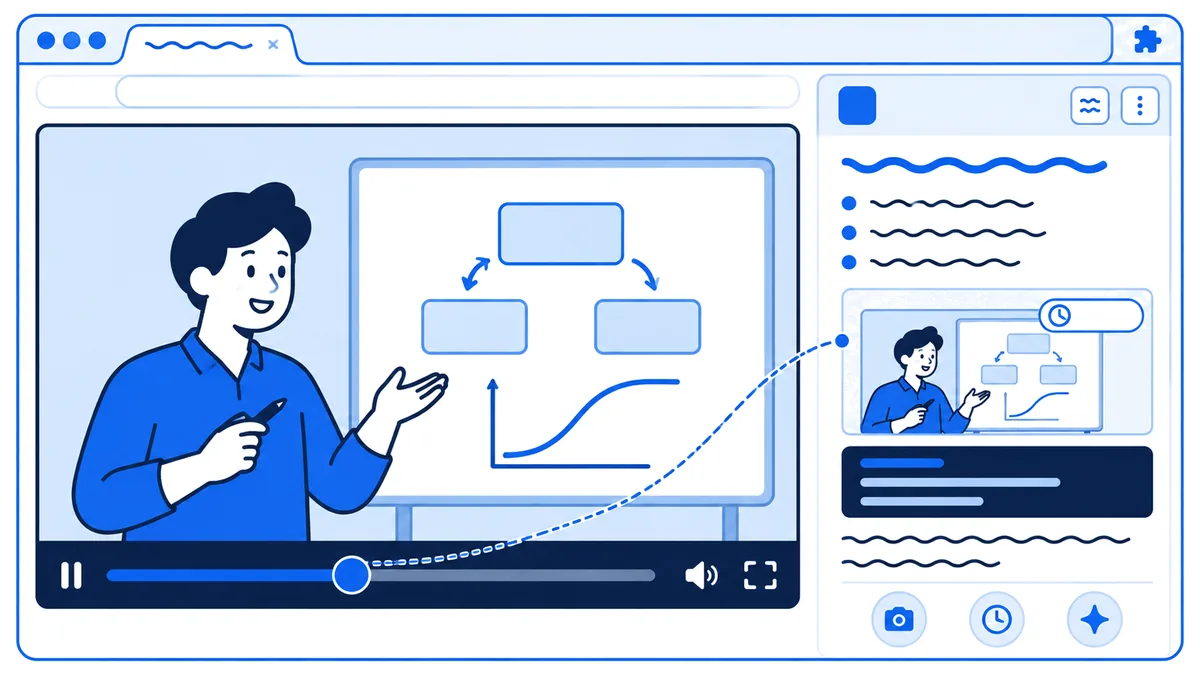
Watches the video live and writes AI study notes as you go
Captures timestamped screenshots of on-screen code, equations & diagrams
Saves everything privately to your own Obsidian vault
How it works
Turn a YouTube video into notes in three steps
Open your video
Paste a link here or just open any video on YouTube — HoverNotes works right where you already watch.
HoverNotes watches with you
The extension recognizes the video and turns on AI notes, capturing the on-screen code, diagrams, and equations as it plays.
Notes saved to Obsidian
AI notes and timestamped screenshots of code and diagrams, saved as Markdown in your own Obsidian vault.
What Our Users Say
The newest detailed reviews from the Chrome Web Store, in the reviewers' own words
Questions
Summarizing YouTube videos into notes: common questions
How do I summarize a YouTube video into notes?+
Install the HoverNotes Chrome extension, open any YouTube video, and turn on notes. Let the AI watch the video and write study notes for you — capturing the on-screen code, equations, and diagrams a plain transcript summary would miss — or jot your own timestamped notes by hand. Both are saved to your Obsidian vault.
Is HoverNotes a YouTube summarizer?+
Not quite. A summarizer writes a compressed version of the video that's quick to skim, which is what you want when you won't watch it. HoverNotes is a video note taker: it watches with you and writes the notes you would have written yourself, including the code, diagrams and equations on screen, so you can review them later. Notes are saved as Markdown in your Obsidian vault.
Does it work without a transcript or captions?+
Yes. Because the AI watches the actual video frames, it takes notes even when captions are turned off. That helps most on coding tutorials, lectures and diagram-heavy videos.
Where are my notes saved?+
On your computer. HoverNotes is local-first: your notes and timestamped screenshots are saved as plain Markdown in your Obsidian vault.
Does HoverNotes only work on YouTube?+
No. HoverNotes takes notes on any video that plays in your browser, including Udemy, Coursera, university lectures and local files, in the language you prefer.
Can I take notes manually, or does the AI do it for me?+
Both. HoverNotes lets the AI watch the video and write timestamped study notes automatically — or you can jot your own notes by hand and click any note to jump back to that exact moment. Use whichever fits the video, and everything saves to your Obsidian vault.
Free tools
More free tools
- Video note takerTake notes on a YouTube link or a video file, by hand or with AI.
- YouTube to notesTurn a YouTube video into study notes with timestamped screenshots.
- Video to notesTurn a video on any site, or a file from your computer, into notes you can review later.
- YouTube screenshotsCapture clean YouTube frames, without the player bar, timestamped in your notes.
- Live video translateHear any video in one of 11 languages as it plays.
- All 13 free toolsNotes, screenshots, translation and speed controls, and what each one needs.
Turn your next YouTube video into notes
Install the HoverNotes extension and capture the code, equations, and diagrams while you watch — by AI or by hand — saved straight to your Obsidian vault. Works on YouTube and any video site.
 Add to Chrome
Free Starter includes 20 minutes of AI notes • Upgrade anytime