Capture screenshots from any video
Grab clean, full-resolution frames from a video right in your browser — then use HoverNotes to take timestamped screenshots of code, diagrams, and equations with one click that drop straight into your notes, saved to your Obsidian vault.
Select a video file
or drag and drop it here
Choose a local video, scrub to any moment, and capture the frame as a full-quality PNG. Nothing is uploaded — the file plays directly in your browser.
Trusted by learners worldwide
Join thousands of students, professionals, and lifelong learners who use HoverNotes to enhance their video learning experience.




What it is
What does video-to-screenshots mean?
Turning a video into screenshots means saving the exact frames you care about as images instead of re-recording your screen or squinting at a paused tab. This free tool plays your video locally in the browser and captures any frame as a full-resolution PNG. HoverNotes takes it further: as a privacy-first video note-taker, it watches the video with you and lets you take timestamped screenshots of the on-screen code, equations, and diagrams that transcripts miss with one click — dropped straight into your notes and saved as Markdown in your own Obsidian vault.
Pausing, screen-grabbing, and cropping every important frame by hand?
Manual screenshots come out blurry, half-covered by your cursor, and scattered across your desktop with names like Screenshot 47. Then you still have to remember which moment each one came from. HoverNotes grabs the clean source frame, timestamps it, and files it straight into your notes — so the screenshot is actually useful later.
Why it's different
Screenshots that capture what transcripts miss
Works even where screenshots get blocked
Normal print-screen comes back black on sites like Netflix and Udemy that block screen capture. The HoverNotes extension grabs the clean, full-resolution frame anyway — no black boxes, no cursor, no blur.
One click, into your notes
With the extension, a screenshot button drops the current frame straight into your notes — timestamped, so you can jump back to that point in the video in one click.
Local-first and private
Your video plays in the browser and never uploads. Screenshots and notes are saved as plain files directly to your own Obsidian vault — your content stays yours.
See the output
From raw frames to notes you actually keep
HoverNotes sits beside your video and turns it into structured notes as you watch — with timestamped screenshots of the code, equations, and diagrams, saved to your Obsidian vault.
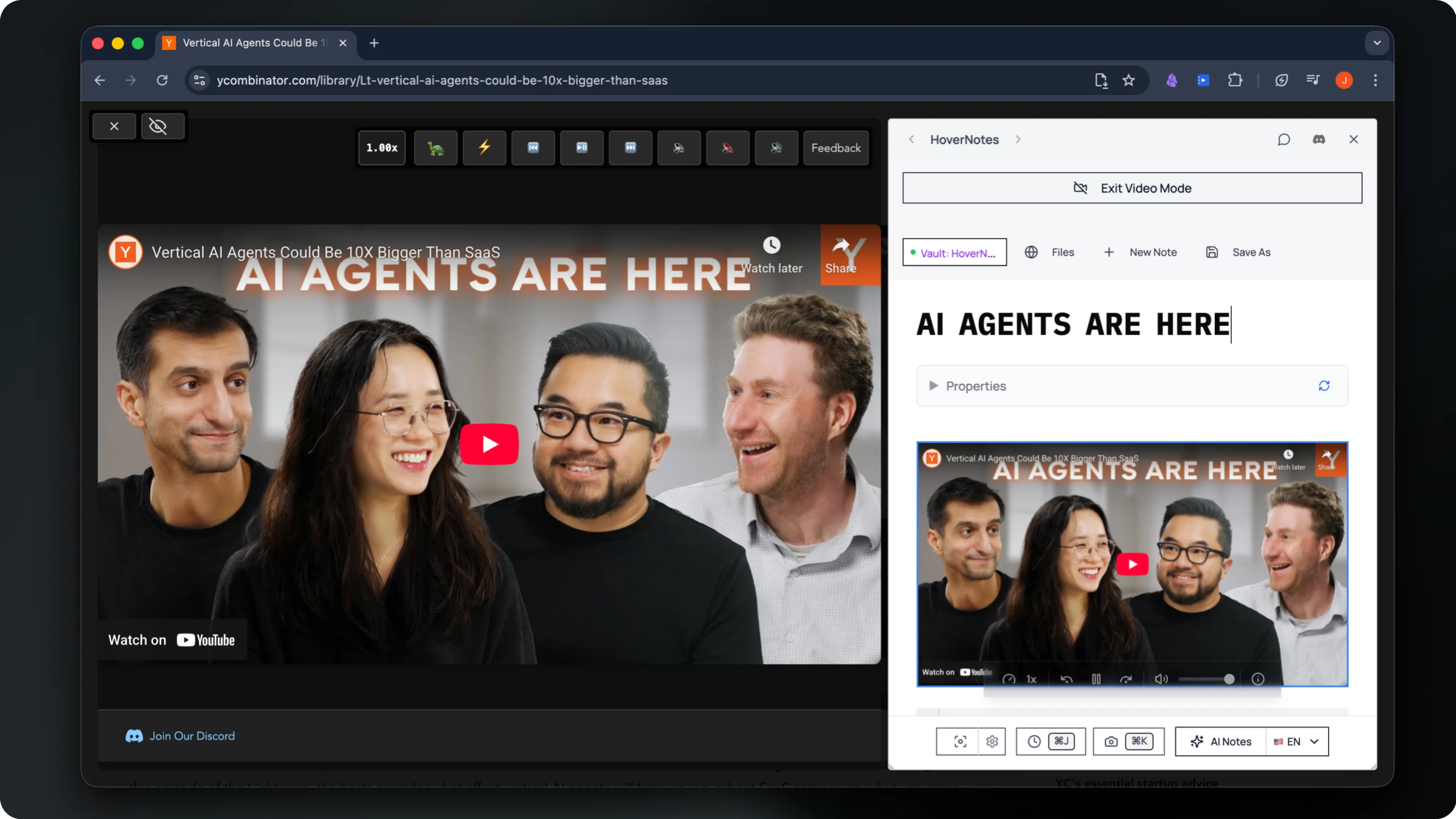
Watches the video live and writes structured AI study notes as you go
Captures timestamped screenshots of on-screen code, equations & diagrams
Saves everything privately to your own Obsidian vault
How it works
Capture screenshots from a video in three steps
Load your video
Pick or drag a local file. It plays right in your browser as a normal video — nothing is uploaded to a server.
Capture the frame
Scrub to the moment you want and hit Capture Frame to save a full-resolution PNG — or install HoverNotes to send timestamped screenshots straight into your notes with one click.
Saved to Obsidian
With HoverNotes, screenshots and AI notes are filed as Markdown locally in your own Obsidian vault — organized and ready to study.
What Our Users Say
Join thousands of learners who've transformed their video learning experience
"For Obsidian users, this is an absolute must. This app is simple, but so incredibly useful, especially if you're doing any kind of YouTube tutorials that require anything visual: math, UI, any design things. It's really incredible. You can screenshot along the way and be able to catalog someone's entire design process. I love how I'm immediately able to open the files within Obsidian. Great job!"
SS VV
Obsidian User
"HoverNotes has genuinely changed the way I learn from coding tutorials. I spend a lot of time watching videos on YouTube and Udemy, and this tool makes everything so much easier. Instead of constantly pausing or rewinding to jot things down, HoverNotes automatically generates clean, well-organized notes in real time—complete with syntax-highlighted code snippets and helpful screenshots. It feels like having a smart study partner sitting next to me. The split-view mode is one of my favorite features. Being able to watch the video and see my notes side by side keeps me focused and saves a ton of time. It's especially great for technical content where switching between windows can be a pain. The interface is clean, intuitive, and clearly built with developers and learners in mind. What really sets HoverNotes apart is how intelligently it captures context. It doesn't just rely on transcripts—it actually 'watches' the video with you and picks up on diagrams, code examples, and even handwritten notes on screen. The AI-generated notes are impressively accurate and easy to review later, especially when you add a few screenshots to give it more context. I also really appreciate the flexibility of how it stores notes. You can access everything in the cloud, or connect it with Obsidian if you prefer to keep things local and private. Whether you're a student, a developer, or just someone who learns best from video content, I can't recommend HoverNotes enough. I've tried a bunch of note-taking tools, but this one is on another level."
Luca
Developer
"Forget other note-taking apps, HoverNotes is in a league of its own. As someone who's lazy when it comes to taking notes, I had tried a bunch of paid and free extensions, but nothing compares to HoverNotes. The AI-Notes feature is my favorite, letting me focus on what truly matters: learning. For developers, it's even better. What stands out is that it doesn't just use transcripts; it actually watches the video with you. This makes it powerful for understanding code, diagrams, sketches, and anything referenced in the video. The notes are well-formatted, with all code, commands, and key details neatly organized. Just take a few screenshots if needed, and you'll get detailed notes for review. It works on almost all websites, offers cloud storage, and you can always access your notes online. But the integration with Obsidian is perfect for those who prefer a private and local note-keeping option. Highly recommended for developers and students alike!"
Derrick
Developer
"HoverNotes is an absolute game-changer for developers and learners! As someone who frequently watches coding tutorials on platforms like YouTube and Udemy, I found this tool to be incredibly efficient and intuitive. The real-time AI-powered notes, complete with syntax-highlighted code snippets and screenshots, have saved me so much time—no more rewinding videos to catch details! The split-view mode is a brilliant addition, allowing me to watch and take notes simultaneously. It's made my learning process smoother and more productive. Highly recommend HoverNotes to anyone looking to streamline their learning experience—it's truly exceptional!"
Abdallah Mtavya
Developer
"This is a must-have for anyone who watches video tutorials and needs efficient note-taking without constantly rewinding to see what they missed. It automatically generates structured summaries, capturing key points without requiring you to pause and write things down manually. Obviously nothing will ever take away the joy of manual note-taking but this complements it and makes it more efficient and time saving. The integration with YouTube and other video platforms is seamless, and the ability to export notes makes it even more convenient. This tool is a game-changer for students and professionals looking to save time and stay organized. I was really impressed on the first try and since then I've looked nowhere else. Looking forward to more diverse applications beyond coding tutorials."
Paul
Professional
"Incredible! This extension is an absolute game changer for being able to concentrate on watching a video for learning, with the good faith that the transcription is spot on!"
Yasmin Smith
Learner
"This is absolutely perfect for taking notes and amazing work done by developers."
Coc Fun
User
"It's Perfect, it can really help me stay on track with all of my notes and learn a lot of information from my video tutorials"
Sworo Yoyo
User
"I really love this extension. It saves me so much time when I have to watch video lectures since pausing and taking notes takes so long for me. Also, the customer support via discord which is super helpful quickly assisted me in solving an issue I had. Overall, I highly recommend this to someone looking for a way to mitigate the time consumption note taking on video lectures can have."
Andy Bardales
Student
"Best extension for sure!! this is has really boosted my learning online and I love the diversity of using my own notes alongside AI notes. I can even study my foreign languages with this! Highly recommend!"
Pisces22
Language Learner
"Best extension ever!!!!!!"
Suraj sah
User
"This is life Saver! Thank you so much for this. You have no idea how much time i spent looking for this kind of tool. God bless you!"
Wasim Sultani
User
"Vous êtes des Génies merci."
Mathieu Raynaud
User
"meilleur logiciel de prise de note aevec ia je peux suivre des cours dans d'autre langue sans barrière linguistique merci je recommande dans mon entourage le seule tuc c'est que a chaque fois je dois sauvegarder dans cloud"
smt prod
User
"Amazing Tool, I can save my time sooooo much. I remember spending soo much time in taking notes, it used to consume soo much time. This tool is such a great help for all students out there. I love the way the tool is built. Very clean and neat and does the job of taking notes. Thank you sooooo much team for your hard work in making this possible. Love from India students"
Hustle King
Student
"超絶便利。作成者は神様だな。ありがとうございます。ありがとうございます。"
たそきち
User
"This is an incredibly useful application for anyone following video courses. It effectively breaks down language barriers, providing access to countless contents and dramatically speeding up the learning process. The application delivers on its promise of eliminating the need to rewatch videos just to take notes on relevant information. The notes are always accurate and surprisingly comprehensive, capturing even visual elements shown on screen that aren't covered in the audio. In some cases, the notes have proven to be clearer than the original presentations. Occasionally, I've encountered some duplicated sections, likely a consequence of how videos are segmented for AI analysis, but this is certainly preferable to the alternative of risking missing parts of the content. The ability to enhance notes with full-screen screenshots or specific area captures is excellent, as is the option to save notes locally in Obsidian. I've been using the application for over a month and have observed that it's constantly being improved and updated with new features, such as the ability to increase or decrease video playback speed. Perhaps the user interaction could still be refined - for example, the need to select the save vault each time - but if I had to keep only one Chrome extension, I would definitely choose this one. I've also experienced that the customer support is very responsive and helpful."
Roberto Demitri
Professional
"Such a cool idea!"
Daniel
User
"What an amazing app! I use the for all my online studies to help me take notes while I watch. It doesn't just transcribe, it summarises perfectly. Hovernotes isn't too basic in summary, and isn't just transcribing word-for-word but retains the notable points of the video. Not just that, but when something is clearly referenced Hovernotes will often take a 'word-for-word' note of those parts making it truely unique. It ensures that it is accurate in what needs to be referenced for later, and summarises in anecdotal stories or side tangents. Exactly what I needed. Thanks for such a useful study companion!"
Jacob Laube
Student
"I was really impressed by the ai taking notes on the video, although I find it a little annoying to have to specify every time the folder path to my vault. Another thing is that, there is no marks on the video afterwards that I already have a note about it, which could confuse me later on. I think that adding a marking of a note taken would really be cool. Beside that, it is one of the best add-ons for obsidian I could find here"
Aina Rasolofoson
User
"Its an awesome tool to be fair!"
Anatoli Kirigwajjo
User
"awesome extention for not making but AI features are stricted for some minutes, if it's became free this will be a path braking extension a learner can use. Please try to collaberate pitch in with some higher company with this idea so that we can get the AI feature for free, All the best"
Avi's choreo
Learner
"Thank you for taking the time to create this wonderful Chrome plugin. However, I believe there are some areas where it can be improved. Firstly, after capturing a screenshot, the next entry point for adding a note is not centered, which requires me to take my hand off the keyboard to scroll to the next note. Secondly, when I enter 'Video Mode,' I receive an error message stating, 'This video is unavailable. Error code: 4.' If you could address these issues, the plugin would be almost perfect."
Simon Woo
User
"Excelente colaborador para el estudio y las notas en obsidian , ademas si el video está en otro idioma tambien lo convierte al idioma que quieras hace que mi productividad se aceleré, gracias hovernotes."
javier quispe tenorio
Student
"very helpful taking notes."
Ayushman Krishna
User
Questions
Video screenshots — common questions
How do I take a screenshot from a video?+
Open the tool, pick or drag a local video file into the player, scrub to the moment you want, and hit Capture Frame. The exact frame is saved as a full-resolution PNG to your downloads — no uploading, no quality loss from re-recording your screen. With the HoverNotes extension installed, a screenshot button lets you drop timestamped shots straight into your notes with one click, on YouTube, Udemy, Coursera and 20+ sites.
Is the screenshot full quality?+
Yes. The frame is captured at the video's native resolution straight from the decoded pixels, so there's no blur, compression, or cursor that you'd get from a normal screen grab. You get the clean source frame as a PNG.
Is my video uploaded anywhere?+
No. The file plays locally in your browser using a temporary in-memory URL and frames are captured on your own device — nothing is ever uploaded to a server. Your screenshots and notes stay on your computer.
Does it work on sites that block screenshots, like Netflix or Udemy?+
Yes. On streaming and course sites that normally return a black image when you try to screen-capture them, the HoverNotes extension still grabs a clean, full-resolution frame — so you can keep timestamped screenshots of a Udemy lecture slide or any other protected video right in your notes.
Can it grab on-screen code, equations, and diagrams?+
That's the whole point. HoverNotes watches the actual video frames, so it captures code snippets, equations, and diagrams exactly as they appear on screen — the parts a transcript completely misses — and timestamps each screenshot so you can jump back to that moment.
How do timestamped screenshots get into my notes?+
With the HoverNotes extension, a screenshot button sits right on the player. One click grabs the current frame, timestamps it, and inserts it directly into your notes — no downloading loose PNGs or pasting them in by hand. Everything is saved as Markdown in your own Obsidian vault, and you can jump back to that exact moment in the video from the screenshot. Install it once and it works here and on any video site.
Is it free?+
Capturing frames in this tool is free, and the HoverNotes Starter plan is free too: manual notes, screenshot capture, video controls and Obsidian export, plus 20 minutes of AI video notes to try. When you want more, upgrade to Unlimited Pro for unlimited AI notes — cancel anytime.
Stop screenshotting videos by hand
Install the HoverNotes extension and take timestamped screenshots of the code, equations, and diagrams with one click — dropped straight into your notes in your Obsidian vault. Works here and on YouTube, Udemy, Coursera, and 20+ sites.
 Add to Chrome
Free Starter includes 20 minutes of AI notes • Upgrade anytime