HoverNotes vs Tactiq
Tactiq is the better pick for live meeting notes — its Chrome extension transcribes Google Meet, Zoom and Teams calls in real time and generates AI summaries and action items. HoverNotes is built for learning from video — it watches courses, lectures and tutorials with you and turns them into AI study notes automatically, capturing the on-screen code and diagrams a transcript misses.
 Add HoverNotes to Chrome
 Saves directly to your Obsidian vault
See it in action
Notes that capture what transcripts miss
HoverNotes sits right beside the video and turns what you watch into AI study notes — automatically, as you learn, capturing the code and diagrams a transcript misses.
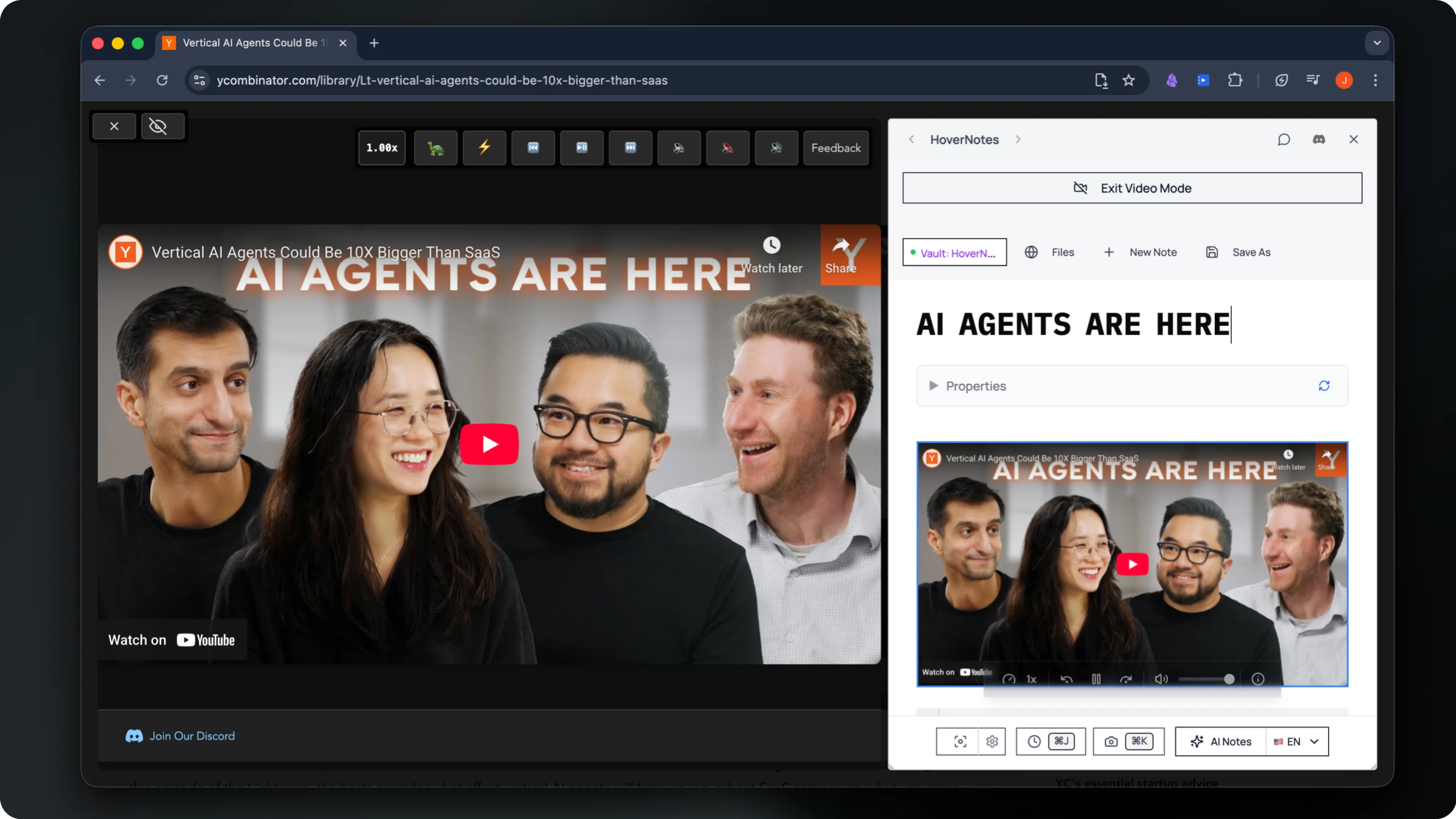
Watches the video live and writes structured AI study notes as you go
Captures timestamped screenshots of on-screen code, equations & diagrams
Saves everything privately to your own Obsidian vault
The honest comparison
HoverNotes vs Tactiq — side by side
Both turn what you hear into notes — for different jobs. Tactiq is a meeting extension that transcribes live calls. HoverNotes is the note-taker that turns the videos you watch into a lasting, screenshot-rich study library.
Compared using each tool's official pricing and product pages, last reviewed June 2026. HoverNotes is independent and not affiliated with the tools listed.
| At a glance | HoverNotes | Tactiq |
|---|---|---|
| Starting price | Free, paid plans available | $8/user/mo (Pro, annual) |
| Free tier | Free, 20 min AI notes | 10 transcripts + 5 AI credits/mo |
| Best for | Video learning | Live meeting transcription |
| Works on | Any browser video + local files | Meet, Zoom, Teams |
Choose HoverNotes if…
You learn from video — courses, lectures, coding tutorials across YouTube, Udemy, Coursera and 20+ platforms — and want AI study notes plus timestamped screenshots of on-screen code, equations and diagrams, captured automatically and saved privately to your own Obsidian vault.
Choose Tactiq if…
You live in meetings — you want a Chrome extension that transcribes Google Meet, Zoom and Teams calls in real time, generates AI summaries, action items and follow-up emails, and shares transcripts with your team.
| Feature | HoverNotes | Tactiq |
|---|---|---|
| Watches video live and writes AI notes as you learn | ||
| Timestamped screenshots of on-screen code, equations & diagrams | ||
| Built for course platforms — YouTube, Udemy, Coursera & 20+ sites | Meetings (Meet/Zoom/Teams) | |
| Works on any video playing in your browser | ||
| Local-first — notes stored on your device | Cloud-based | |
| Exports notes to Obsidian (Markdown) | Share & export transcripts | |
| Transcribes live meetings (Meet/Zoom/Teams) | ||
| AI summaries, action items & follow-up emails | ||
| Team spaces & transcript sharing | ||
| AI credit limits on free/entry plans | 5–10 credits/mo | |
| Free plan to start | 10 transcripts/mo |
Questions
HoverNotes vs Tactiq — common questions
Is HoverNotes better than Tactiq?+
It depends on the job. For learning from video, HoverNotes is purpose-built: it watches courses, lectures and tutorials with you across YouTube, Udemy, Coursera and 20+ platforms, captures timestamped screenshots of on-screen code, equations and diagrams, and saves AI study notes to your Obsidian vault. Tactiq is the stronger choice for live meetings — its Chrome extension transcribes Google Meet, Zoom and Teams calls in real time and generates AI summaries and action items.
What is the difference between HoverNotes and Tactiq?+
Tactiq is a meeting transcription extension: it captures live captions from Google Meet, Zoom and Microsoft Teams, then uses AI credits to generate summaries, action items and follow-up emails. HoverNotes is a note-taker for video learning — it watches the videos you're studying, captures screenshots of the code and diagrams the moment they appear, and writes timestamped AI study notes straight to a local Obsidian vault.
Can Tactiq take notes from YouTube or course videos?+
Tactiq is built around live meeting captions on Google Meet, Zoom and Teams, plus uploaded meeting recordings. It transcribes the speech, but it doesn't watch a course alongside you or capture the on-screen frames — so the code, equations and diagrams in a coding tutorial or lecture aren't saved as images. HoverNotes is built for course and tutorial video and grabs exactly those visual moments as timestamped screenshots.
Is HoverNotes cheaper than Tactiq?+
Tactiq has a free plan capped at 10 transcripts and 5 AI credits per month, with Tactiq Pro from about $8/user/month and Team at $16.67/user/month billed annually. HoverNotes is free to install, with paid plans for heavier use. The bigger difference is privacy: HoverNotes keeps your notes local in your own Obsidian vault, while Tactiq stores transcripts in the cloud.
Who should use Tactiq instead of HoverNotes?+
Choose Tactiq if your main job is meetings — you want a Chrome extension that transcribes Google Meet, Zoom and Teams calls in real time, generates AI summaries, action items and follow-up emails, and shares transcripts with your team. Choose HoverNotes if you learn from video and want a lasting, screenshot-rich study-note library built automatically as you watch.
Make the videos you watch stick
Join 20,000+ learners turning every course, lecture, and tutorial into AI study notes they keep — captured automatically and saved to their own Obsidian vault.
Free Starter includes 20 minutes of AI notes • Upgrade anytime