HoverNotes vs Video Highlight
HoverNotes is the AI note taker that watches your video with you and takes study notes for you, beside any video in your browser as it plays. Video Highlight watches a video for you and prepares notes to read afterwards. Which fits depends on whether you want to sit with the video or skip it.
 Add HoverNotes to Chrome
 Saves directly to your Obsidian vault
Short answer: Pick Video Highlight if you'd rather not watch: it watches a YouTube video, an uploaded file or a tab recording for you and prepares notes to read. Pick HoverNotes if you want to watch and learn: it takes study notes beside any video in your browser as it plays and saves them as Markdown in Obsidian.
Last checked:
Compared from Video Highlight's own pages (videohighlight.com, its pricing, Chrome extension, Deep Watch, private files and export pages, and its HoverNotes comparison page) and its Chrome Web Store listing, against HoverNotes' pricing and feature pages, on November 24, 2026. We read what Video Highlight says Deep Watch does; we haven't tested it. Prices are US list prices.
HoverNotes is our product, so we have a stake in this comparison. We say where the other tool is the better choice.
See it in action
Notes that capture what transcripts miss
HoverNotes sits right beside the video and turns what you watch into AI study notes — automatically, as you learn, capturing the code and diagrams a transcript misses.
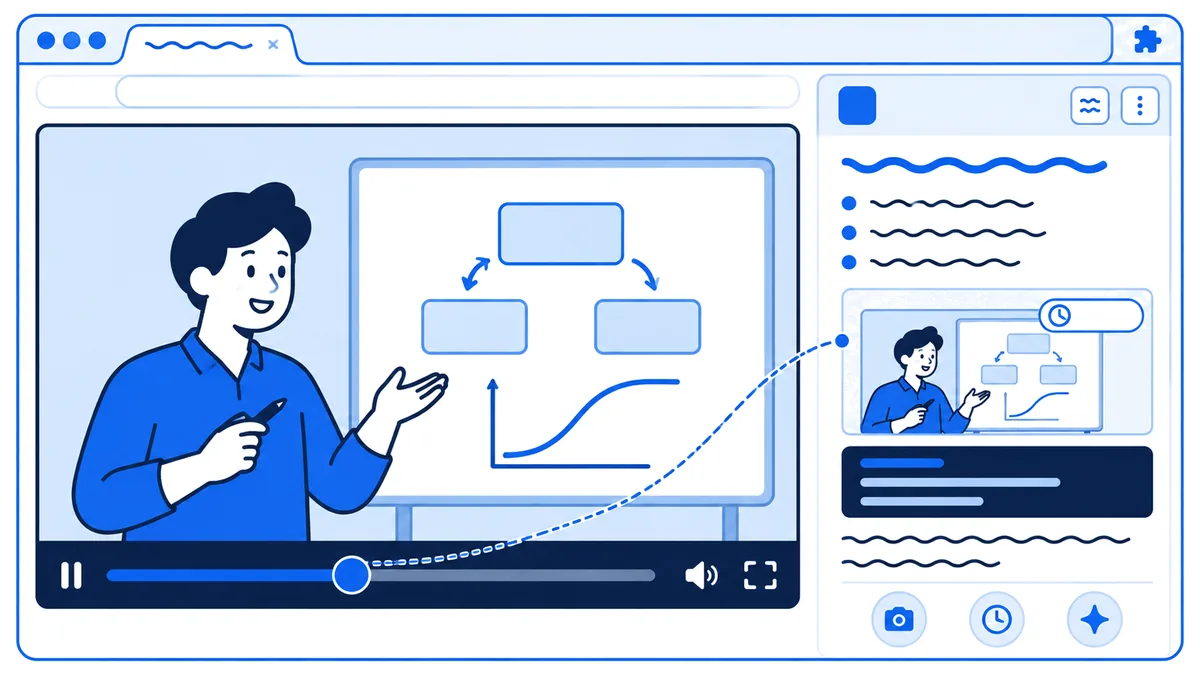
Watches the video live and writes AI study notes as you go
Captures timestamped screenshots of on-screen code, equations & diagrams
Saves everything privately to your own Obsidian vault
The honest comparison
HoverNotes vs Video Highlight — side by side
Both put pictures of the screen in video notes. HoverNotes writes them beside the video as you watch and saves Markdown to Obsidian. Video Highlight prepares them after it has watched the video, in its own library.
| At a glance | HoverNotes | Video Highlight |
|---|---|---|
| Paid plan (US) | Unlimited Pro $18/mo or $120/yr | Plus $12/mo or $96/yr, Pro $24/mo or $180/yr |
| Free plan | 20 min AI Notes, 10 min Live Translate | 10 videos, 7 hr 30 min a month |
| Best for | Study notes as you watch | Reading notes instead of watching |
| Works on | Any browser video + local files | Web app + Chrome extension |
Choose HoverNotes if…
You want to watch the lesson and have AI study notes build up beside it, with timestamped screenshots of the code, slides and diagrams, on any site or local video file, saved as Markdown in your Obsidian vault.
Choose Video Highlight if…
You want to skip watching: read notes with pictures of the screen, a summary and a searchable transcript, then open the video just where you need it.
| Feature | HoverNotes | Video Highlight |
|---|---|---|
| Notes written beside the video as you watch | No: notes are prepared after it watches the video | |
| Pictures of the screen in your notes | Timestamped screenshots (Ctrl/⌘+K); AI picks them on paid plans | Deep Watch notes with pictures (Plus and up); press H on YouTube |
| Works on | Any website with a video + local files | YouTube, Vimeo and Dailymotion links; uploads and tab recordings on paid plans |
| Course sites (Udemy, Coursera…) | Notes in place, every plan | Record the tab, then get notes (paid plans) |
| Your own video files | Every plan, including Free | Upload as Private files (paid plans) |
| Where notes are saved | Markdown files in your Obsidian vault or a folder | Your Video Highlight library |
| Export formats | Markdown, PDF, Word | PDF, Word, Markdown, CSV, subtitles; Notion on paid plans |
| Transcripts | Saved to your vault with AI Notes (paid) | Searchable, 37 languages, beside the player |
| Ask questions about a video | Hovie, in the note editor (paid) | Ask, with timestamped answers |
| Audio files (MP3, WAV, M4A…) | Paid plans | |
| Translation | Live Translate: hear the video in your language | Summaries in the language you choose |
| Free plan | 20 min AI Notes + 10 min Live Translate; own notes unlimited | 10 videos, 7 hr 30 min a month; no Deep Watch or uploads |
Where Video Highlight is the better choice
HoverNotes isn't the right tool for every job. Pick Video Highlight if one of these matters more to you.
Read instead of watch
Video Highlight says Deep Watch watches the whole video for you, looking at what is on screen and reading what is said, and keeps the key points with pictures of the screen, each at its time. It works on YouTube links, uploaded video files and Chrome tab recordings, on Plus, Pro and Business. HoverNotes takes notes while you watch.
A searchable video library
Transcripts in 37 languages beside the player, Ask with timestamped answers, search across your library by what was said, and importing the latest 25 videos of a YouTube playlist or channel in one step.
Audio, exports and sharing
It transcribes and summarizes audio files (MP3, WAV, M4A and more) on paid plans, exports transcripts as SRT or VTT subtitles, sends summaries to Notion, and shares notes from a YouTube video by link. HoverNotes takes notes on video, not audio files.
Lower price
Plus is $12 a month, or $96 a year billed yearly, and its free plan gives summaries, transcripts and Ask on up to 10 videos a month. HoverNotes Unlimited Pro is $18 a month or $120 a year in the US.
Questions
HoverNotes vs Video Highlight — common questions
Is HoverNotes a Video Highlight alternative?+
For learning from videos you watch in your browser, yes, and HoverNotes is our product, so weigh that. HoverNotes takes AI study notes and timestamped screenshots beside any video as it plays (YouTube, Udemy, Coursera or any other site, plus local video files) and saves them as Markdown in your Obsidian vault or a folder. If you would rather not watch the video at all and read notes instead, Video Highlight is built for that.
What's the main difference between HoverNotes and Video Highlight?+
When the notes are made. HoverNotes watches your video with you: notes appear beside the video while you watch, and you can add your own as you go. Video Highlight says its Deep Watch "watches the whole video for you": you give it a YouTube link, an uploaded video file or a Chrome tab recording, and it prepares notes with pictures of the screen, each point at its time, for you to read afterwards.
Does Video Highlight write notes while the video plays?+
No. Video Highlight's own comparison page says it prepares your notes after it has watched the video (videohighlight.com/vs/hovernotes, checked November 24, 2026). On YouTube, its Chrome extension opens a side panel with Summary, Transcript, Highlights and Ask, and pressing H saves a screenshot with its time. HoverNotes writes notes beside the video as it plays.
Can I use Video Highlight on Udemy, Coursera or other course sites?+
Through its Chrome extension: you record the video playing in a Chrome tab, the recording goes to your Video Highlight library as a private video, and then it prepares your notes. Recording is included with paid plans. HoverNotes takes notes in place on any website with a video, including course platforms, on every plan.
Is HoverNotes cheaper than Video Highlight?+
No. Video Highlight Plus is $12 a month, or $8 a month billed yearly ($96 a year), and Pro is $24 a month, or $15 a month billed yearly ($180 a year); Deep Watch needs Plus or higher, and there's no trial (videohighlight.com/pricing, checked November 24, 2026). Its free plan covers summaries, transcripts and Ask on up to 10 public videos and 7 hr 30 min a month. HoverNotes Unlimited Pro is $18 a month or $120 a year in the US; prices vary by country. HoverNotes' free plan includes 20 minutes of AI Notes and 10 minutes of Live Translate, and your own notes, screenshots and Obsidian saving have no limit.
Can I save my notes to Obsidian?+
HoverNotes saves each note as a Markdown file, with its screenshots, straight into your Obsidian vault or a folder you choose. Video Highlight keeps notes in your Video Highlight library; you can download Deep Watch notes as a PDF with pictures, and export the summary as Markdown, PDF or Word, or send it to Notion on paid plans. Its comparison page says it has no Obsidian or vault sync.
Make the videos you watch stick
Join 30,000+ learners turning every course, lecture, and tutorial into AI study notes they can review later — taken as they watch and saved to their own Obsidian vault.
Free: unlimited notes and screenshots, plus 20 minutes of AI Notes • Unlimited Pro is $18 a month in the US