AI notes for your LinkedIn Learning courses
Leveling up with LinkedIn Learning? HoverNotes watches each lesson with you and writes clean study notes — capturing the on-screen code, slides, and demos a transcript misses, with timestamps you can jump back to. Everything saves straight to your Obsidian vault.
 Add to Chrome — it's free
Trusted by learners worldwide
Join thousands of students, professionals, and lifelong learners who use HoverNotes to enhance their video learning experience.
Learners at
- UT Austin
- Georgia Tech
- Arizona State
- UBC
- Monash
- TCS
- Deloitte
- IBM
- Accenture
- PwC
What it is
A real note-taker for LinkedIn Learning courses
HoverNotes is a browser extension that takes notes on LinkedIn Learning videos as you watch. Open any lesson in a course or learning path and it turns it into organized, timestamped notes — written automatically by AI or typed by hand. Because the AI reads what is actually on screen, it captures the slides, code, and tool demos instructors walk through, not just the spoken captions. Notes save as plain Markdown to your own Obsidian vault — local-first and private, so your professional development notes stay yours.
Finishing a LinkedIn Learning course with nothing to show for it?
Professional courses move quickly, and the parts worth keeping — the workflow demo, the slide, the keyboard shortcut — are exactly what a plain transcript leaves out. Pausing to retype every screen kills your momentum, and the certificate alone does not help you six months later. HoverNotes captures it all the first time, so you build a reference you actually return to.
Why it's different
The AI note taker that watches your video with you
Captures the demos, not just the captions
The visual AI sees what is actually on screen — slides, tool walk-throughs, and code — and captures them as timestamped screenshots, even when the captions skip right over them.
Study notes you actually reuse
Headings, syntax-highlighted code, and clean formatting give you notes you can revisit long after the course ends — not a raw transcript you have to reorganize.
Local-first and private
Your notes save as Markdown directly to your own Obsidian vault on your machine.
See the output
Notes that capture what a LinkedIn Learning transcript misses
HoverNotes sits beside your LinkedIn Learning lesson and turns it into study notes as you watch — with timestamped screenshots of the slides, demos, and code, saved to your Obsidian vault.
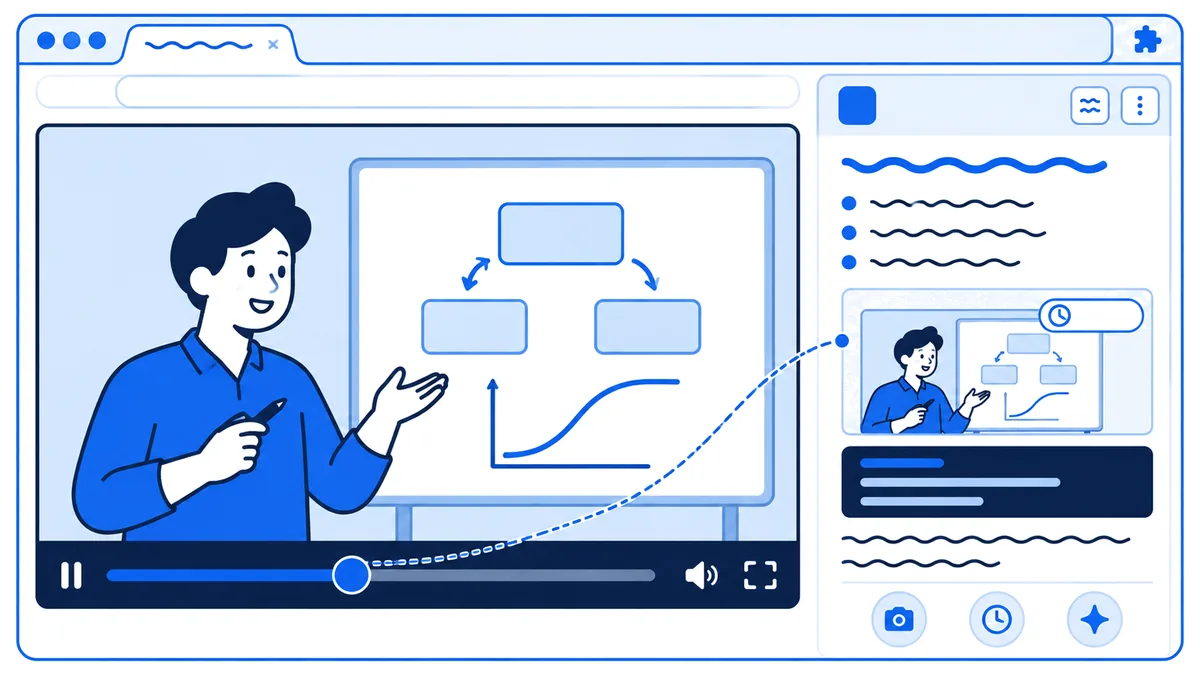
Watches the video live and writes AI study notes as you go
Captures timestamped screenshots of on-screen code, equations & diagrams
Saves everything privately to your own Obsidian vault
How it works
Take notes on LinkedIn Learning in three steps
Open any LinkedIn Learning lesson
With the HoverNotes extension installed, open any video in a LinkedIn Learning course or learning path and turn on notes.
Take notes, your way
Let the AI watch and write study notes for you, or jot your own timestamped notes by hand — whichever fits the lesson.
Saved to Obsidian
AI notes plus timestamped screenshots of slides, demos, and code, all saved as Markdown locally in your own Obsidian vault, ready to revisit.
What Our Users Say
The newest detailed reviews from the Chrome Web Store, in the reviewers' own words
Questions
LinkedIn Learning notes — common questions
Does HoverNotes work on LinkedIn Learning?+
Yes. Install the HoverNotes browser extension, then open any lesson on linkedin.com/learning and turn on notes. HoverNotes watches the video and writes clean, timestamped notes, capturing the slides, code, and demos a transcript misses — or you can type your own notes by hand.
Can it capture the slides and tool demos?+
Yes — that is the core difference. Because the AI watches the actual video frames, it captures the slides, on-screen code, and tool walk-throughs as timestamped screenshots, exactly as the instructor shows them, even when the captions skip them.
Are these real notes or just a transcript?+
Real notes. A transcript is a raw wall of text; HoverNotes gives you organized notes with headings, syntax-highlighted code blocks, and timestamped screenshots of what is on screen — the kind of notes you actually reuse on the job.
Does it download LinkedIn Learning videos?+
No. HoverNotes is a note-taker, not a downloader. It never saves or re-hosts the course video — it only captures your notes and timestamped screenshots of what is on screen, saved privately to your own Obsidian vault.
Does it work across a whole learning path?+
Yes. HoverNotes works on any LinkedIn Learning lesson you can play in your browser, so it carries across every course and learning path — each set of notes saved with timestamps in your Obsidian vault.
Where are my notes saved?+
Locally and privately. HoverNotes is local-first: your notes and timestamped screenshots are saved as plain Markdown directly to your computer in your Obsidian vault. Your notes stay yours.
Is it free?+
HoverNotes has a free Starter plan: manual notes, screenshot capture, video controls, and Obsidian export are all free, plus 20 minutes of AI video notes to try. When you want more, upgrade to Unlimited Pro for unlimited AI notes — cancel anytime.
Turn your LinkedIn Learning courses into notes you can review later
Install the HoverNotes extension and let AI capture the slides, code, and demos while you watch on LinkedIn Learning — or take your own timestamped notes by hand. Everything saves straight to your Obsidian vault. Works on LinkedIn Learning, YouTube, Udemy, Coursera, and any other video site.
Add to Chrome Free Starter includes 20 minutes of AI notes • Upgrade anytime