HoverNotes vs Opennote
Opennote has shut down: it was acquired by Reducto, and the app closed on July 1, 2026. If you studied from video and need a new home for your notes, HoverNotes takes AI notes beside the courses, lectures and tutorials you watch, with screenshots of on-screen code and diagrams, and saves them as Markdown in your own Obsidian vault.
 Add HoverNotes to Chrome
 Saves directly to your Obsidian vault
Last checked:
Checked Opennote's own site (opennote.com and its May 6, 2026 acquisition post) and HoverNotes' pricing and feature pages on November 4, 2026. Opennote's prices and plan limits can no longer be checked because the app is closed, so this page doesn't list them.
HoverNotes is our product, so we have a stake in this comparison. We say where the other tool is the better choice.
See it in action
Notes that capture what transcripts miss
HoverNotes sits right beside the video and turns what you watch into AI study notes — automatically, as you learn, capturing the code and diagrams a transcript misses.
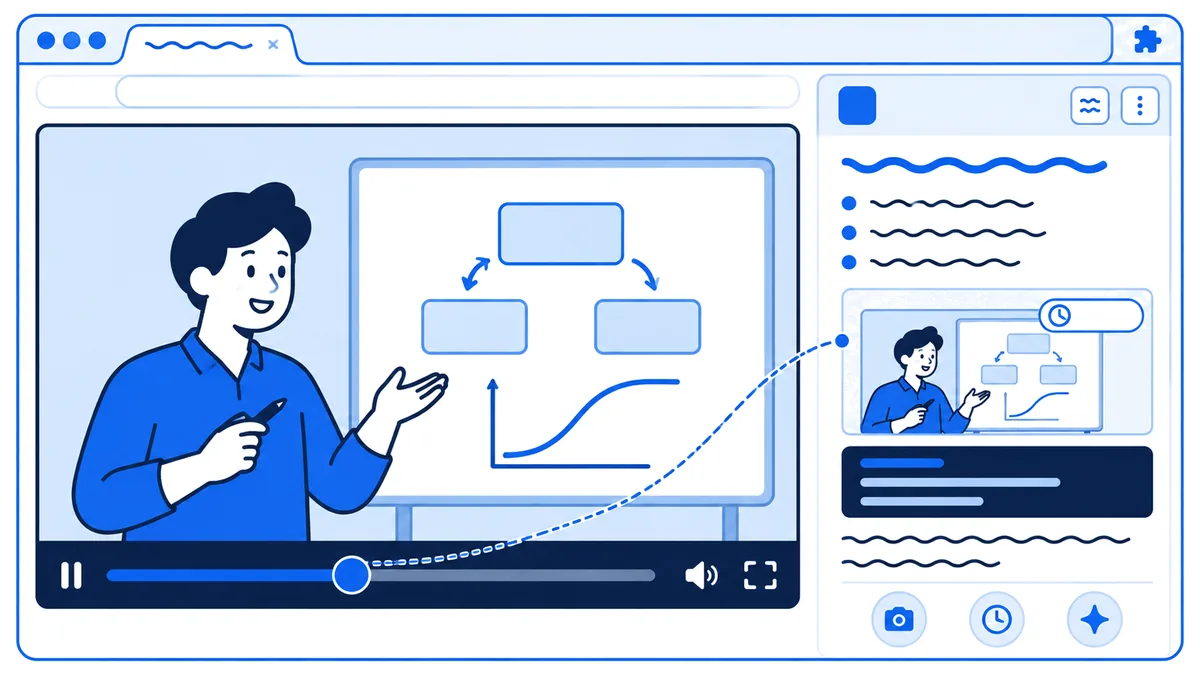
Watches the video live and writes AI study notes as you go
Captures timestamped screenshots of on-screen code, equations & diagrams
Saves everything privately to your own Obsidian vault
The honest comparison
HoverNotes vs Opennote — side by side
Opennote was an all-in-one study notebook, and it has been sunset. HoverNotes does one job: it turns the videos you watch into notes with screenshots, saved as Markdown files on your computer.
| At a glance | HoverNotes | Opennote |
|---|---|---|
| Status | Available | Sunset after Reducto acquisition |
| Free plan | 20 min AI Notes, 10 min Live Translate | App no longer available |
| Your data | Markdown files on your computer | Email support@opennote.me |
| Best for | Video learning | Was an all-in-one study notebook |
Choose HoverNotes if…
You study from video (courses, lectures, coding tutorials on YouTube, Udemy, Coursera or any other site) and want AI notes plus timestamped screenshots of on-screen code, equations and diagrams, saved as Markdown files in your own Obsidian vault.
If you're leaving Opennote…
Opennote's app closed on July 1, 2026, after the Reducto acquisition. Email support@opennote.me for a copy of your data, then keep future notes in files you control.
| Feature | HoverNotes | Opennote |
|---|---|---|
| Available to use today | Sunset; app no longer available | |
| Getting your notes | Markdown files already on your computer | Email support@opennote.me for a copy |
| AI notes beside any video in your browser, plus local video files | App no longer available | |
| Timestamped screenshots of on-screen code, equations & diagrams | App no longer available | |
| Generated videos, flashcards & practice problems | Offered before the sunset | |
| Free plan, no card needed | 20 min AI Notes + 10 min Live Translate | App no longer available |
What Opennote did that HoverNotes doesn't
Opennote is closed, but if you relied on one of these, HoverNotes won't replace it.
Generated study material
Opennote generated videos, flashcards and practice problems. HoverNotes writes notes and screenshots from video; it doesn't generate flashcards or practice problems.
One notebook for any material
Opennote was a place to write and learn across subjects, not only from video. HoverNotes is built around the videos you watch.
Collaboration
Opennote let you collaborate on notes with others. If you studied in a group inside Opennote, look for a replacement built for shared notebooks.
Questions
Leaving Opennote — common questions
Is Opennote shutting down?+
It already has. Opennote announced on May 6, 2026 that it had been acquired by Reducto and kept the service running until July 1, 2026. Its website now says the app has been sunset and is no longer available (opennote.com, checked November 4, 2026). To get a copy of your data, Opennote asks you to email support@opennote.me.
What's the best Opennote alternative for video learning?+
It depends on what you used Opennote for, and HoverNotes is our product, so weigh that. If most of your studying happens by watching video (courses, lectures, coding tutorials), HoverNotes works beside the video on YouTube, Udemy, Coursera or any other site, saves timestamped screenshots of on-screen code, equations and diagrams, and writes AI notes as Markdown files in your own Obsidian vault. It doesn't replace Opennote's generated videos, flashcards or practice problems.
How do I move my notes off Opennote?+
Opennote's app is no longer available, so you can't export from it yourself. Its website says to email support@opennote.me for a copy of your data. If the copy comes as Markdown files, you can drop them straight into an Obsidian vault. Every new note you take with HoverNotes is then saved as Markdown into that same vault, so old and new notes sit together on your computer.
Will my notes disappear if HoverNotes is ever acquired?+
Notes you've already saved won't, because they are plain Markdown files in your Obsidian vault on your computer, not in a HoverNotes account. They stay readable in any Markdown editor whatever happens to HoverNotes. The AI features run on HoverNotes' servers, so those depend on the service continuing.
Does HoverNotes do everything Opennote did?+
No. Opennote was a notebook that generated videos, flashcards and practice problems and let you collaborate. HoverNotes does one job: notes and screenshots from the videos you watch, saved as Markdown you keep. If you mainly need notes from video, it covers that; for flashcards and practice problems, pick a tool built for them.
Keep your notes in files you own
Join 30,000+ learners turning every course, lecture, and tutorial into AI study notes they keep — captured automatically and saved to their own Obsidian vault.
Free: unlimited notes and screenshots, plus 20 minutes of AI Notes • Unlimited Pro is $18 a month in the US