HoverNotes is our product. We report every result as it came, including where others did better.

We gave four AI note takers the same 2-minute video

The video shows 12 names and numbers we made up. The narrator never says them, so a tool can only get them by reading the screen.

All four read the screen. Digiotouch AI got all 12, HoverNotes 11, LensNote 4 and Recal 3, and none made anything up. The difference is how you use them: the other three summarize a recording you upload, and HoverNotes takes study notes beside the video as you watch.

Free: 20 minutes of AI Notes, no card. On a computer.

Facts each tool got right
ToolOn screenof 12Spokenof 3Made up
Digiotouch AI1220
HoverNotesours1130
LensNote430
Recal330

HoverNotes ran on 5 Nov 2026, the others on 19 Nov 2026. A name without its value scores 0: LensNote had 2 of those, Recal 7. How we tested

The test video

Two minutes, six scenes: code, a flow diagram, a results table, a formula, a made-up term and a review code. Watch it with sound: the narrator points at the screen but never reads it out.

The file every tool got, re-encoded for the web. 2:00, with captions.
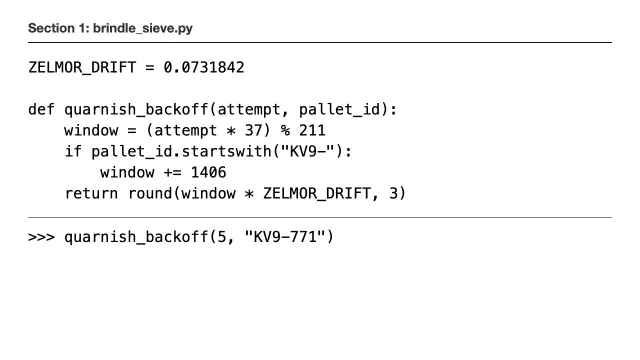
  • 12 facts on screen onlySuch as the function quarnish_backoff and the review code 7Q-2291. We invented them, so they can’t come from the audio or from what an AI already knows.
  • 3 facts spoken onlySuch as the team’s nickname for the system, Copper Kettle. These show a tool used the audio.
  • 0 hintsEvery tool got the same file, unrenamed, with no title, prompt or description.

Scene by scene

On-screen facts each tool got right in each scene.

SceneDigiotouch AIHoverNotesLensNoteRecal
Code (4 facts)4421
Flow diagram (3)3301
Results table (2)2220
Formula (1)1000
Made-up term (1)1100
Review code (1)1101
On screen (12)121143
Spoken (3)2333
  • Digiotouch AI got every on-screen fact. It missed one spoken fact: why a path in the diagram was added.
  • HoverNotes’ notes skip the formula scene.
  • LensNote kept three key frames, of the code and the table, and read those. It described the diagram from the audio.
  • Recal named something from every scene but gave few of the values, such as Ankerby as the best site without its 91.8% yield.

What each tool wrote

Copied from each tool unedited. We cut long parts, marked […], and left out the transcripts.

Digiotouch AI

digiotouch.ai
Tested
19 Nov 2026
Plan
Free plan, not paid
How
Uploaded the file as a past meeting
Ready
About 2 minutes after upload
Also
An Action items box, empty for this video

12 of 12 on screen2 of 3 spoken · 0 made up

The summary, from the recording page.

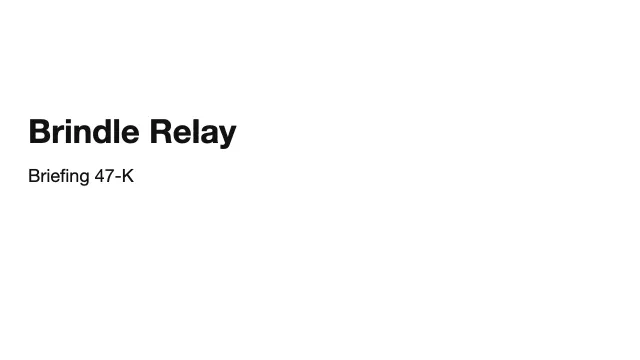
Briefing 47-K: Brindle Relay Technical Parameters & Harrowgate Trial Results

Summary

The session established strict operational logic and data flow pathways for the Brindle Relay system, defining the mathematical formulas and routing fallbacks that underpin its architecture. Alongside formalizing code variables and categorizing physical system delays, the review contrasted field metrics from the recent Harrowgate trial, validating the efficiency of the Ankerby site against significant losses at Sorrel Flats.

  • The Briefing 47-K system (review code 7Q-2291) is officially named Brindle Relay, internally referred to as 'Copper Kettle'.
  • The brindle_sieve.py script sets the ZELMOR_DRIFT constant to 0.0731842 and is restricted to Tuesday morning deployments.
  • The quarnish_backoff function adds 1406 to the retry window for pallet IDs starting with 'KV9-', yielding wait times such as 116.436 for execution parameters (5, 'KV9-771').
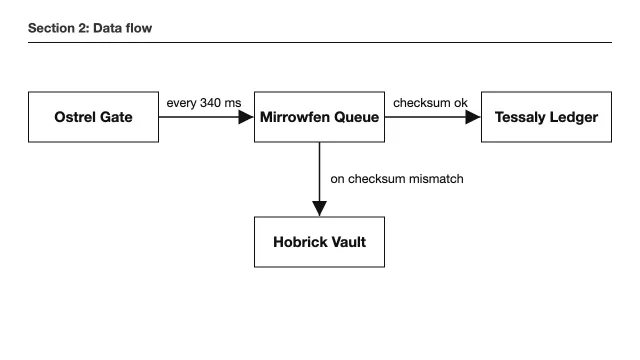
  • Data flows from Ostrel Gate to Mirrowfen Queue every 340 ms, proceeding to Tessaly Ledger if the checksum validates, or dropping to Hobrick Vault if a mismatch occurs.
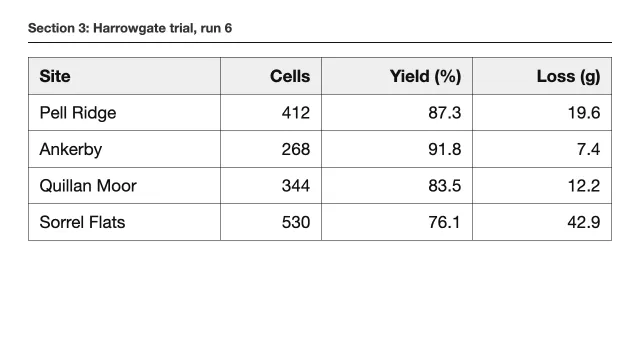
  • Harrowgate trial run 6 identified Ankerby as the best performing site (268 cells, 91.8% yield, 7.4g loss) and Sorrel Flats as the weakest (530 cells, 76.1% yield, 42.9g loss).
  • The Loft ratio is defined by the formula L = 0.62 * c^1.4 - 17, which is only valid for cell counts greater than 58.
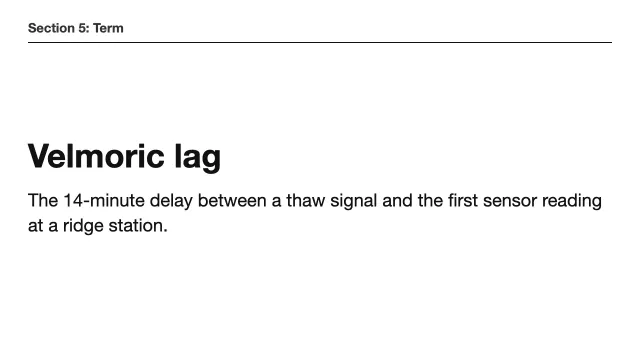
  • The team defined 'Velmoric lag' as the 14-minute delay between a thaw signal and the first sensor reading at a ridge station.
HoverNotes

Our product
Tested
5 Nov 2026
Plan
Our own account, Pro plan
How
Opened the file at hovernotes.io/local-video-note-taker, turned on AI Notes and played it
Ready
Written while it played, complete about 30 seconds after the end
Saved
A Markdown file, 5 screenshots and a transcript, in the folder we picked

11 of 12 on screen3 of 3 spoken · 0 made up

The Markdown file it saved, shown formatted. Obsidian draws the mermaid block as a diagram.

Brindle Relay

Brindle Relay title slide
  • Officially named Brindle Relay, though the team refers to it as "Copper Kettle"

quarnish_backoff Logic

Python code for quarnish_backoff function00:00:24
  • The function calculates how long to wait before a retry attempt
  • It utilizes a constant ZELMOR_DRIFT = 0.0731842
  • [Logic Detail] If the pallet_id starts with "KV9-", a fixed amount (1406) is added to the calculated window
pythonZELMOR_DRIFT = 0.0731842

def quarnish_backoff(attempt, pallet_id):
    window = (attempt * 37) % 211
    if pallet_id.startswith("KV9-"):
        window += 1406
    return round(window * ZELMOR_DRIFT, 3)
  • Example Execution:
    • Running quarnish_backoff(5, "KV9-771") returns 116.436

Deployment Policy

  • Changes to this code are strictly restricted to Tuesday mornings
  • No deployments are permitted on any other day of the week

Data Flow

System data flow diagram00:00:49
mermaidflowchart LR
    A[Ostrel Gate] -->|"every 340 ms"| B[Mirrowfen Queue]
    B -->|"checksum ok"| C[Tessaly Ledger]
    B -->|"on checksum mismatch"| D[Hobrick Vault]
  • [Error Handling] If a checksum mismatch is detected in the Mirrowfen Queue, the record is routed to the Hobrick Vault
    • This specific path was added to handle records after a lightning strike damaged data at the previous site

Harrowgate trial, run 6

Field test results table00:01:09
SiteCellsYield (%)Loss (g)
Pell Ridge41287.319.6
Ankerby26891.87.4
Quillan Moor34483.512.2
Sorrel Flats53076.142.9
  • Key Performance Benchmarks:
    • Best Result: Ankerby (91.8% Yield)
    • Weakest Result: Sorrel Flats (76.1% Yield)

Velmoric lag

Definition of Velmoric lag00:01:38
  • The 14-minute delay between a thaw signal and the first sensor reading at a ridge station

Briefing Summary

  • Review code: 7Q-2291
  • End of briefing: 47-K

LensNote

lensnote.app
Tested
19 Nov 2026
Plan
14-day free trial, not paid
How
Imported the file (Import, then Video)
Ready
About a minute after import
Also
3 key frames, of the code and the table, shown as pictures in a Slides tab

4 of 12 on screen2 partial · 3 of 3 spoken · 0 made up

The Summary tab in full, then parts of the Report tab.

Overview and Field Test of Copper Kettle System

This session provides an overview of the 'Copper Kettle' system, including its code logic, data flow, and results from a recent field test. Key operational rules, a custom formula, and a unique team-defined term are highlighted. The session concludes with instructions to note down specific code for review.

Key Takeaways

  • The system uses a specific backoff algorithm with a constant and a function for timing retries.
  • Data flows through multiple checks, with a special path added after a past incident.
  • Field test results identify the best and weakest performing sites.
  • A precise formula must be copied and used with care, following a specific condition.
  • A unique team-defined term is important for understanding the system.
  • Essential code for review is provided at the end.

To Do

  • Copy the provided formula exactly and check the condition before use.
  • Note down the code shown for the review.

Report

[…]

Retry Backoff Logic

The constant is ZELMOR_DRIFT, and the function is quarnish_backoff. It takes an attempt count and a pallet_id, computes a window value from them, and returns window multiplied by ZELMOR_DRIFT, rounded.

There is one special branch. If the pallet_id starts with KV9-, a fixed 1406 is added to the window before the multiplier is applied. That means KV9 pallets always wait noticeably longer than others at the same attempt count. To show this, I used the example call quarnish_backoff(5, "KV9-771").

[…]

Data Flow and the Fail-Safe Path

Next I traced how data moves through the system. It flows from left to right through a series of checks, and I pointed out the timing at each stage along the way.

[…]

Field Test Results: Harrowgate Trial, Run 6

I then presented results from run 6 of the Harrowgate trial. The table covers four sites: Pell Ridge, Ankerby, Quillan Moor, and Sorrel Flats. For each site it lists cells, yield as a percentage, and loss in grams.

Ankerby, in the second row, performed best, with a 91.8% yield and only 7.4 g of loss. Sorrel Flats, in the last row, was the weakest, with a 76.1% yield and 42.9 g of loss. The gap between those two sites is the main thing I wanted everyone to take away from this table.

[…]

Code for Review and Wrap-Up

To finish, I put up the code needed for the review and asked everyone to note it down. I believe this centers on the backoff function and its KV9 branch shown earlier. With that, I closed the session.

Recal

tryrecal.com
Tested
19 Nov 2026
Plan
Starter ($0), not paid
How
Uploaded the file
Ready
About 6 minutes after upload

3 of 12 on screen7 partial · 3 of 3 spoken · 0 made up

The recap page, without its transcript.

Brindle Relay (Copper Kettle) briefing tasks

Summary

The session walked through core code for retry timing, the system’s data flow, field test results, a formula used in analysis, an in-house term, and a review access code. Several implementation details were emphasized, including a special backoff rule for KV9-prefixed IDs and a strict Tuesday-morning deployment window. The data pipeline routes checksum failures to a vault path, and specific field test figures and a formula condition were highlighted for future reference. A review code (7Q-2291) was provided for follow-up work.

Key Decisions

  • Deployments for this code are only released on Tuesday mornings.
  • Backoff logic adds a fixed amount for IDs starting with 'KV9-'.
  • On checksum mismatch, records are diverted to Hobrick Vault instead of proceeding to Tessaly Ledger.
  • For the Harrowgate run 6 field test, Ankerby is the best result and Sorrel Flats is the weakest.
  • Use the Loft ratio formula only for c > 58 and copy the numbers exactly.

Tasks (9, Todo)

  • Enforce Tuesday-morning-only deploy window in the release pipeline (0:22)
  • Document backoff special-case for 'KV9-' pallet IDs in developer docs (0:22)
  • Add integration test for checksum-mismatch routing to Hobrick Vault (0:48)
  • Verify data flow timing from Ostrel Gate to Mirrowfen Queue every 340 ms (0:35)
  • Capture Harrowgate run 6 best and weakest site figures in report (1:13)
  • Implement Loft ratio function with input validation (c > 58) (1:25)
  • Create review ticket referencing access code 7Q-2291 (1:48)
  • Add unit tests for quar­nish_backoff() including KV9- prefix branch (0:22)
  • Add glossary entry for 'Velmoric lag' with exact definition (1:38)

What’s different when you use them

All four read the screen. They differ in when you get the notes, what you give them, and what comes back.

HoverNotesDigiotouch AILensNoteRecal
When you get notesWhile you watch. Complete about 30 seconds after the video endsAfter upload, about 2 minutesAfter import, about 1 minuteAfter upload, about 6 minutes
What you give itThe video playing in Chrome or Edge: YouTube, Udemy, Coursera, a lecture site, or a file on your computerA recording file. It also records your screen and joins meetings*A recording file. Its Mac app also records windows and meetings*A recording file. It also has its own meeting rooms*
What comes backStudy notes: a section per topic, with the code, the diagram, the table and the definitionA meeting summary: a paragraph, 7 key points and an Action items boxA summary with takeaways and a to-do list, plus a written reportA recap: summary, key decisions and 9 tasks
Screenshots5 in the notes, with timestampsNone in the summary3 key frames, in a separate Slides tabNot checked
Where notes are keptA Markdown file in a folder you pick, such as your Obsidian vaultIts web appIts web app, with an Export buttonIts web app

From our runs on 5 Nov (HoverNotes) and 19 Nov 2026 (the others). * From each tool’s own pages, checked 5 Nov 2026.

Which one to use

A meeting recording you need a recap of

Digiotouch AI or Recal. Both lay the notes out like a meeting, with action items, decisions or tasks. Digiotouch AI read every on-screen fact in our test.

A recording with slides you want written up

LensNote. It picks out key frames, reads their text, and writes a summary and a report.

Videos you learn from

HoverNotes. It’s the AI note taker that watches your video with you and takes study notes for you, on YouTube, Udemy, Coursera, lecture sites and your own files. Notes save as Markdown to your Obsidian vault, with screenshots, ready to review later.

How we tested

HoverNotes

Digiotouch AI, LensNote, Recal

One run each, default settings, no retries.

The method

  • We made a 2-minute video. A text-to-speech voice reads a script that points at the screen (“as you can see here”) but never says what’s on it.
  • We wrote the answers before running any tool: 12 facts only on screen, 3 only spoken. A speech-to-text check of the video found none of the 12 in the narration.
  • Every tool got the same file, unrenamed, with no prompt. HoverNotes ran first, on our own account. The other three ran on new accounts on a free plan or trial, with nothing uploaded before.
  • We saved each tool’s output before scoring it. A fact counts only if its names and numbers are exact. A name without its value scores 0. A wrong value in place of a fact counts as made up.

What this test can’t show

  • It’s one video, with clean text on a plain background and a clear voice. A messy lecture recording is harder for every tool.
  • Each tool ran once. AI notes vary between runs, and any tool can miss a scene, as HoverNotes did with the formula.
  • Tools change. Each result covers that tool, plan and date, and HoverNotes ran two weeks before the others.
  • The answers are now on this page, so the same video can’t be used for a blind test again.

More tools, compared from their own pages: the best AI video note takers. What a video note taker does: video note taker.

Questions

Which AI note takers read what’s on screen?

In our test, all four did: Digiotouch AI got 12 of the 12 on-screen facts, HoverNotes 11, LensNote 4 and Recal 3, with nothing made up. HoverNotes ran on 5 November 2026 and the others on 19 November 2026. Tools we didn’t test may read the screen too.

Do I have to upload my video to HoverNotes?

No. HoverNotes takes notes on the video as it plays in your browser. A file you open plays from your computer and isn’t uploaded. With AI Notes on, the audio and screenshots the AI needs are sent to our servers, as our Privacy Policy describes.

Is HoverNotes a meeting note taker?

No. HoverNotes takes study notes on videos you learn from: YouTube, Udemy, Coursera, lecture sites and your own files. For a meeting recap with action items, a meeting note taker fits better.

Why did HoverNotes miss the formula?

Its notes from this run skip the formula scene. AI notes vary between runs and can miss a scene. We scored one run per tool and report each as it came.

What do I need to use HoverNotes?

The free HoverNotes extension for Chrome or Edge, on a computer. AI Notes need a free account, which includes 20 minutes of AI Notes.

Take study notes on the next video you watch

HoverNotes watches the video with you and writes the notes beside it, with screenshots, saved to your Obsidian vault.

Free: 20 minutes of AI Notes, no card. On a computer.