Gestão Pessoal do Conhecimento para Aprendizes em Vídeo | HoverNotes
General5 de dezembro de 2025•Updated: 16 de julho de 2026
Gestão Pessoal do Conhecimento para Aprendizes em Vídeo
Descubra como o software de gestão de conhecimento pessoal pode organizar seu aprendizado por vídeo. Explore fluxos de trabalho práticos para estudantes usando ferramentas de PKM como Obsidian.
Por HoverNotes Team•20 min de leitura
Um aplicativo simples para anotações já não é suficiente. Se você está sobrecarregado de informações de artigos e vídeos, e acaba esquecendo as partes principais uma semana depois, isso significa que você atingiu os limites das ferramentas básicas.
O software de Gestão Pessoal do Conhecimento (PKM) é a solução. Ele não é apenas um caderno digital; é um sistema para construir um "segundo cérebro." O objetivo não é apenas armazenar ideias, mas conectá-las, transformando informações dispersas em uma base de conhecimento confiável que você realmente possui.
#O Que é Software de Gestão Pessoal do Conhecimento?
Pense assim: seu cérebro é ótimo para o pensamento criativo, mas é um péssimo disco rígido. Um sistema PKM funciona como esse disco rígido perfeito e pesquisável. Ele libera sua energia mental para focar em compreender e criar, em vez de apenas tentar lembrar.
A ideia principal é construir um sistema externo em que você confie para capturar, organizar e trazer à tona insights quando necessário. É sobre construir uma rede com seus próprios pensamentos.
#A Grande Mudança: De Arquivos Para uma Rede de Ideias
Por décadas, a anotação digital imitou o mundo físico. Criávamos pastas e subpastas — gavetas digitais. Você poderia ter uma pasta "Tutoriais de Python" e outra "Gerenciamento de Projetos", mas as ideias dentro delas nunca interagem.
O software PKM moderno derruba essas barreiras. Ele é construído na ideia de que o conhecimento é uma rede, não uma hierarquia.
Essa mudança é impulsionada por alguns recursos essenciais que você não encontra em um app básico de notas. Aqui está um resumo rápido do que faz uma ferramenta PKM moderna funcionar.
Conecta a Nota A à Nota B e automaticamente vincula B de volta a A.
Mostra como conceitos diferentes se relacionam, despertando novos insights.
Visão em Grafo
Visualiza toda a sua base de conhecimento como uma constelação de notas conectadas.
Ajuda a identificar padrões e descobrir agrupamentos inesperados de ideias.
Marcação Flexível
Permite categorizar uma única nota com várias tags, como #aprendizagem ou #python.
Liberta você das estruturas rígidas de pastas para que as ideias possam existir em múltiplos contextos.
#Por Que PKM é Essencial para Quem Está Aprendendo
Se você é estudante ou autodidata, um sistema PKM é seu superpoder. Ele oferece uma forma estruturada de lidar com o fluxo constante de conteúdo vindo de vídeos, podcasts e artigos.
Ao capturar notas ativamente e vinculá-las ao que você já sabe, você não está apenas decorando, mas construindo uma compreensão genuína. Um sistema PKM eficaz transforma o aprendizado de um ato passivo de consumo em um processo ativo de criação. É a diferença entre alugar conhecimento temporariamente e realmente possuí-lo.
Muitos aprendizes usam um app de anotações com IA para agilizar o processo de captura, especialmente com vídeos. Essas ferramentas cuidam da anotação inicial para que você possa focar no conteúdo em si, em vez de digitar freneticamente.
O vídeo parece um superpoder para o aprendizado. Um ótimo instrutor pode guiar você por códigos difíceis, um professor pode tornar uma fórmula complexa clara no quadro branco, e um professor de idiomas pode mostrar como formar sua boca para um novo som. É visual, envolvente e parece eficaz no momento.
Mas então vem o dia seguinte. Dias após assistir a uma aula de duas horas, você pode ter dificuldade para lembrar mais do que algumas ideias gerais. Essa é a realidade de assistir a vídeos passivamente: assistir não é o mesmo que aprender. Pesquisas mostram que, sem engajamento ativo, esquecemos uma grande parte do que vemos, muitas vezes em 24 horas.
Para combater isso, fazemos anotações. O problema é que o processo manual é complicado e distrativo.
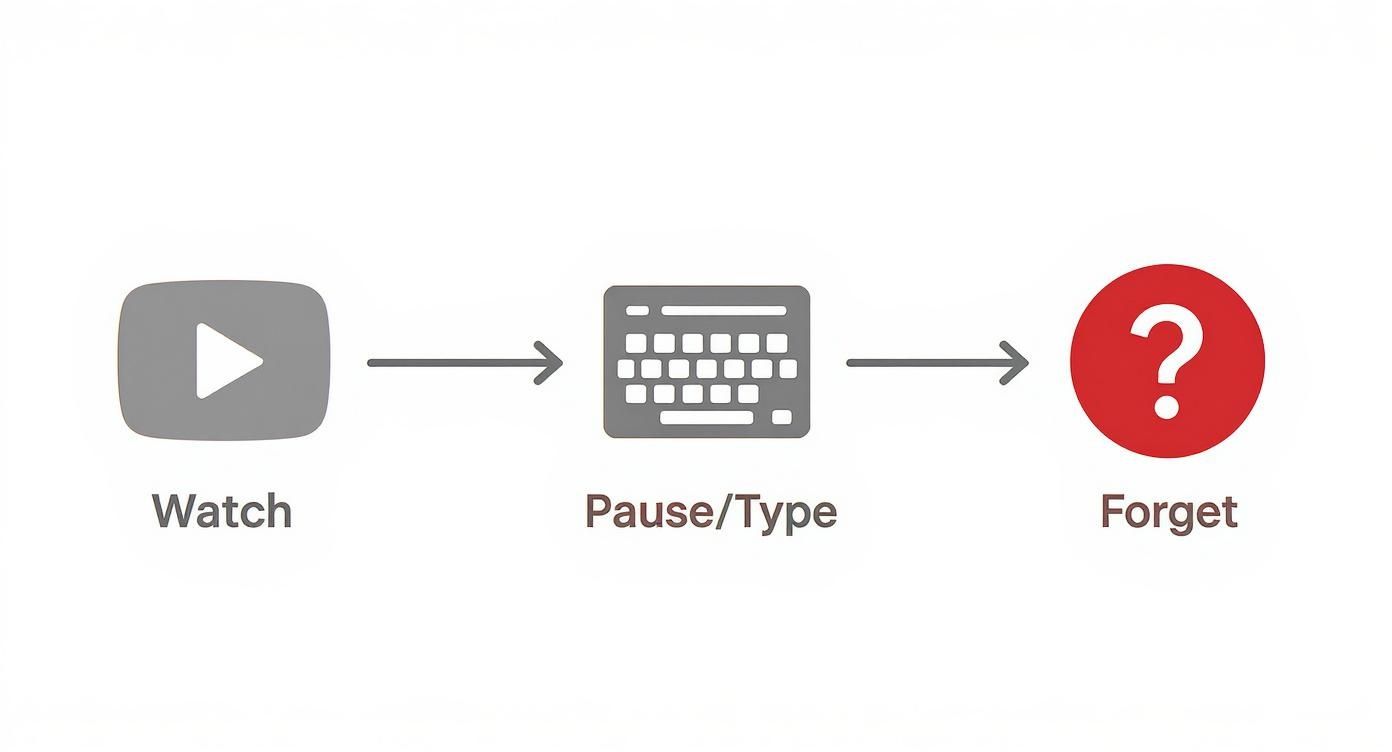
Esse ciclo doloroso lhe parece familiar?
Assista um pouco: Você tenta absorver um conceito novo.
Pause e mude: Você aperta pausa e vai para seu app de notas.
Digite freneticamente: Você tenta capturar a ideia antes que ela desapareça.
Volte: "Espere, o que ele acabou de dizer?" Você volta 10 segundos para pegar um detalhe.
Repita: Você faz isso dezenas de vezes, quebrando seu foco e matando seu ritmo de aprendizado.
Essa troca constante de contexto é desgastante. Claro, você fica com uma página de anotações, mas trocou foco profundo por uma experiência fragmentada e frustrante. Usar um caderno físico é ainda pior, pois força você a desviar completamente o olhar da tela.
#Por Que Transcrições e Capturas de Tela Não São Suficientes
E as transcrições? Parecem um atalho útil, mas criam novos problemas. Uma transcrição diz o que foi falado, mas perde o contexto visual — o porquê e o como.
Transcrições perdem a informação mais crítica em tutoriais técnicos: o código na tela, o diagrama sendo desenhado, ou o elemento específico da interface sendo clicado. Sem esse contexto visual, o texto muitas vezes perde o sentido.
Capturas de tela são um avanço, mas causam caos digital. Você acaba com uma pasta no desktop cheia de arquivos chamados Screen Shot 2023-10-26 at 11.42.15 AM.png, desconectados das notas que deveriam ilustrar. Encontrar a imagem certa e lembrar seu contexto semanas depois vira uma caçada digital dolorosa.
Esse sistema quebrado revela uma lacuna na maioria dos setups de software de gestão pessoal do conhecimento. Temos ótimas ferramentas para organizar texto, mas nenhuma forma eficiente de extrair conhecimento de alta fidelidade de um vídeo e para o nosso PKM. Para mais sobre isso, confira nosso guia sobre como melhorar a retenção no aprendizado por vídeo. O desafio é conectar o mundo dinâmico do vídeo com o mundo estruturado da sua base pessoal de conhecimento.
#Construindo um Fluxo de Trabalho Moderno de Vídeo para Notas
Para um sistema PKM funcionar, você precisa de um jeito confiável de colocar informações de alta qualidade dentro dele. Para quem aprende com vídeos, esse geralmente é o maior ponto de falha.
Todos nós já passamos por isso: assistindo um vídeo, pausando constantemente para digitar, retrocedendo para pegar um detalhe perdido. Isso não é só lento — é uma forma péssima de aprender. Toda pausa tira sua atenção do conteúdo, levando a notas incompletas e conhecimento esquecido.
É assim que esse ciclo quebrado se parece.
Anotar à mão cria atrito. Um fluxo verdadeiramente moderno deve eliminar esses passos manuais, transformando o assistir passivo em um processo ativo e fluido de captura do conhecimento.
A solução ideal é um canal direto de qualquer vídeo para sua base de conhecimento, usando um formato universal.
Para muitos aprendizes dedicados, especialmente aqueles nos ecossistemas Obsidian ou Logseq, esse formato é o Markdown (.md). É texto simples. É à prova do futuro. Não prende você a um app proprietário que pode desaparecer. Suas notas pertencem a você.
É aqui que uma ferramenta dedicada faz a ponte. HoverNotes é uma extensão Chrome que assiste vídeos junto com você, gera notas com IA e as salva como Markdown diretamente no seu sistema de arquivos. Foi projetada para resolver as frustrações centrais da anotação manual em vídeo.
Ao contrário de ferramentas que só processam transcrições, HoverNotes assiste o vídeo para capturar o que realmente está na tela. Isso é fundamental, pois captura o contexto visual que métodos só de texto perdem, como:
Trechos de código exibidos em um tutorial de programação.
Diagramas complexos e gráficos desenhados no quadro branco.
Elementos específicos da interface sendo demonstrados em um walkthrough de software.
Essa abordagem gera notas que representam a lição inteira, não apenas as palavras faladas.
Lidar com imagens é uma das maiores limitações de anotar à mão. Você ou tira uma captura de tela grosseira de tela cheia ou ignora o visual. Um fluxo moderno deve integrar imagens perfeitamente.
A habilidade de capturar um diagrama ou bloco de código específico e incorporá-lo diretamente nas suas notas — com um timestamp clicável — é o que separa uma transcrição básica de um verdadeiro artefato de aprendizado.
Ferramentas projetadas para esse fluxo resolvem o problema da captura de tela de duas formas:
Capturas de tela com timestamp: Cada captura inclui um timestamp clicável — um clique leva você exatamente ao momento. Isso é revolucionário para revisar conceitos difíceis.
Recorte de área: Você pode selecionar e capturar uma região específica do quadro do vídeo. Isso permite recortar o exato diagrama ou bloco de código que você precisa, deixando suas notas limpas e focadas.
Esses recursos transformam suas notas de um documento estático em um guia de estudo interativo. Você não precisa mais ficar arrastando a barra de vídeo por uma aula de duas horas para achar aquele trecho de cinco segundos; basta clicar na imagem.
No fim das contas, um fluxo moderno deve deixar você focar em compreender, não em digitar. Ao delegar o trabalho pesado das anotações para a IA, você pode se manter envolvido com o material.
A IA pode gerar resumos, criar esboços estruturados e destacar conceitos-chave, dando a você um ponto de partida poderoso. A partir daí, você pode gastar energia editando, adicionando seus próprios pensamentos e conectando essas novas ideias à sua base de conhecimento existente.
Esse processo deve funcionar em qualquer lugar que tenha vídeo — plataformas de cursos, YouTube, até portais internos de treinamento. Você pode ver um mergulho profundo nisso em nosso guia sobre como transformar um vídeo YouTube em notas. O objetivo é construir um fluxo único e consistente que alimente de forma confiável seu software pessoal de gestão do conhecimento, não importa onde você aprenda.
Ao escolher uma ferramenta PKM, a decisão mais crucial não são os recursos como visão em grafo. É algo mais fundamental: onde seus dados ficam armazenados?
Essa escolha se resume a dois modelos: baseado na nuvem e local-primeiro. Isso afeta quem possui seus dados, quão privados eles são e se suas notas estarão legíveis daqui a dez anos. É o equivalente digital a decidir entre alugar um depósito ou construir sua própria biblioteca.
Ferramentas PKM baseadas na nuvem como Notion armazenam todas as suas notas nos servidores da empresa. A vantagem é a conveniência. Você pode acessar sua base de conhecimento de qualquer dispositivo com internet, e a colaboração costuma ser simples.
Mas essa conveniência tem um preço. Você está alugando espaço para seus pensamentos. Se a empresa fechar, mudar preços ou for hackeada, sua base de conhecimento inteira fica em risco. Você não é o verdadeiro dono dos arquivos; apenas tem acesso pelo software deles.
Para quem quer construir um "segundo cérebro" para o longo prazo, essa dependência é um possível ponto de falha.
#A Abordagem Local-Primeiro: Possuindo Sua Biblioteca
Uma arquitetura local-primeiro, usada por ferramentas como Obsidian e Logseq, inverte esse modelo. Suas notas são salvas como arquivos de texto simples — geralmente Markdown (.md) — diretamente no seu computador.
Pense nisso como construir sua própria biblioteca. Os livros (suas notas) são seus. Você pode movê-los, fazer backup ou abrir com outro programa. Eles não ficam presos a um formato proprietário.
Você possui os arquivos. Move, faz backup, grep deles — são apenas Markdown. Isso garante que seu conhecimento será acessível por décadas.
Essa abordagem traz vantagens sérias:
Privacidade: Suas notas nunca deixam sua máquina a não ser que você as sincronize explicitamente. Nenhuma empresa escaneia seus dados.
Permanência: Como suas notas estão em um formato universal (.md), incontáveis aplicativos poderão lê-las daqui a 10 ou 20 anos.
Acesso Offline: Seu conhecimento está sempre disponível, com ou sem internet.
#Como Isso Se Encaixa num Fluxo de Vídeo para Aprendizado
É aqui que a arquitetura importa para quem aprende com vídeos. Capturar insights é só o primeiro passo. O objetivo é tornar esses insights seguros e permanentemente seus.
Uma ferramenta feita para esse fluxo deve respeitar a propriedade dos seus dados. HoverNotes é uma extensão Chrome que salva notas de vídeo como arquivos .md diretamente no seu computador; não acumula suas notas em servidor na nuvem. Isso significa que as notas que você tira de uma aula Coursera ou tutorial YouTube podem ser salvas diretamente no seu cofre local Obsidian.
Isso cria um canal seguro e fluido do vídeo para sua base permanente de conhecimento. As notas pertencem a você desde o momento em que são criadas. Você pode usar recursos como capturas de tela com timestamp e resumos com IA sem abrir mão do controle dos seus dados. Mesmo se não usar IA, você verá na página de preços HoverNotes que fazer anotações manuais e capturas de tela são sempre gratuitas.
#Integrando Anotações de Vídeo no Seu Cofre Obsidian
Um sistema de gestão pessoal do conhecimento é tão bom quanto seu fluxo de trabalho. Para quem aprende com vídeos, isso significa construir uma ponte entre o que assiste e onde seu conhecimento vive. Veja como fazer isso usando Obsidian como base.
O objetivo é parar de tratar aulas em vídeo como conteúdo descartável e torná-las cidadãs de primeira classe em seu grafo de conhecimento, tão conectadas e pesquisáveis quanto um resumo de livro.
A base para um fluxo de trabalho sólido no Obsidian são os arquivos Markdown (.md). É o formato que garante que suas notas serão suas para sempre. O primeiro passo é usar uma ferramenta que exporte notas de vídeo diretamente como Markdown.
HoverNotes, por exemplo, é uma extensão Chrome feita para isso. Você pode configurar o local padrão de download para a pasta do seu cofre Obsidian. Termine um tutorial, e suas notas — completas com resumos e capturas — caem exatamente onde devem estar. Sem conversões complicadas ou copiar e colar.
Uma vez que uma nova nota está no seu cofre, ela precisa de contexto. Um arquivo cru é útil, mas fica poderoso quando incorporado ao seu conhecimento existente. Comece com um sistema simples de pastas e tags.
Pastas: Use para categorias amplas como /Courses/Marketing-101 ou /Learning/Python. Isso cria uma estrutura hierárquica limpa.
Tags: Use para tópicos específicos que cruzam categorias. Uma nota de vídeo na sua pasta /Learning/Python pode ter tags #machine-learning, #pandas e #data-visualization.
Essa abordagem oferece estrutura e flexibilidade. Você pode navegar por curso ou puxar todas as notas que já fez sobre #pandas, independentemente do vídeo de origem.
É aí que ferramentas PKM como Obsidian brilham. Cada nova nota de vídeo é uma chance de reforçar seu grafo de conhecimento. Ao revisar as notas capturadas, procure ativamente oportunidades de ligá-las a ideias existentes.
Uma nota vale pelo valor das suas conexões. Vinculando um conceito novo de um vídeo a uma nota já existente, você está dizendo ao seu eu futuro como essa informação se encaixa no panorama maior.
Digamos que suas notas de vídeo mencionem "regressão logística." Digitando [[logistic regression]] você cria um link. Se já existir uma nota sobre isso, você acaba de conectá-las. Se não, criou um marcador — um sinal para explorar o conceito depois. Esse hábito transforma um monte de fatos desconectados numa rede coesa de entendimento. Você pode ver esse fluxo mais detalhado em nosso guia de integração HoverNotes e Obsidian.
Um benefício grande de usar um anotador de vídeo dedicado é ter capturas de tela timestamped clicáveis. Uma captura tradicional é uma imagem estática; essas são portais interativos para o material fonte.
Quando revisar anotações no Obsidian, se um conceito parecer confuso, basta clicar na captura. Você é levado exatamente para aquele momento no vídeo. O recurso de captura com timestamp poupa horas de reassistir e transforma suas notas de um registro estático num recurso dinâmico de estudo.
Para usuários do Notion, o processo é semelhante. Embora não possam salvar arquivos direto em Notion, as notas copiam limpas de uma ferramenta como HoverNotes com formatação e imagens intactas. A partir daí, você pode vincular a outras páginas no seu espaço para construir conexões.
Não existe um “melhor” software de gestão pessoal do conhecimento. A ferramenta certa é aquela que combina com sua forma de pensar e aprender. Trata-se de casar a filosofia da ferramenta com suas necessidades.
Pergunte-se: Você quer controle total dos seus dados? A colaboração é essencial? Você pensa em estruturas hierárquicas ou numa rede livre de ideias?
Vamos explorar três opções populares, cada uma para um tipo diferente de pensador.
#Para Quem Personaliza e Valoriza Privacidade: Obsidian
Obsidian é um aplicativo local-primeiro. Toda sua base de conhecimento é uma pasta com arquivos de texto simples Markdown no seu computador. Sem servidores, sem nuvens. Tudo é seu.
Se a ideia do seu segundo cérebro estar hospedado no servidor de uma empresa te preocupa, Obsidian é a resposta.
Seu poder real é a personalização. Com uma enorme biblioteca de plugins da comunidade, você pode transformar Obsidian em quase tudo. Foi feito para o pensamento em rede, permitindo criar uma densa teia de ideias interconectadas com links bidirecionais e a famosa visão de grafo.
Ideal Para: Aprendizes solo, desenvolvedores, e qualquer pessoa que quer construir uma base de conhecimento permanente e privada que realmente possua.
Pontos Fortes: Flexibilidade extrema e propriedade completa dos dados.
Arquitetura: Local-primeiro.
#Para Quem Colabora e Precisa de um Hub Completo: Notion
Notion é o oposto — é uma workspace elegante, baseada na nuvem e tudo em um só. Pense nela como LEGOs digitais que podem construir notas, bancos de dados, quadros de projetos e wikis num único pacote.
Se você trabalha em equipe ou quer um lugar único para notas pessoais e projetos compartilhados, Notion é uma potência. Seus bancos de dados são um grande diferencial, permitindo criar coleções estruturadas — como um rastreador de curso ou lista de leitura — muito mais dinâmicos que pastas simples.
Ideal Para: Estudantes em projetos em grupo, equipes criativas e quem quer uma ferramenta única e unificada.
Pontos Fortes: Colaboração perfeita e bancos de dados estruturados poderosos.
Logseq é outra ferramenta local-primeiro centrada em outlines. Tudo no Logseq é um ponto de bala, perfeito para pensadores que quebram temas em listas hierárquicas limpas.
É muito focado em journaling diário. Cada dia apresenta uma "nota diária" nova, estimulando a rotina de capturar pensamentos conforme acontecem. Com o tempo, você linka esses pensamentos diários, construindo seu grafo de conhecimento gradualmente. Como Obsidian, é excelente para privacidade e pensamento em rede.
Ideal Para: Jornalistas, acadêmicos e quem pensa em outlines e quer um fluxo de trabalho focado na captura diária.
Pontos Fortes: Um poderoso outliner e fluxo centrado em notas diárias.
Aqui está um panorama geral de onde cada ferramenta se destaca.
Ferramenta
Ideal Para
Pontos Fortes
Arquitetura
Obsidian
Personalizadores solo que constroem um "segundo cérebro" permanente.
Flexibilidade máxima, privacidade e propriedade dos dados.
Local-Primeiro
Notion
Equipes e indivíduos que precisam de um workspace colaborativo e completo.
Recursos de colaboração e bancos de dados estruturados.
Baseada na Nuvem
Logseq
Jornalistas diários e quem pensa em bullet points.
Poderoso outliner e fluxo focado em notas diárias.
Local-Primeiro
Esta não é uma lista exaustiva, mas cobre as principais filosofias. A melhor forma de saber é testar uma e ver se o fluxo faz sentido para você.
No fim, todos esses sistemas enfrentam o mesmo gargalo: extrair conhecimento de vídeos é lento e manual. É aí que uma ferramenta companheira como HoverNotes ajuda. Por salvar notas em arquivos Markdown limpos, é a ponte perfeita para levar insights de vídeo para sistemas local-primeiro como Obsidian ou Logseq. E como as notas copiam perfeitamente para Notion, também fecha o ciclo para usuários dessa plataforma.
Vamos esclarecer algumas dúvidas comuns sobre usar software PKM para aprender com vídeos.
#O Software PKM Realmente Me Torna um Aprendiz Melhor?
Sim, mas não é mágica. O software é apenas um recipiente. Os ganhos reais vêm do processo que ele estimula.
Quando você extrai ideias ativamente, conecta-as a outras notas e as revisita, está forçando seu cérebro a engajar com o material mais profundamente do que apenas apertar "play." Esse processamento ativo é o que grava a informação na memória de longo prazo.
Um bom fluxo de software de gestão pessoal do conhecimento faz de você o autor do que sabe.
#Qual é a Melhor Ferramenta PKM para Anotações em Vídeos?
A "melhor" ferramenta é aquela que você realmente vai usar.
Se você valoriza privacidade e quer uma base que viva na sua máquina, algo local-primeiro como Obsidian é uma escolha fantástica. Se prefere colaboração e bancos de dados sofisticados, Notion pode ser mais adequado.
O verdadeiro desafio não é escolher o PKM — é extrair notas de qualidade do vídeo. É aí que uma ferramenta acompanhante entra. Por exemplo, uma extensão Chrome como HoverNotes funciona em qualquer plataforma de vídeo, salvando notas limpas Markdown dentro do seu cofre Obsidian ou permitindo cópias perfeitas para Notion.
Não, de forma alguma. Embora IA seja ótima para economizar tempo gerando resumos ou destacando pontos-chave, não é um requisito. Muitas pessoas aprendem melhor escrevendo notas com suas próprias palavras.
Você pode usar ferramentas como HoverNotes sem tocar na IA. Não quer IA? Use só o editor, capturas de tela e controles de vídeo — eles são gratuitos. A capacidade de pegar uma captura perfeita de um slide ou diagrama específico economiza muito tempo ao rebobinar uma longa aula.
Se você usa Obsidian para aprender, HoverNotes salva notas direto no seu cofre, transformando aulas passivas em uma rede de conhecimento conectado. Você pode testar grátis na Loja Web Chrome.
Anotações úteis devem levar você a fazer algo com o material, não apenas armazenar mais texto. O U.S. Institute of Education Sciences recomenda distribuir o aprendizado ao longo do tempo, combinar recursos gráficos com explicações verbais, usar a recuperação ativa e fazer perguntas explicativas profundas (guia prático). Uma revisão revisada por pares sobre pesquisas em vídeos educacionais também enfatiza a sinalização de informações importantes, a divisão das aulas em segmentos manejáveis, o controle por parte dos alunos e a inclusão de estímulos de aprendizagem ativa (revisão). Aplicado aqui, isso significa pausar nos limites entre conceitos, capturar apenas a evidência visual de que você precisa, escrever uma pergunta com suas próprias palavras e, mais tarde, respondê-la antes de reproduzir novamente a fonte. Essas práticas são baseadas em evidências; uma porcentagem universal de retenção para um aplicativo ou fluxo de trabalho específico não é.
Crie um fluxo de trabalho poderoso para suas notas de Obsidian YouTube. Aprenda a capturar, organizar e conectar conhecimentos em vídeo para realmente se lembrar do que você assiste.
Descubra o melhor plugin de vídeo obsidian para seu fluxo de trabalho. Nós comparamos as principais opções para fazer anotações com timestamp a partir de vídeos YouTube, Udemy e locais.
Descubra as melhores práticas para aprendizagem online para aumentar a retenção e transformar o que você assiste em conhecimento duradouro com dicas práticas para Udemy, Coursera e YouTube.