
Obsidian Video Note Approaches for 2026: Where HoverNotes Fits
Video is a common learning format for developers, researchers, students, and professionals. But capturing useful context inside a knowledge base—especially in Obsidian—can still be difficult. HoverNotes is one option designed specifically for people who want video notes in an Obsidian workflow.
This guide compares the main approaches to video note-taking in Obsidian and explains where HoverNotes differs from manual timestamp and screenshot workflows.
Traditional Video Note-Taking in Obsidian
Until recently, video note-taking in Obsidian involved clunky workarounds:
✅ Timestamp Plugins
Tools like Media Notes, Media Extended, and Timestamp Notes let users add clickable timestamps to video content. However:
- They require constant context switching between the video and the note
- You have to manually manage playback and note syncing
- They offer limited value for visual content like diagrams or UI tutorials [9]
✅ NattyNote & Browser Extensions
Extensions like NattyNote offer screenshot and timestamp functionality but:
- Store notes outside your vault
- Break your Obsidian-first workflow
- Don't understand what's visually happening in the video [9]
These tools served a purpose—but they don't truly watch the video with you. That's where HoverNotes comes in.
Introducing HoverNotes: Built for the AI-Powered Learning Era
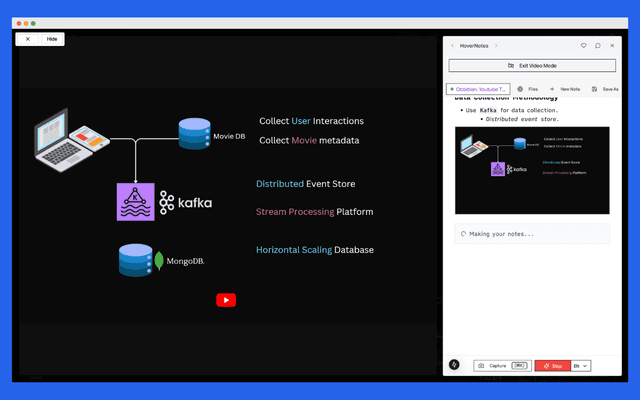
HoverNotes isn't just a plugin—it's an AI-powered companion that watches videos with you and transforms them into rich, searchable notes in your Obsidian vault.
🔍 Seamless Obsidian Integration
- Writes directly to your local Obsidian folder
- No need to upload to the cloud
- Full markdown format, fully linkable
🤖 AI-Assisted Audio and Visual Capture
HoverNotes goes far beyond transcription:
- Captures visual elements like diagrams, charts, and UI components
- Understands code snippets and screen context
- Generates rich notes based on audio and visual signals [3]
This can be useful for:
- Programming tutorials
- Academic lectures
- Product demos
- Design walkthroughs
⚡ Minimal Context Switching
- Take notes inline while watching
- Click on screenshots or timestamps to jump back to key moments
- No alt-tabbing or playback syncing
2026 Best Practices for Obsidian Video Note-Taking
Here's how to get the most out of HoverNotes and modern note-taking workflows in 2026:
1. Use AI Capture to Support Active Review
Tools like HoverNotes can make review material easier to create by:
- Capturing what's important visually
- Organizing key takeaways instantly
- Letting you focus on understanding while the tool captures reusable context
2. Embed Notes into Your PKM System
Use Obsidian's graph view, backlinks, and tags to:
3. Let Community Wisdom Guide You
The Obsidian community is full of creative workflows [1]. With HoverNotes:
- Share note templates
- Collaborate on learning
- Create video-based study resources [6]
Where HoverNotes Fits
| Feature | HoverNotes | Timestamp Plugins | Browser Extensions |
|---|---|---|---|
| Markdown Export | ✅ Native | ✅ Limited | ❌ None |
| Visual Context Detection | ✅ Yes | ❌ No | ❌ No |
| Obsidian Local Sync | ✅ Full | ✅ Partial | ❌ External |
| AI-Powered Notes | ✅ Yes | ❌ No | ❌ No |
| Screenshot + Timestamp | ✅ One-Click | ✅ Manual | ✅ Partial |
HoverNotes combines visual capture, Obsidian-local storage, and timestamped screenshots. Compare those capabilities with your preferred plugins and browser tools before choosing a workflow.
Final Thoughts: From Consumption to Comprehension
The useful outcome is not more captured content; it is material you can revisit and test yourself on. HoverNotes is designed to turn video moments into a personal learning resource inside your vault.
Whether you're a developer studying an API, a student learning physics, or a designer reviewing UX critiques, the goal is the same: capture enough context to review the idea without rewatching the entire video.
✨ Ready to Try It?
Start capturing the full value of every video you watch.
👉 Try HoverNotes now and never forget what you learned again.
References
What Learning Research Supports
Useful notes should make you do something with the material, not merely store more text. The U.S. Institute of Education Sciences recommends spacing learning over time, combining graphics with verbal explanations, using active retrieval, and asking deep explanatory questions (practice guide). A peer-reviewed review of educational video research also emphasizes signaling important information, splitting lessons into manageable segments, giving learners control, and adding active-learning prompts (review). Applied here, that means pausing at concept boundaries, capturing only the visual evidence you need, writing a question in your own words, and later answering it before replaying the source. These practices are evidence-based; a universal retention percentage for one app or workflow is not.