Alternative a NoteGPT per l'apprendimento video online
Cerchi un'alternativa a NoteGPT? Scopri strumenti pensati per studenti seri che necessitano di archiviazione locale, integrazione Obsidian e contesto visivo dai video.
Di HoverNotes Team•16 min di lettura
NoteGPT è ottimo per ottenere rapidamente un riassunto di testo di un video YouTube. Ma per chiunque voglia imparare davvero dal contenuto video, solo la trascrizione non basta.
L'apprendimento vero significa catturare più delle sole parole. Si tratta di salvare diagrammi, frammenti di codice e dimostrazioni sullo schermo che rendono il video un mezzo potente. Il problema della memorizzazione con i video è reale: le persone guardano, ma non ricordano. Una vera alternativa a NoteGPT deve aiutarti a costruire conoscenze permanenti, non solo generare un riassunto temporaneo.
#Perché potresti aver bisogno di un'alternativa a NoteGPT
Se ti serve solo il succo di un clip di notizie, NoteGPT funziona bene. Ma la sua dipendenza da riassunti solo testuali crea grandi lacune per chiunque sia impegnato in un apprendimento serio.
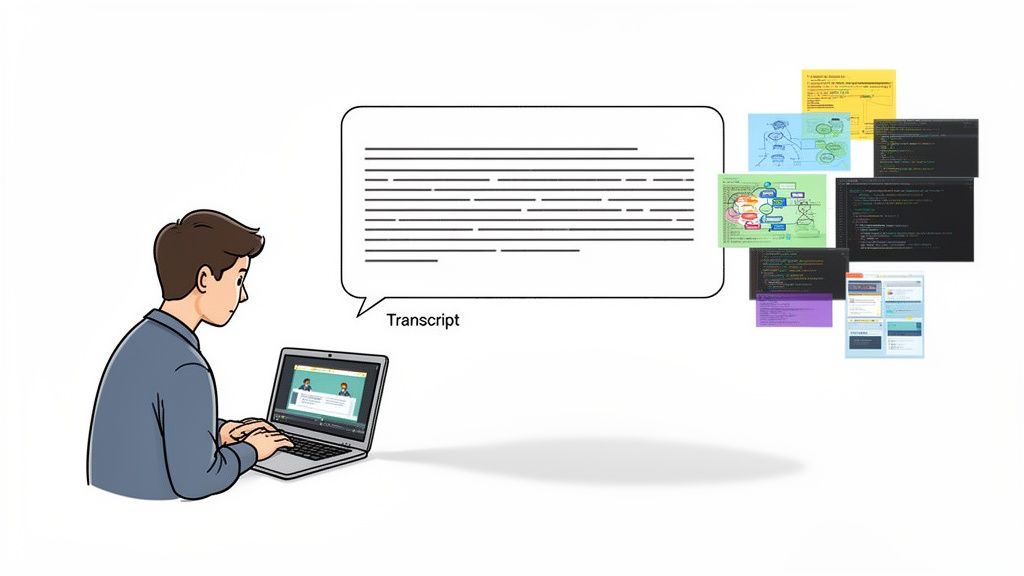
Il problema principale è semplice: imparare dai video è un’esperienza visiva. Una trascrizione non può mostrarti l’architettura di sistema su una slide, la riga di codice precisa che risolve un bug o lo schizzo alla lavagna che spiega un concetto chiave. Se ti affidi solo al testo, perdi tutto quel contesto visivo critico. I tuoi appunti diventano incompleti, rendendoli molto meno utili quando li rivedi.
Prendere appunti manualmente mentre guardi è anche noioso. Continui a mettere in pausa e riprodurre, e gli screenshot sparsi finiscono per essere scollegati dai tuoi appunti. Questo è esattamente il punto dolente che spinge le persone a cercare uno strumento migliore.
Per studenti e autodidatti emergono alcune frustrazioni specifiche con gli strumenti generali di riassunto:
Nessun contesto visivo: I tuoi appunti finiscono per essere un muro di testo, completamente scollegato dalle spiegazioni visive. Perdi diagrammi, codice e dimostrazioni sullo schermo.
Supporto limitato alle piattaforme: Molti strumenti sono costruiti solo per YouTube. Ma che dire dei tuoi corsi su Coursera o Udemy, delle lezioni universitarie private o persino di un file video locale sul tuo computer?
Nessuna proprietà dei dati: I tuoi appunti spesso rimangono intrappolati su server di terze parti. Per chi usa una base di conoscenze personale come Obsidian, questo è inaccettabile. Hai bisogno che i tuoi appunti siano file semplici, sul tuo dispositivo. L’archiviazione local-first significa che possiedi la tua conoscenza per sempre.
Queste lacune evidenziano la differenza tra riassumere contenuti e costruire realmente una base di conoscenza permanente. Per approfondire, consulta la nostra guida sull’efficace apprendimento video.
Per chiarire meglio, la tabella qui sotto mostra le differenze fondamentali.
#NoteGPT vs. Strumenti dedicati all’apprendimento: un confronto rapido
Caratteristica
NoteGPT (Riassunto generale)
Alternativa dedicata all’apprendimento
Output principale
Riassunto e trascrizione testuale.
Appunti strutturati con testo e screenshot con timestamp incorporati.
Supporto piattaforme
Spesso limitato a YouTube.
Funziona su qualsiasi piattaforma video (Udemy, Coursera, file locali).
Proprietà dei dati
Appunti salvati su server cloud del provider.
Appunti salvati localmente come file Markdown (.md). Li possiedi tu.
Cattura visiva
Perde diagrammi, codice e demo sullo schermo.
Cattura elementi visivi con screenshot e ritagli specifici.
Focus sul flusso di lavoro
Consumo rapido e riassunto.
Ritenzione a lungo termine e costruzione base conoscenza personale.
Come vedi, gli obiettivi sono fondamentalmente diversi. Uno serve per consumo rapido; l’altro per conoscenza duratura.
#Comprendere il panorama delle app AI per prendere appunti
Il mercato delle app AI per appunti sembra affollato, ma ecco il punto chiave: non tutti gli strumenti sono fatti per lo stesso compito. Quando cerchi un’alternativa a NoteGPT, capire questo può evitarti molte frustrazioni.
Molte app popolari sono focalizzate su un solo compito. Strumenti come Otter.ai e Fireflies.ai sono eccezionali per trascrivere riunioni di lavoro. Identificano i diversi parlanti e producono un testo pulito. Ma è il loro mondo. Provali su un tutorial di coding o una lezione universitaria e noterai subito il problema. Una semplice trascrizione audio perde gli elementi visivi essenziali.
Questa è la linea di confine tra un trascrittore di riunioni e un vero strumento di apprendimento.
#Cloud-first vs. Local-first nella proprietà dei dati
Un'altra divisione critica riguarda dove risiedono i tuoi dati. La maggior parte degli strumenti AI è basata sul cloud. I tuoi appunti e dati personali sono memorizzati sui server dell’azienda. È comodo, ma un campanello d’allarme per chi studia seriamente o tiene alla privacy e al possesso dei dati.
Gli strumenti local-first sono diversi. Salvano i file direttamente sul tuo dispositivo. Se usi Obsidian o Logseq, questo è imprescindibile. Significa che i tuoi appunti sono semplici file Markdown (.md) in una cartella sotto il tuo controllo. Li possiedi, sono privati e saranno leggibili per sempre, con o senza internet. Consulta la nostra guida dettagliata per trovare la migliore app AI per appunti che segue questo modello.
Lo spazio delle app AI per prendere appunti è competitivo, con giganti come Otter.ai e persino Microsoft OneNote in gioco. NoteGPT, pur avendo traffico robusto con 7,3 milioni di visite mensili, è molto più piccolo rispetto ai leader di categoria come TurboScribe.ai che ne conta 18,6 milioni. Questo indica un mercato frammentato dove gli strumenti specializzati possono prosperare.
Puoi anche guardare piattaforme come Google NotebookLM, che offrono modi unici di organizzare la conoscenza.
Questa specializzazione è un’ottima notizia per chi impara. Significa che puoi trovare uno strumento creato appositamente per il tuo flusso di lavoro specifico — sia che trascriva riunioni, riassuma articoli o catturi sia informazioni visive sia parlate da qualsiasi piattaforma video. La chiave è abbinare lo strumento al compito.
#Tre funzionalità che ogni studente serio di video deve avere
Quando passi dalla visione casuale all’uso del video per un vero apprendimento, le tue esigenze cambiano. Un semplice riassunto non basta. Invece, tre funzionalità specifiche diventano essenziali per costruire una base di conoscenza duratura.
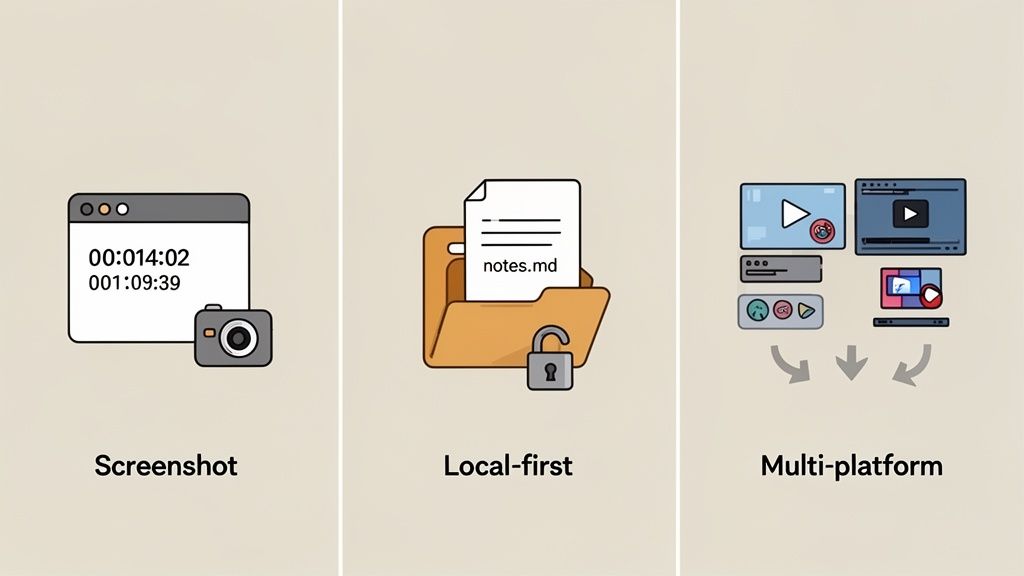
Qualsiasi vera alternativa a NoteGPT progettata per studenti dedicati deve garantire questi tre punti.
Questo trio — cattura visiva, proprietà locale e flessibilità di piattaforma — è ciò che distingue uno strumento base da un vero ambiente di apprendimento.
Imparare da video tecnici è un gioco visivo. La trascrizione ti dice cosa ha detto l’insegnante, ma non può mostrarti il diagramma sulla lavagna o la riga di codice specifica evidenziata.
Gli strumenti basati solo sulla trascrizione mancano il punto. La capacità di catturare il contesto visivo non è solo un plus, è fondamentale. Un buon strumento deve vedere ciò che vedi tu.
Screenshot con timestamp: Ogni screenshot dovrebbe essere un segnalibro. Cliccaci sopra e torni subito a quel momento esatto del video. Niente più scorrimento lungo la timeline.
Ritagli con zona specifica: Non sempre serve l’intero schermo. Poter ritagliare solo il blocco di codice o la formula rilevante e inserirlo direttamente negli appunti fa risparmiare molto tempo.
Visuali incorporate: Gli screenshot non devono stare in cartelle separate. Devono vivere dentro i tuoi appunti, accanto al testo che li spiega, per un contesto immediato durante la revisione.
Senza questo, i tuoi appunti sono uno script incompleto. Con esso, diventano un documento ricco e multimediale da cui puoi realmente imparare.
Molti strumenti online tengono i tuoi appunti in ostaggio sui loro server. Il tuo accesso dipende dal fatto che l’azienda resti in piedi e tu continui a pagare. Per chi studia seriamente, specialmente nella comunità della Gestione Personale della Conoscenza (PKM), questo è inaccettabile.
Tu possiedi i file. Li sposti, li salvi, li cerchi: sono solo Markdown. Questo principio è basilare per chi costruisce una base di conoscenza destinata a durare una vita.
L’archiviazione local-first è la soluzione. Significa che i tuoi appunti sono salvati direttamente sul computer come file di testo semplice, solitamente in formato Markdown (.md). Questo approccio è la base per utenti di app come Obsidian o Logseq.
Garantisce alcune cose:
Possiedi i tuoi dati: Gli appunti sono tuoi. Per sempre.
Privacy garantita: I tuoi appunti non lasciano mai la tua macchina, a meno che tu non voglia.
Accesso offline: La tua base di conoscenza è sempre disponibile, con o senza internet.
Non è solo un dettaglio tecnico, ma una posizione filosofica su chi deve controllare la conoscenza.
L’apprendimento non avviene solo su YouTube. Succede su Coursera, Udemy, LinkedIn Learning, portali universitari e siti di formazione aziendali interni. A volte, è un file video sul tuo disco rigido. Uno strumento che funziona solo su una piattaforma crea fastidiose lacune nel tuo flusso di lavoro.
Un vero compagno d’apprendimento deve essere agnostico rispetto alla piattaforma. Deve funzionare ovunque ci sia un video. Questa flessibilità ti permette di costruire un’abitudine uniforme di presa appunti su tutti i materiali di studio. Puoi approfondire questo flusso di lavoro nella nostra guida su come prendere migliori appunti video AI.
Chi studia bene conosce l'importanza della marcatura temporale nei video YouTube per navigare rapidamente — una funzionalità che un ottimo strumento dovrebbe estendere a qualsiasi piattaforma di apprendimento.
#Presentiamo HoverNotes: uno strumento di apprendimento costruito su misura
HoverNotes è un’estensione Chrome che guarda i video insieme a te, genera appunti AI e li salva come Markdown direttamente nel tuo file system. È stata progettata da zero per essere un partner dedicato all’apprendimento.
Funziona come potente alternativa a NoteGPT ripensando il modo in cui interagisci con il materiale educativo. Invece di estrarre solo testo, HoverNotes analizza il video fotogramma per fotogramma per capire cosa c’è sullo schermo. Questa è la differenza cruciale: HoverNotes cattura diagrammi, frammenti di codice e formule che gli strumenti solo con trascrizione ignorano.
La differenza centrale è nell’approccio. HoverNotes si basa su un principio semplice: per un vero apprendimento, il contesto visivo è imprescindibile. Cattura non solo ciò che viene detto, ma ciò che viene mostrato.
Screenshot con timestamp: Ogni screenshot che scatti è automaticamente collegato al momento esatto nel video. Un clic sull’immagine negli appunti ti riporta subito a quel punto.
Cattura ritagli: A volte non serve l’intero fotogramma. Lo strumento "Snip" ti permette di selezionare e catturare solo il diagramma o la riga di codice necessaria, inserendola ordinatamente nei tuoi appunti.
Visual incorporati: Dimentica cartelle di screenshot sparsi. HoverNotes incorpora queste immagini direttamente nei tuoi appunti, accanto al testo pertinente, fornendo contesto immediato.
Diversamente dagli strumenti che analizzano solo trascrizioni, HoverNotes "guarda" il video per catturare ciò che appare sullo schermo. Questo gli permette di creare appunti ricchi e utili invece di un semplice file di testo piatto.
#Creato per il tuo flusso di lavoro, non per il loro
HoverNotes è costruito per darti il controllo sulla tua conoscenza. È progettato con una filosofia local-first, che significa che i tuoi appunti vengono salvati direttamente sul computer come semplici file Markdown (.md). Questo è un cambiamento radicale per chi usa Obsidian, Logseq o qualsiasi altro sistema PKM. Gli appunti si salvano come file .md direttamente nella tua cassaforte Obsidian, senza formati proprietari. I tuoi appunti sono tuoi.
È anche progettato per aiutarti a concentrarti. La modalità video senza distrazioni dispone il video e i tuoi appunti affiancati, bloccando annunci e suggerimenti video per massimizzare la concentrazione. Puoi saperne di più su come HoverNotes funziona sul sito ufficiale.
#Come scegliere lo strumento giusto per il tuo flusso di lavoro
Non esiste uno strumento "migliore" unico per prendere appunti video. La scelta dipende da cosa vuoi ottenere.
Se ti serve solo un riassunto veloce di un clip di notizie, uno strumento come NoteGPT è una scelta rapida ed efficace. Prende la trascrizione, ti dà l’idea principale e vai avanti. Per trascrivere una riunione di lavoro, un servizio dedicato come Otter.ai è uno standard del settore per un motivo.
Ma se il tuo obiettivo è un apprendimento profondo e una memorizzazione a lungo termine, le tue esigenze sono completamente diverse. Qui una vera alternativa a NoteGPT costruita per un apprendimento attivo diventa essenziale.
Il tuo caso d’uso principale dovrebbe guidare la decisione. Vuoi consumare contenuti rapidamente o costruire una base di conoscenza permanente su cui contare per anni?
Per riassunti rapidi: NoteGPT è costruito proprio per questo.
Per trascrizione riunioni: Guarda strumenti specializzati come Otter.ai o Fireflies.ai.
Per apprendimento approfondito da video: Non si tratta solo di uno strumento diverso; è un flusso di lavoro differente.
Se sei uno studente che segue un modulo Coursera, uno sviluppatore che segue un tutorial di coding o un utente Obsidian che costruisce una seconda mente, ti serve molto più che solo testo. Il tuo flusso di lavoro richiede di catturare il contesto visivo, possedere i dati e lavorare su ogni piattaforma.
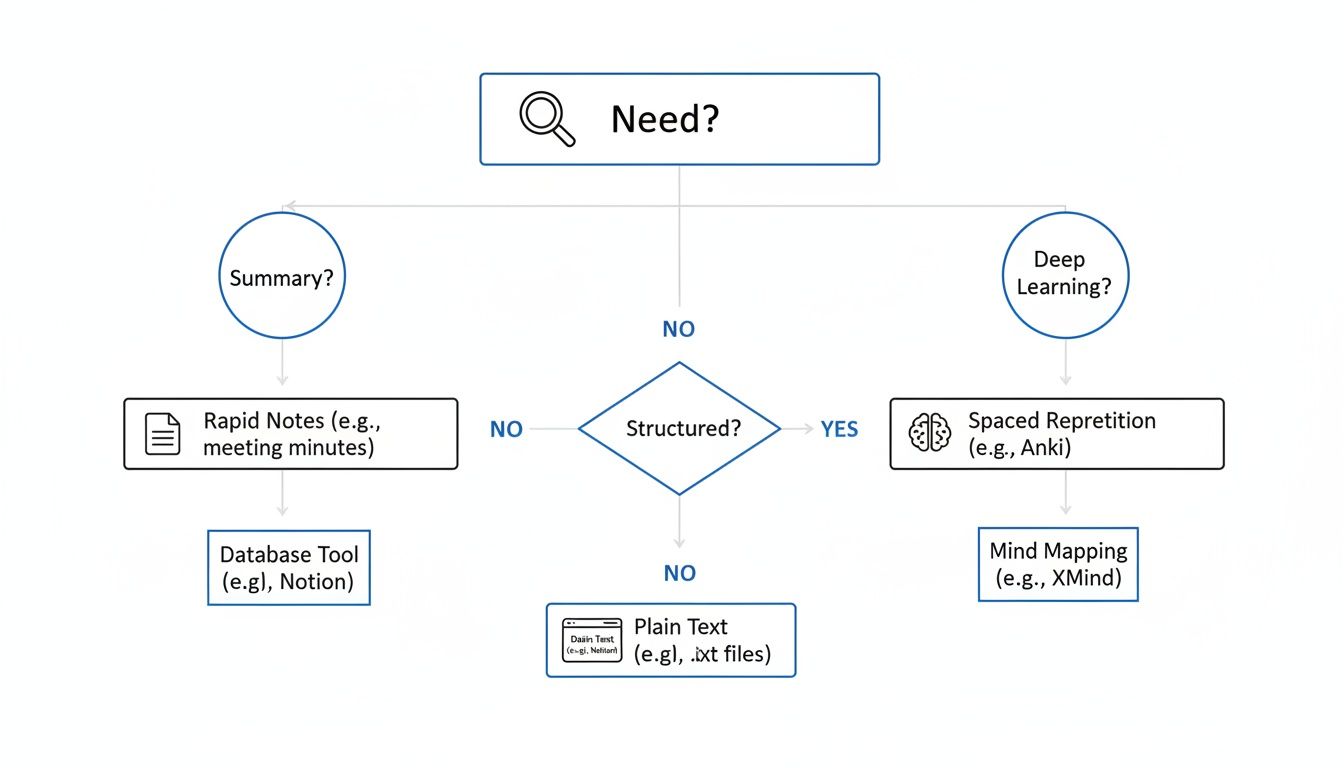
Questo albero decisionale visualizza questa scelta.
L'intuizione chiave è semplice: il tuo obiettivo determina le funzionalità che ti servono, che ti indirizzano verso lo strumento giusto.
Uno strumento come HoverNotes è progettato specificamente per quel percorso di "apprendimento profondo". È fatto per lo studente che vuole catturare un diagramma del professore o il programmatore che deve salvare la funzione esatta mostrata a video. Poiché salva gli appunti come file Markdown locali, si integra perfettamente in un flusso Obsidian dove la proprietà dei dati è imprescindibile. La nostra guida completa per trovare la giusta app per appunti video approfondisce questo tema.
Se usi Obsidian per studiare, HoverNotes salva gli appunti direttamente nella tua cassaforte. Solo la funzione di screenshot con timestamp ti fa risparmiare ore di ri-visualizzazioni.
Passare a uno strumento nuovo non dovrebbe essere un progetto complicato. Passare a una alternativa a NoteGPT dedicata come HoverNotes è pensato per inserirsi nelle tue abitudini esistenti senza fatica.
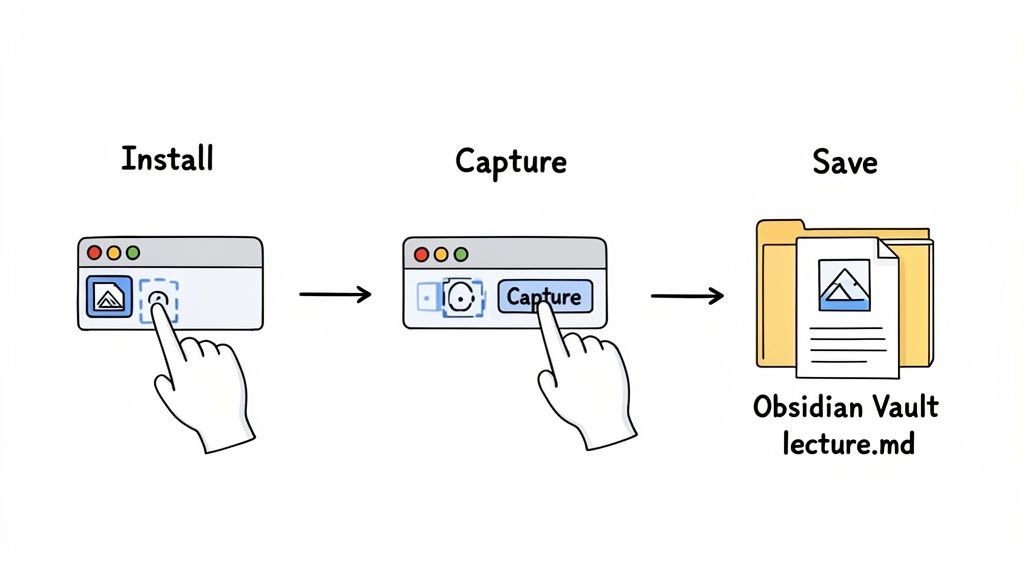
Iniziare richiede un paio di minuti. Installi l’estensione Chrome, apri un video e cominci a prendere appunti. Niente configurazioni complesse.
Puoi provare HoverNotes gratuitamente e ottenere 20 minuti di crediti AI solo per l’iscrizione, senza bisogno di carta di credito. È sufficiente per testare una lezione intera e vedere la differenza. Verifica le opzioni attuali sulla pagina prezzi HoverNotes.
Uno strumento vale solo quanto la sua capacità di funzionare dove tu lavori.
Per gli utenti Obsidian: L’integrazione è perfetta. Dici a HoverNotes di salvare i tuoi appunti come semplici file .md direttamente nella tua cassaforte Obsidian. Questo approccio local-first significa che possiedi i dati, e ogni appunto — completo di screenshot incorporati — appare subito nella tua base di conoscenza.
Per gli utenti Notion: Il processo è altrettanto semplice. Dopo aver preso appunti, puoi selezionare tutto, copiare e incollarlo direttamente in una pagina Notion. Tutta la formattazione, come titoli, elenchi puntati e immagini, si trasferisce senza problemi.
L’idea è eliminare ogni attrito. Sia che tu stia costruendo una seconda mente local-first in Obsidian sia che organizzi i progetti in Notion, i tuoi appunti video devono fluire nel sistema senza passaggi extra.
Questa integrazione diretta significa che passi meno tempo a lottare con gli strumenti e più tempo a imparare.
Quando cerchi lo strumento giusto per sostituire NoteGPT, alcune domande tornano sempre. Ecco risposte sincere.
#Esiste una buona alternativa gratuita a NoteGPT per studenti?
Sì. Mentre molti strumenti sono pensati per professionisti, alcuni sono progettati con gli studenti in mente.
HoverNotes offre un accesso davvero utile a livello base. Hai appunti manuali illimitati, screenshot con timestamp infiniti e una modalità video senza distrazioni. Inoltre, ricevi 20 minuti di crediti AI gratuiti all’iscrizione, per testare le funzioni AI su qualche lezione senza costi. Non vuoi usare l’AI? Usa semplicemente l’editor, gli screenshot e i controlli video: sono gratuiti. Verifica le opzioni aggiornate sulla pagina prezzi HoverNotes.
#Posso usare questi strumenti su più piattaforme oltre YouTube?
Questa è una delle ragioni principali che spingono a cercare un’alternativa. Il vero apprendimento non avviene solo su YouTube.
Gli strumenti giusti funzionano ovunque ci sia un video. Quindi su piattaforme come Udemy, Coursera e LinkedIn Learning, ma anche sul portale universitario o con file video locali aperti nel browser. Funziona ovunque ci sia un video.
Lo scopo è costruire un’abitudine di presa appunti unica e coerente che funzioni ovunque. Se il tuo strumento è limitato a una piattaforma, il tuo sistema di apprendimento sarà sempre frammentato.
#Come gestiscono elementi visivi come frammenti di codice o diagrammi?
Qui si vede la vera differenza. NoteGPT si basa sulle trascrizioni, quindi è solo testo. "Ascolta" il video, ma non lo vede.
Le migliori alternative, come HoverNotes, usano AI multimodale. "Guardano" il video insieme a te. Questo gli permette di catturare e incorporare intelligenti screenshot con timestamp di contesti visivi cruciali — come diagrammi complessi o slide chiave — direttamente negli appunti. Puoi anche ritagliare solo il frammento di codice o il diagramma necessario.
#Cos’è “local-first” e perché dovrebbe interessarmi?
Local-first significa che i tuoi appunti vengono salvati direttamente sul tuo computer, non su server cloud di una società. Per chi vuole davvero costruire una base di conoscenza a lungo termine con strumenti come Obsidian questa è una condizione imprescindibile.
Garantisce tre cose:
Possiedi la tua conoscenza. Nessuno può portartela via.
I tuoi appunti sono completamente privati.
Funzionano offline e sono salvati in un formato a prova di futuro come Markdown (.md).
Anche se non usi mai l’AI, la modalità di concentrazione senza distrazioni e la cattura screenshot con un clic valgono la pena per chi studia seriamente. Se stai costruendo una base di conoscenza personale da ciò che guardi, HoverNotes è fatto apposta per questo.
Cerchi un'alternativa a Fireflies AI per studenti? Scopri perché gli strumenti per meeting non bastano per i corsi video e trova un assistente AI per prendere appunti pensato per l'apprendimento.
Cerchi un'alternativa a fathom ai per studenti? Scopri strumenti di apprendimento video che catturano note visive, non solo trascrizioni, per YouTube e Coursera.