Fireflies Alternative for Online Courses: A Student's Guide | HoverNotes Blog | HoverNotes
General2026年1月18日
Fireflies Alternative for Online Courses: A Student's Guide
Searching for a Fireflies AI alternative for students? Discover why meeting tools fall short for video courses and find an AI notetaker built for learning.
著者 HoverNotes Team•14 分で読める
TL;DR: Fireflies.ai is built for transcribing audio from business meetings. For online courses, you need a tool that also captures visual information like slides, code, and diagrams. A video-first tool like HoverNotes watches the video with you, captures timestamped screenshots, and saves notes as local Markdown files, making it a better fit for students.
If you’ve tried using a meeting tool like Fireflies.ai for your online courses, it probably felt like something was missing. You're right. Fireflies is great for what it does—transcribing audio from meetings—but learning from video isn't an audio-only task.
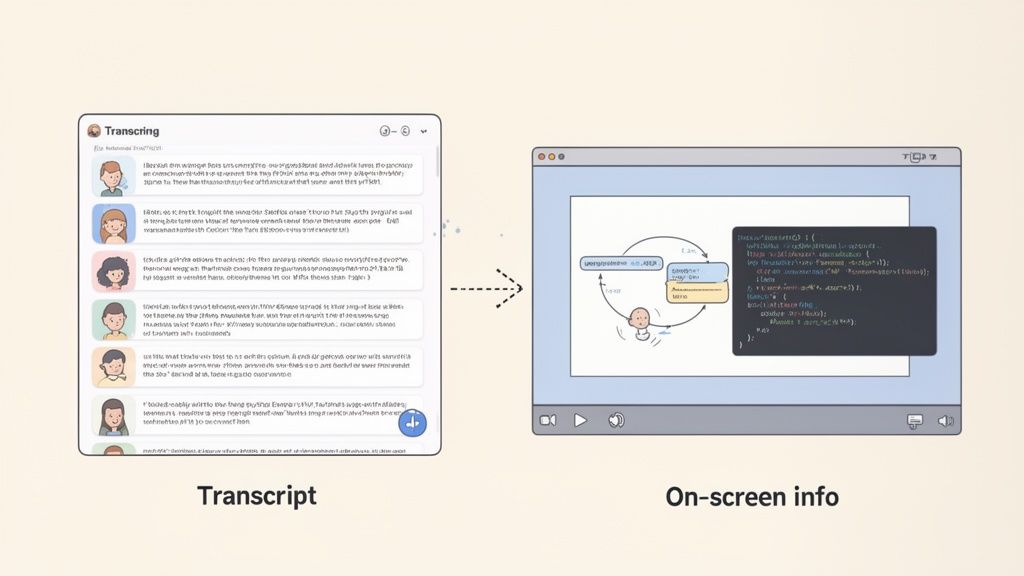
Real learning from platforms like Coursera, Udemy, or YouTube tutorials requires capturing visual context. Meeting tools hear what's said but miss what's shown. You get a transcript of the lecture but none of the actual slides, code, or diagrams.
This screenshot shows exactly what a simple audio transcript can't capture. The value for students is linking the spoken words directly to the formulas or code being explained on screen. Constantly pausing to take notes or grabbing scattered screenshots is tedious and breaks your focus.
The core problem is a mismatch of purpose. Fireflies is designed to create summaries and action items from spoken conversations in a business setting. The dialogue is the main event.
Students face a different challenge. You're watching a video, but research shows most people don't remember what they watch. The key to better retention is active note-taking, but manual note-taking during a video is a pain. This is where AI can help, but it has to be the right kind of AI. You can read more on how to transcript a YouTube video for better retention.
#Meeting Tools vs. Learning Tools: What's the Difference?
Meeting transcribers are built to capture one thing: audio. To do that well, they need clear sound, which is why people focus on techniques to reduce background noise. This focus on audio is exactly why they are a poor fit for visually dense educational content.
Learning tools need to be multimodal. They have to process both audio and video to create useful notes. They need to see the professor’s slides, capture the coder’s screen, and save the diagram being drawn.
This reframes your search. You don't need a better meeting tool. You need a Fireflies alternative for online courses—one designed for how students actually learn.
#Meeting Transcribers vs. Video Learning Tools At a Glance
These tools are built for different jobs. One is for tracking conversations, the other is for building knowledge. This table breaks down the differences.
Core Function
Meeting Tools (e.g., Fireflies.ai)
Video Learning Tools (e.g., HoverNotes)
Primary Input
Audio stream from calls and meetings
Video stream from any website or local file
Key Output
Text transcript, speaker labels, summaries
Structured notes with embedded, timestamped screenshots
Context Captured
What was said
What was saidandwhat was shown on screen
Best For
Business meetings, sales calls, team syncs
Online courses, coding tutorials, lecture reviews
Choosing the right tool isn't about which is "better," but which is built for the job. For students navigating video lectures, the choice is clear.
#The Critical Difference: Visual Context vs. Audio Transcription
The biggest reason a meeting tool like Fireflies.ai feels wrong for studying is simple: it only hears, it doesn't see. For a business call, an audio transcript is often enough. For learning, it’s a deal-breaker.
Imagine you're watching a coding tutorial. The instructor says, "Now, change this variable to isActive," but that variable name is never spoken aloud again. An audio transcriber misses it. Your notes now have a hole, and you're stuck scrubbing through the video to find that one crucial detail.
This isn’t just a coding problem. It happens in almost every subject.
Think about the content you learn from—lectures, tutorials, online courses. It’s a mix of spoken words and on-screen visuals. Relying only on audio means you're throwing away half the lesson.
Diagrams and Charts: A biology professor points to a diagram of the Krebs cycle. The transcript captures their words, but without the visual, the context is gone.
Mathematical Formulas: An engineering lecture where the professor works through an equation on a whiteboard. The audio might say "and we carry the two," but the actual formula is never verbalized.
Software Demonstrations: A design course walking through Figma. The instructor clicks through menus, often without saying every action out loud.
In every case, the transcript is an outline of the lesson, not the lesson itself. This is where a true Fireflies ai alternative for students needs to be different. Our guide to AI video notes explains why a video-first approach is critical for retention.
Instead of just listening, a video-first tool watches the video with you. This is a fundamental shift. It analyzes the visual frames in sync with the audio, just like a person would, to build a complete picture.
This is how HoverNotes works. HoverNotes is a Chrome extension that watches videos with you, generates AI notes, and saves them as Markdown directly to your file system. It connects what's said with what's shown.
Unlike tools that only parse transcripts, HoverNotes watches the video to capture what's actually on screen. This creates a single study resource that links spoken explanations with their visual counterparts.
The result is a set of notes that makes sense on its own. You get the professor's explanation paired with a timestamped screenshot of the exact slide. You can click that screenshot to jump back to that precise moment in the video. You can also use a snip capture tool to grab just the relevant code block or formula and embed it directly into your notes.
This ends the cycle of scattered screenshots on your desktop and a separate, disconnected text file. Your notes become a single, reliable source of truth.
When you're looking for a Fireflies.ai alternative as a student, your needs are different from a business team's. You're building a personal knowledge base that lasts. Here’s how to pick a tool that helps you learn.
It comes down to asking the right questions before you commit. A tool might look good, but if it doesn't fit your study habits, it just creates more work.
Your learning happens everywhere. One day it’s a YouTube tutorial, the next it's a lecture on your university’s custom portal. A student notetaker has to work on all of them.
Check the major platforms: Does it work on YouTube, Coursera, and Udemy?
Test it on your real-world sites: Can it handle your university’s lecture player? What about a local video file? Many tools are limited to a few popular websites.
Flexibility means it works wherever video plays. HoverNotes is a Chrome extension designed to work on any website with video, including local files. It adapts to your needs.
Learning from video is visual. A transcript alone is like getting the script to a movie without seeing the film. The best AI notetaker for students needs to see what you see.
The most important feature is the ability to capture timestamped screenshots inside your notes. Clicking a screenshot of a key diagram to instantly jump back to that moment in a two-hour lecture saves a huge amount of time.
Look for tools that also let you snip specific regions of the video. This way, you can grab just the essential code block or formula, keeping your notes clean and focused.
What happens to your notes after you've taken them? A great tool should fit into your existing system. For serious students, especially those using Obsidian or Logseq, this means one thing: Markdown.
Many students prefer local-first tools for privacy. You don't want your knowledge locked away in a proprietary cloud format. Your notes should be yours, saved as plain text files on your machine. This local-first approach means you own your knowledge forever. Notes should also copy and paste cleanly into tools like Notion or Google Docs with formatting intact.
Finally, the tool should be built for deep focus. Online learning platforms are full of distractions. You can learn more about what makes a great tool in our guide to the best AI note taker app.
A distraction-free mode that isolates the video and your notes is a must. For a good benchmark of what’s possible, check out things like Medial V9's AI-powered features for captions, search, and quizzes, which show how modern tools can support active learning. Ultimately, the right tool should block the noise so you can focus.
#Comparing Fireflies vs HoverNotes for Student Workflows
Let’s see how these tools perform when you’re studying for an exam or following a tutorial. The difference between a business meeting tool and a learning tool becomes obvious when you apply them to student tasks.
The search for a Fireflies.ai alternative is driven by the fact that online learning requires active engagement. Without it, students retain very little of what they watch. A purpose-built video note taking app can make a huge difference.
Let's compare Fireflies and HoverNotes on the features that matter for learning from video.
Feature
Fireflies.ai
HoverNotes
Primary Input
Audio-only
Audio & Video
Visual Capture
❌ No
✅ Yes (Screenshots, Snips)
Timestamped Screenshots
❌ No
✅ Yes, with one-click video navigation
Selective Capture
❌ No (transcribes everything)
✅ Yes (Snip code, diagrams, slides)
Local-First Storage
❌ No (cloud-based)
✅ Yes (saves directly to your local files)
Multilingual Notes
Transcribes original language
Translates and notes in your chosen language
Obsidian/Markdown Support
Limited export options
✅ Yes (native, seamless integration)
Best For...
Documenting meeting conversations
Retaining knowledge from educational videos
This table makes the distinction clear. Fireflies is designed to record what was said, while HoverNotes is built to help you understand and retain what was taught by capturing both audio and visuals.
#Scenario 1: Reviewing a 2-Hour Lecture for an Exam
You need to find key concepts from a long, recorded lecture.
With Fireflies.ai: You get a huge wall of text. It’s searchable, but you can't find the moment the professor explained a critical diagram on a slide without a lot of guesswork.
With HoverNotes: You get structured notes. Key slides and diagrams are captured as timestamped screenshots. To review a diagram, you find it in your notes and click the image to jump straight to that moment in the video.
#Scenario 2: Following a Fast-Paced Coding Tutorial
You're learning Python from a YouTube video and trying to keep up.
With Fireflies.ai: The tool is useless here. It only transcribes the audio, ignoring the code on-screen. Your notes will say "now we'll create a function," but the code itself is missing.
With HoverNotes: You use the Snip capture feature to grab just the code block directly from the video. That screenshot is inserted into your notes with a clickable timestamp. No more manual re-typing and no more pausing every five seconds.
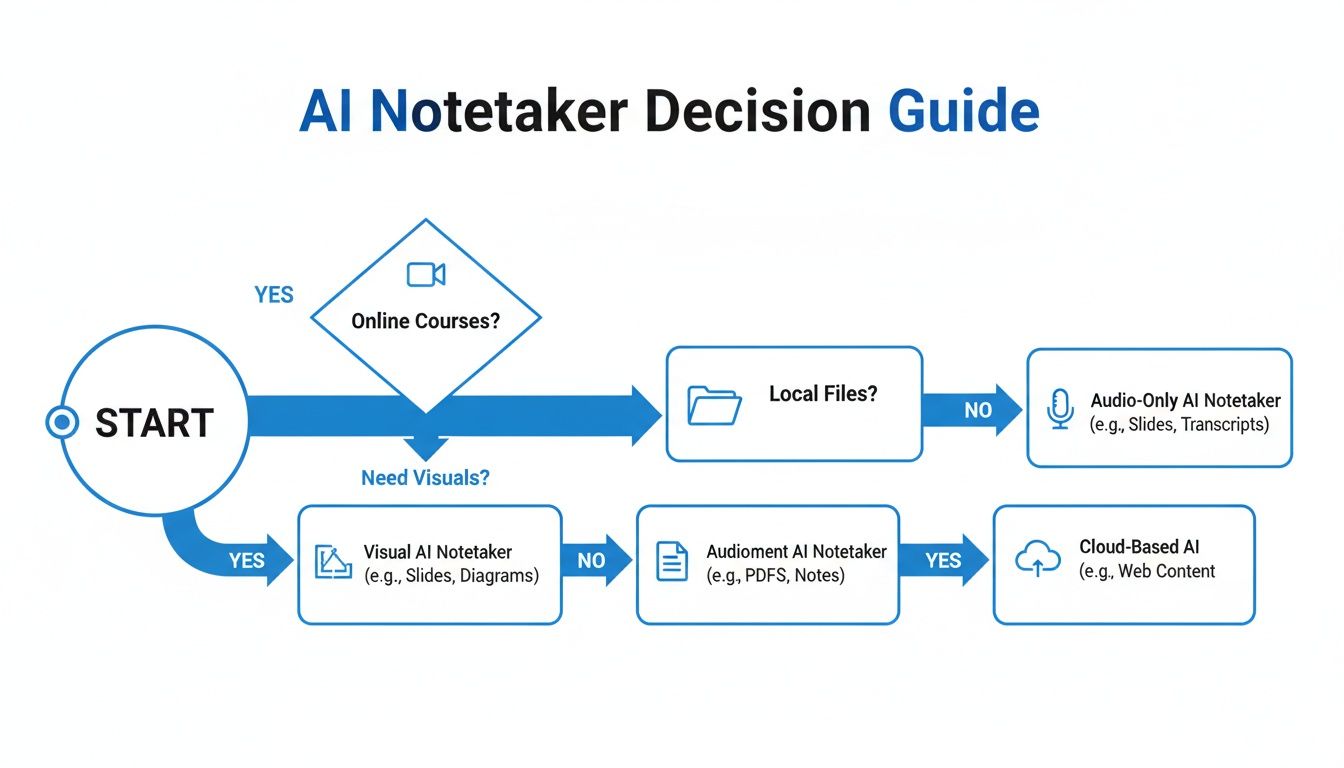
This decision tree helps visualize how to pick the right AI notetaker.
If your learning depends on on-screen visuals and you value privacy with local files, a specialized video learning tool is the clear path.
#Scenario 3: Learning a Language from Foreign Content
You're learning Japanese by watching tutorials spoken in Japanese. Your goal is to get study notes in English.
With Fireflies.ai: It will transcribe the Japanese audio into Japanese text. This isn't much help for a beginner who needs translation.
With HoverNotes: It offers multi-language AI notes. You can watch a video in Japanese and tell the AI to generate your notes in English. It processes both the audio and visuals, then gives you a summary and key points in your native language.
Fireflies documents what was said in a meeting. A student-focused tool like HoverNotes helps you understand and retain what was taught in a video, capturing both audio and visual information.
This is about picking the right tool for the job. If your day is filled with business meetings on Zoom or Google Meet, and you just need transcripts, Fireflies.ai is an excellent choice. It’s built for that and does it well.
But if you're a student trying to retain information from video, using a meeting tool is the wrong approach.
Your goal isn't to get a transcript; it's to build a useful knowledge base from visually rich material. The best Fireflies AI alternative for students won’t just listen to a video—it will watch it.
A video-centric tool captures diagrams and code. It includes features built for studying, like clickable screenshots and a distraction-free mode.
For students, the most important question is: Does this tool help me understand and remember the material better? A simple audio transcript rarely does.
Your notes are only as good as their accessibility. For many learners, especially those using Obsidian or Logseq, that means owning your data. You want your notes saved as clean Markdown files on your own machine, not locked in a proprietary cloud service.
A local-first approach is a non-negotiable feature. Our article on local-first notes explains why this is so important for building a lasting knowledge base. Tools like HoverNotes are designed for this, saving your notes as .md files directly into your Obsidian vault.
If you use video for learning, a video-centric tool is a much better fit. You can try HoverNotes for free—the distraction-free mode and timestamped screenshots are always free, and you get 20 minutes of AI credits to test the full experience, no credit card required.
You can, but it’s the wrong tool for the job. Fireflies.ai is built for meeting audio. It will transcribe the spoken words but will be blind to everything on the screen—slides, code, diagrams. A tool designed for video captures both audio and visuals, giving you a complete picture for studying.
#What’s the Best Fireflies Alternative for an Obsidian User?
If you’re an Obsidian user, you need a tool that saves notes as .md files directly to your machine. This is exactly what HoverNotes was built for. It saves notes directly to your file system, ready to be integrated into your Obsidian vault. It’s a local-first approach, so you own your notes.
You own the files. Move them, back them up, grep them—they're just Markdown. This is a fundamental difference from cloud-based services.
#Is There a Free Fireflies Alternative for Video Notes?
Yes. While Fireflies has a free tier for meetings, a video-centric tool like HoverNotes offers a free plan that's more relevant for students. The core manual note-taking features are free and powerful.
Here’s what you get for free, forever:
Distraction-Free Video Mode: Hides YouTube ads and recommended videos, letting you focus with your notes beside the lecture.
Unlimited Timestamped Screenshots: Grab as many visual cues as you need. Every screenshot is a clickable link back to that moment in the video.
You also get 20 free minutes of AI credits for signing up to try automated note generation. No credit card is needed.
If you're an Obsidian user building a knowledge base from your courses, HoverNotes saves notes as clean Markdown files directly to your local vault. You can try it free — the distraction-free mode and timestamped screenshots are always free, and you get 20 minutes of AI credits to test the full experience.
A practical guide on how to take notes on videos from YouTube, Udemy, or any platform. Learn a better workflow to improve retention and stop forgetting.