Ritenzione dell'apprendimento video: perché dimentichi ciò che guardi
Scopri la scienza cognitiva dietro il motivo per cui dimentichi la maggior parte dei contenuti video educativi e come una presa di appunti attiva e strategica può trasformare la tua memorizzazione.
Di HoverNotes Team•15 min di lettura
Passi un paio d’ore a guardare video educativi, sentendoti produttivo, solo per renderti conto il giorno dopo che riesci a malapena a ricordare i punti chiave. Non è un difetto personale; è una trappola cognitiva comune. Il contenuto video è così curato e facile da fruire che il nostro cervello scambia questa facilità per reale apprendimento, creando quella che si chiama illusione di fluidità.
#La curva dell’oblio nell’apprendimento tramite video
Quel rapido decadimento della conoscenza dopo aver visto un video non è solo nella tua mente. Segue uno schema prevedibile chiamato curva dell’oblio di Ebbinghaus, che mostra quanto velocemente i nostri ricordi svaniscono senza un rinforzo attivo.
Porre domande, riassumere, prendere appunti, fare quiz
Processo Cognitivo
Elaborazione superficiale, leggera
Elaborazione profonda, creazione di connessioni, sintesi
Risultato nella memorizzazione
Basso, rapido oblio
Alto, conoscenza duratura
La tabella lo chiarisce: la visione passiva è una ricetta per dimenticare. Fallisce per alcune ragioni chiave:
Basso coinvolgimento cognitivo: Ascoltare e guardare semplicemente non obbliga il cervello a lavorare duramente per elaborare, riassumere o collegare nuove idee a ciò che già sai.
Mancanza di struttura: A differenza di un libro di testo con capitoli e riassunti, il video è un flusso continuo di informazioni. Senza prendere appunti, è quasi impossibile strutturare quel contenuto per una rapida revisione successiva.
Illusione di comprensione: La presentazione fluida e la narrazione chiara ti fanno sentire come se avessi padroneggiato l’argomento. Questa sensazione è spesso ingannevole, mascherando una comprensione superficiale che svanisce quasi immediatamente.
Il problema centrale dell’apprendimento video passivo è l’assenza di difficoltà desiderabile—lo sforzo mentale necessario per fissare l’informazione nella memoria a lungo termine.
Cercare di risolvere questo manualmente è faticoso. Devi continuare a mettere in pausa per scrivere appunti, fare screenshot goffi o tentare di imparare da una semplice trascrizione. Se hai mai provato a imparare solo dal testo, conosci i suoi limiti—ne parliamo più approfonditamente nella nostra guida su come ottenere la trascrizione da un video YouTube. Elementi visivi come diagrammi e codice sullo schermo sono spesso la parte più importante.
La vera sfida non è solo guardare più video; è cambiare come li guardi. Introducendo un coinvolgimento attivo, puoi combattere la curva dell’oblio e trasformare contenuti video effimeri in conoscenza duratura e utile.
#Come il tuo cervello elabora (e cancella) i contenuti video
Ti è mai sembrato che le informazioni di un video entrino da un orecchio ed escano dall’altro? C’è una ragione scientifica. Guardare semplicemente qualcosa non crea i percorsi neurali forti di cui il cervello ha bisogno per la memoria a lungo termine. È come attraversare una foresta una sola volta: il sentiero è flebile e si ricopre subito di erba.
Per fissare un ricordo, il cervello deve lavorare. Gli scienziati cognitivi chiamano questo concetto difficoltà desiderabile. È quel livello giusto di sforzo mentale che forza il cervello a elaborare, collegare e comprendere nuove informazioni. Il problema è che guardare passivamente un video offre quasi zero difficoltà desiderabile.
La natura fluida e coinvolgente del video in realtà gioca contro di te. È così scorrevole che il cervello non deve faticare, quindi non costruisce quei percorsi neurali ben consolidati.
Un altro colpevole è il carico cognitivo. Pensa alla tua memoria di lavoro come la RAM del cervello: ha una capacità piccola e limitata. Se la sovraccarichi, comincia a lasciar cadere informazioni.
I video sono noti per questo. Ti bombardano con un flusso continuo di informazioni audio e visive, saturando facilmente la tua "RAM mentale". Il cervello è così impegnato a tenere il passo con questo flusso che non gli resta banda libera per l’elaborazione profonda necessaria per spostare le informazioni nella memoria a lungo termine.
Il tuo cervello è così occupato a ricevere informazioni che non ha mai la possibilità di elaborarle davvero. Perché l’apprendimento sia duraturo, il cervello deve fare più che osservare; deve partecipare.
Questo sovraccarico cognitivo spiega perché puoi guardare un tutorial di 30 minuti, sentirti di aver capito, e poi un’ora dopo avere difficoltà a ricordare un singolo passaggio specifico. L’informazione è stata presente per un attimo, ma non ha mai fatto il salto critico dalla memoria di lavoro alla conoscenza permanente.
Per risolvere questo, devi passare da osservatore passivo a partecipante attivo. Questo semplice cambiamento costringe il cervello a confrontarsi con il materiale invece di lasciarlo scorrere via. Il modo più diretto per farlo è prendere appunti.
Non qualsiasi appunti, ma appunti attivi:
Riassumere: Metti in pausa e riformula l’idea principale con parole tue. Questo ti obbliga a elaborare ciò che hai appena sentito.
Porre domande: Annota le domande che ti vengono in mente. Questo stimola il pensiero critico.
Collegare: Associa un nuovo concetto a qualcosa che già conosci. Questo costruisce ganci mnemonici più forti.
Questo processo è la base per un apprendimento duraturo. Se studi per un esame, ti servono strategie che creino questo tipo di coinvolgimento. Ne parliamo più a fondo nella nostra guida su come studiare efficacemente per gli esami, ma la conclusione è chiara: il coinvolgimento è imprescindibile se vuoi ricordare ciò che guardi.
#Usare la presa attiva di appunti per battere la curva dell’oblio
Se la visione passiva è il nemico della ritenzione, l’unico modo per vincere è diventare un partecipante attivo. L’arma più efficace contro la curva dell’oblio nell’apprendimento dai video è la presa attiva di appunti.
L’obiettivo non è creare una trascrizione perfetta parola per parola. Il vero beneficio arriva quando forzi il cervello a interagire con ciò che guardi e ascolti. Il semplice atto di riassumere un concetto con parole tue, riformulare una spiegazione o scrivere una domanda ti sposta da osservatore passivo a apprendente attivo. Questo crea la giusta quantità di attrito—difficoltà desiderabile—perché il cervello costruisca ricordi forti e duraturi.
Per quanto suoni bene, la realtà di prendere appunti da un video è goffa. Il flusso di lavoro tradizionale è pieno di fastidi che interrompono continuamente la concentrazione.
Se ci hai provato, conosci bene la routine:
La danza della pausa e riproduzione: Passi più tempo a smanettare coi controlli del video che a pensare al contenuto.
Passare goffamente da un’app all’altra: Passare dal video all’app per appunti è un’esperienza zoppicante che ti fa uscire dallo stato di flusso.
Perdere il contesto visivo: Come catturi un diagramma complesso o una linea di codice importante nei tuoi appunti? Fare screenshot è un fastidio, che quasi sempre finisce in una cartella casuale, scollegato dagli appunti cui si riferiscono.
Tutto questo attrito manuale è il motivo per cui tante persone rinunciano a prendere appunti dai video. Qui strumenti progettati specificamente per questo problema possono fare la differenza.
Un buon flusso di lavoro non rende solo più facile la presa di appunti; la rende più efficace eliminando attività noiose così puoi concentrarti sulla comprensione del materiale.
Per chi usa un sistema di gestione della conoscenza come Obsidian, questo è particolarmente critico. Lo scopo è trasformare le intuizioni da un video in un contenuto conoscitivo duraturo e ricercabile. Quando i tuoi appunti sono salvati come file Markdown (.md) semplici, possiedi la tua conoscenza per sempre. Diventa una parte permanente della tua libreria, non qualcosa bloccato su una piattaforma proprietaria.
Un approccio moderno lascia che un assistente AI gestisca il lavoro pesante. Per esempio, uno strumento come HoverNotes può guardare il video con te, generare un riassunto strutturato e catturare automaticamente screenshot con timestamp di elementi visivi importanti. Questo risolve il problema di pausa-riavvolgi e ti assicura di non perdere mai il contesto visivo cruciale. Puoi persino usarlo per applicare tecniche strutturate come il metodo Cornell ai tuoi appunti video.
#Costruire un flusso di lavoro intelligente per l’apprendimento video
Passiamo dalla teoria alla pratica. L’obiettivo è costruire un flusso di lavoro ripetibile che elimini l’attrito della presa manuale di appunti. Un sistema intelligente dovrebbe gestire le parti noiose, lasciando al cervello spazio per concentrarsi sulla comprensione.
Invece di lottare continuamente col tasto pausa, immagina uno strumento che lavori al tuo fianco. HoverNotes è un’estensione Chrome che guarda i video con te, genera appunti AI e li salva come Markdown direttamente sul tuo file system. È progettata per risolvere proprio i problemi che rendono così goffa la presa manuale di appunti.
#Automatizzare le parti noiose della presa di appunti
La fonte principale di frustrazione nel prendere appunti manualmente è il continuo cambio di contesto. O sei concentrato sul video o stai digitando gli appunti — è quasi impossibile fare entrambe le cose bene contemporaneamente. Qui l’AI può diventare un assistente utile, gestendo la cattura così puoi concentrarti sull’apprendimento.
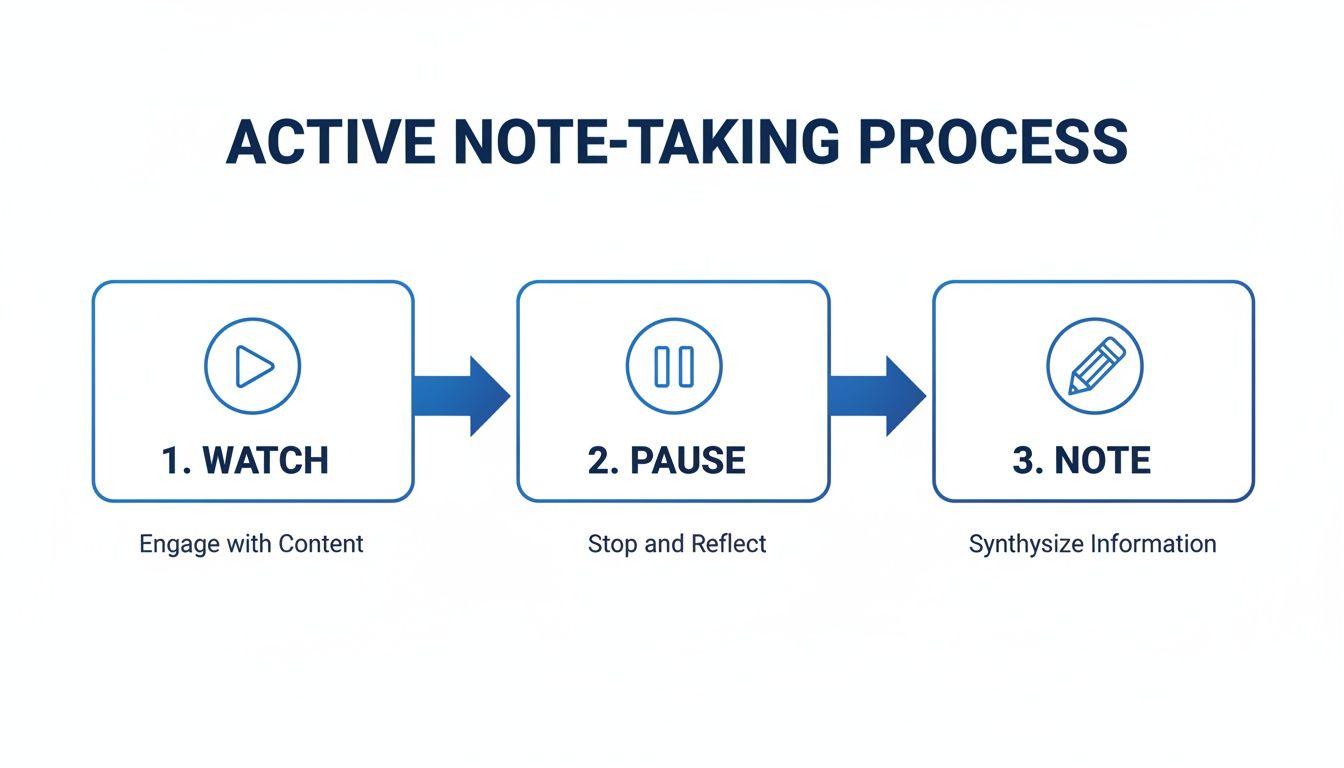
Questo diagramma illustra il loop doloroso e ripetitivo del vecchio stile di prendere appunti da video.
Mostra come devi costantemente interrompere il flusso di apprendimento solo per documentarlo—una enorme fonte di attrito cognitivo. Un flusso di lavoro moderno automatizza questo ciclo, catturando informazioni senza interruzioni mentre continui a guardare.
Una grossa carenza di molti strumenti video è che elaborano solo la trascrizione audio. Per la maggior parte dei contenuti educativi, questo manca completamente il punto. Un tutorial di programmazione senza il codice a schermo è inutile. Una lezione di medicina senza diagrammi anatomici è incompleta.
Diversamente da strumenti che analizzano solo trascrizioni, HoverNotes guarda il video per catturare ciò che appare sullo schermo. Sa che per un apprendimento vero il contesto visivo è imprescindibile.
Questo approccio risolve due problemi contemporaneamente:
Screenshot con timestamp: Puoi catturare istantaneamente un fotogramma completo del video. Ogni screenshot include un timestamp cliccabile — un clic ti riporta esattamente a quel momento, eliminando la frustrante caccia a un punto preciso in una lunga lezione.
Ritaglio: A volte non serve l’intero schermo. Puoi "ritagliare" il blocco di codice, la formula o il diagramma specifico che ti serve, integrando un elemento visivo pulito e focalizzato direttamente negli appunti.
Questo crea un insieme di note ricco, molto più utile di un muro di testo. Avere i tuoi pensieri digitati insieme a elementi visivi perfettamente temporizzati rende la revisione dei tuoi https://hovernotes.io/it/video-notes un modo molto più efficace di studiare. Puoi anche esplorare altri strumenti AI di sintesi video per vedere come possono aiutarti a estrarre le informazioni chiave.
Un flusso di lavoro intelligente deve garantirti la proprietà totale della tua conoscenza. Molte piattaforme bloccano i tuoi appunti nel loro sistema proprietario. Se interrompi l’abbonamento o chiudono, la tua conoscenza sparisce.
L’approccio migliore è salvare gli appunti in un formato aperto e a prova di futuro. Quando gli appunti sono salvati come semplici file Markdown (.md) direttamente sul tuo computer, sono tuoi. Per sempre. Possiedi i file. Puoi spostarli, fare backup, cercarli — sono solo Markdown. Questo è ideale per utenti Obsidian che vogliono integrare l’apprendimento video direttamente nel loro vault locale, e gli appunti si integrano perfettamente anche in Notion.
#Trasformare gli appunti video in conoscenza permanente
Prendere appunti mentre guardi un video è il primo passo. Il vero lavoro—quel tipo che conduce a una comprensione profonda e duratura—avviene dopo la fine del video. Una raccolta di appunti è solo materia grezza. L’obiettivo è intrecciare quel materiale con ciò che già sai, trasformando fatti isolati in una parte permanente della tua base di conoscenza.
Quando il video finisce, è tempo di elaborare quegli appunti in un sistema come Obsidian o Notion. Questo non significa solo rileggerli. Significa confrontarsi attivamente con le idee.
Un primo passo semplice ma potente è riformulare i concetti chiave con parole tue. Questo piccolo gesto obbliga il cervello a passare dal consumo passivo all’elaborazione attiva, confermando che hai effettivamente capito il materiale, non solo ascoltato.
Se sei un utente Obsidian, questa parte ti sarà naturale. Il modo più efficace per fissare la conoscenza è collegare le nuove idee a quelle esistenti. Pensa a questo come costruire una "rete di pensieri".
Rivedendo i tuoi appunti video, chiediti:
Come si collega questo a qualcosa che già conosco?
Questa nuova informazione mette in discussione o supporta una convinzione che ho attualmente?
Dove si colloca questo pezzo di conoscenza nel quadro più ampio dell’argomento?
Ogni volta che crei una di queste connessioni, dai al cervello un altro appiglio per recuperare quell’informazione in futuro. Un fatto isolato è fragile. Un fatto collegato ad altre cinque idee diventa parte di una rete resiliente e interconnessa. Questa pratica è la base di ogni serio sistema di conoscenza, motivo per cui molti si concentrano su costruire un secondo cervello per organizzare la vita digitale.
Il vero valore dei tuoi appunti non sta in ciò che scrivi, ma nelle connessioni che suscitano. Ogni collegamento rafforza la tua intera base di conoscenza, trasformandola da una biblioteca statica a uno strumento dinamico e pensante.
#Perché il formato dei tuoi appunti è fondamentale
Questo processo di integrazione dipende da un dettaglio cruciale: il controllo sui tuoi appunti. Il formato in cui li salvi fa la differenza.
Avere la conoscenza salvata in un formato testo semplice come Markdown (.md) è un enorme vantaggio. Niente software proprietario, nessun servizio cloud che tiene in ostaggio le tue idee.
Quando usi uno strumento local-first come HoverNotes, che salva gli appunti direttamente nel file system del tuo computer, mantieni la proprietà totale. Gli appunti sono tuoi. Puoi spostarli, fare backup, cercarli o aprirli con qualsiasi editor di testo.
Questo garantisce che lo sforzo che metti nell’apprendimento oggi costruisca un patrimonio personale che ti servirà per decenni, senza essere bloccato da un abbonamento. Con sempre più apprendimento online—una tendenza descritta in ricerche sulla rapida crescita del mercato e-learning—possedere i frutti di quell’apprendimento diventa imprescindibile.
Ecco risposte alle domande comuni di chi vuole far durare le sessioni di studio video.
#È meglio digitare gli appunti o scriverli a mano?
Scrivere a mano ti obbliga a rallentare e riformulare, ottimo per fissare le idee. Ma per imparare dai video è poco pratico. Devi fare pause continue, riavvolgere e resti spesso indietro.
La presa digitale di appunti è più pratica qui. Puoi stare al passo col parlante, catturare elementi visivi e organizzare i tuoi pensieri senza interrompere il flusso.
Un approccio ibrido è spesso il migliore. Uno strumento come HoverNotes ti permette di digitare i pensieri mentre catturi screenshot con timestamp con un clic. Hai la velocità della digitazione più il contesto visivo che un taccuino cartaceo non può mai catturare.
Per impedire al cervello di buttare via subito ciò che hai appena imparato, rivedi gli appunti entro le prime 24 ore. Questa prima revisione è la più importante per spostare l’informazione nella memoria a lungo termine.
Dopodiché, usa la ripetizione dilazionata. Un programma semplice è rivedere di nuovo dopo tre giorni, poi una settimana dopo e infine dopo un mese.
Le revisioni più efficaci non sono solo una rilettura. Si tratta di integrare quella conoscenza. Il vero beneficio arriva quando metti quegli appunti video in un sistema come Obsidian e cominci a collegarli a ciò che già sai. Non stai solo rinfrescando i fatti; stai costruendo una rete di idee connesse.
#Non posso semplicemente lasciare che un AI prenda tutti gli appunti per me?
Considera l’AI come un assistente, non un sostituto. Il suo vero potere è gestire il lavoro noioso: trascrivere, riassumere sezioni chiave e catturare elementi visivi con tempismo perfetto. Questo libera la tua energia mentale per ciò che conta: comprendere idee complesse, fare domande e collegare i puntini.
Un approccio efficace è lavorare in tandem. Lascia che un tool AI generi una base dettagliata di trascrizioni e screenshot. Il tuo compito è costruire sopra con le tue intuizioni, domande e conclusioni. Salti la parte noiosa e passi il tempo su ciò che davvero è apprendimento.
La modalità senza distrazioni e la funzione di screenshot con timestamp in HoverNotes da soli possono farti risparmiare ore di ri-guardare. Anche senza AI, sono gratis da usare. Puoi provarli e ottenere 20 minuti di crediti AI gratuiti, senza necessità di carta di credito, su https://hovernotes.io. Controlla le opzioni attuali sulla pagina prezzi HoverNotes.
Appunti utili dovrebbero portarti a fare qualcosa con il materiale, non limitarsi ad archiviare altro testo. L’Institute of Education Sciences degli Stati Uniti raccomanda di distribuire l’apprendimento nel tempo, combinare grafici con spiegazioni verbali, usare il recupero attivo e porre domande esplicative profonde (guida pratica). Una rassegna sottoposta a revisione paritaria sulla ricerca sui video educativi sottolinea inoltre l’importanza di evidenziare le informazioni rilevanti, suddividere le lezioni in segmenti gestibili, dare a chi apprende il controllo e aggiungere stimoli di apprendimento attivo (rassegna). Applicate a questo contesto, queste indicazioni significano fare una pausa nei punti di passaggio tra concetti, catturare solo le prove visive di cui hai bisogno, scrivere una domanda con parole tue e, in seguito, rispondere prima di rivedere la fonte. Queste pratiche sono basate su evidenze; una percentuale universale di memorizzazione per una singola app o un singolo flusso di lavoro non lo è.
Scopri come apprendere più velocemente e ricordare meglio con strategie comprovate e supportate dalla scienza per il richiamo attivo, la presa di appunti e routine di studio efficienti.
Smettila di dimenticare ciò che guardi. Questa guida propone metodi supportati dalla scienza per migliorare la tua capacità di memorizzazione durante l'apprendimento video, utilizzando il richiamo attivo e tecniche di presa di appunti più intelligenti.
Odkrijte učinkovite študijske tehnike za vizualne učence, ki vam bodo pomagale izboljšati pomnjenje video vsebin z diagrami, posnetki zaslona in vizualnim zapisovanjem zapiskov.