Đang gặp khó khăn với Udemy? Học các chiến lược thực tiễn để học Udemy một cách hiệu quả khi tôi bị ADHD, từ việc chọn khóa học đến cách ghi chú giúp tăng cường tập trung.
Bởi HoverNotes Team•28 phút đọc
Để học hiệu quả từ Udemy khi bạn bị ADHD, hãy quên cách xem thụ động đi. Bạn cần một khung học tập chủ động, có cấu trúc hoạt động phù hợp với não bộ khao khát sự mới mẻ và tương tác tự nhiên, chứ không phải chống lại nó.
Điều này có nghĩa là chia nhỏ các khóa học dài, tạo ra sự chịu trách nhiệm bên ngoài, và biến những bài giảng video thoáng qua thành những ghi chú cụ thể mà bạn thực sự có thể sử dụng.
#Tại sao phương pháp "Chỉ Xem" lại thảm họa cho não ADHD
Chúng ta đều đã trải qua rồi. Bạn mua một khóa học Udemy mới, tràn đầy hứng khởi, và tưởng tượng những kỹ năng mới bạn sắp học được. Đó là một cú hích dopamine mạnh mẽ.
Nhưng với nhiều người trong chúng ta bị ADHD, cảm giác phấn khích ban đầu đó nhanh chóng biến mất. Thay vào đó là một vòng luẩn quẩn quen thuộc: quá tải, mất tập trung, và cuối cùng là một khóa học dở dang ám ảnh thư viện của bạn. Lời khuyên chuẩn là "chỉ xem video" chẳng ích gì vì nó bỏ qua những thách thức cốt lõi mà chúng ta đối mặt.
Đây không phải là thất bại cá nhân. Mà là sự không tương thích giữa cách nội dung Udemy được thiết kế và cách não bộ ADHD hoạt động.
Não bộ ADHD vận hành nhờ dopamine, thứ thúc đẩy phần thưởng và động lực. Xem video thụ động gần như không cung cấp điều đó. Một khoá học Python dài 20 giờ là một thử thách dài với phần thưởng ở rất xa, khiến nó có vẻ như không thật. Não bạn được thiết kế cho những cơn chạy nước rút nhanh với phản hồi ngay lập tức.
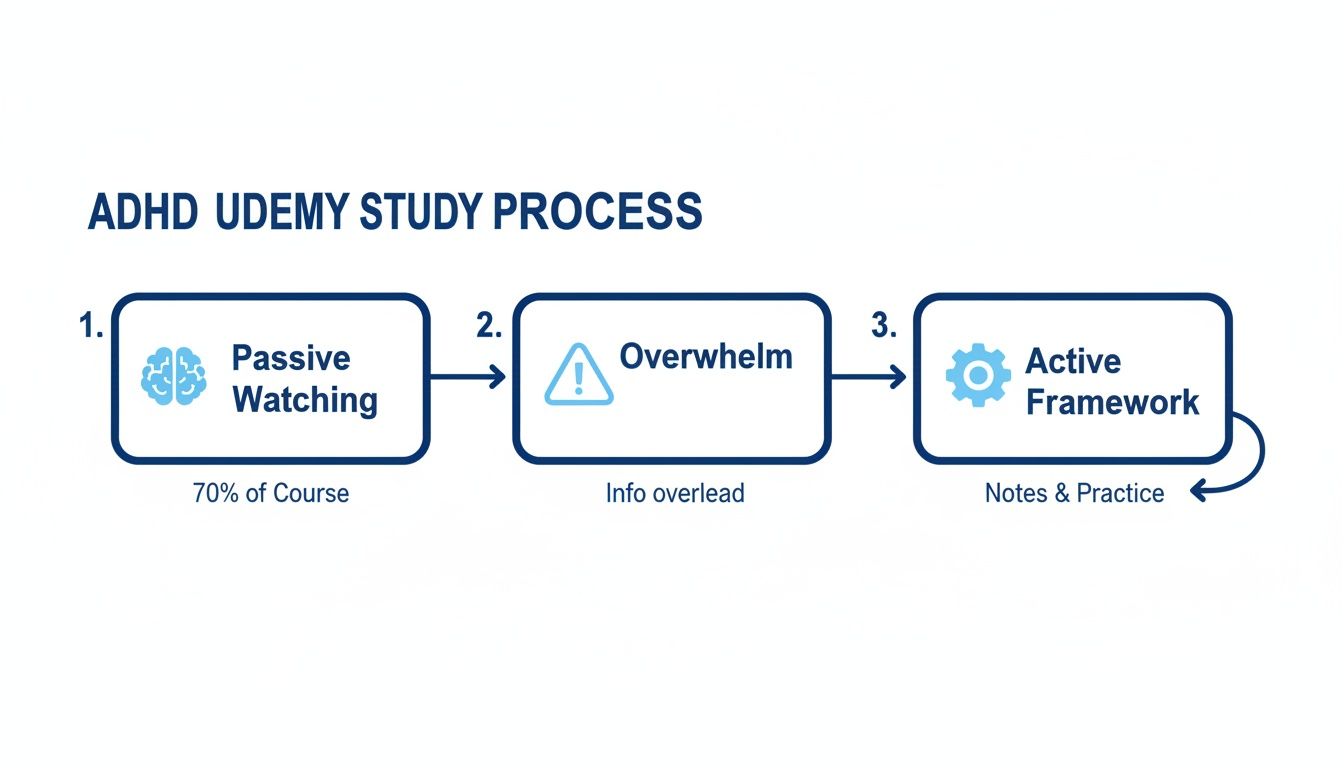
Đây là hành trình kinh điển từ người xem thụ động đến học viên bị quá tải. Cách duy nhất để thoát là xây dựng ngay từ đầu một khung học tập chủ động, thân thiện với ADHD.
Thiếu tương tác chủ động dẫn trực tiếp đến quá tải nhận thức. Cách tiếp cận có cấu trúc là điều bắt buộc.
Các bài giảng video dài là một cuộc tấn công vào chức năng điều hành — kỹ năng vốn là thách thức với người ADHD. Chúng ta nói đến sự chú ý kéo dài, tổ chức và khởi đầu tác vụ. Thiếu kế hoạch rõ ràng, khối lượng nội dung lớn có thể làm bạn tê liệt.
Khởi đầu tác vụ: Chỉ việc bấm "phát" một video dài 45 phút đã như leo núi.
Trí nhớ làm việc: Cố gắng giữ khái niệm từ đầu đến cuối video là thảm họa. Những chi tiết quan trọng bay mất.
Mù thời gian: Dễ nghĩ video "ngắn" 15 phút sẽ nhanh, nhưng bạn quên tính thêm việc tua lại, tạm dừng và các phiền toái không tránh khỏi.
Vấn đề lớn nhất là học qua video thường khuyến khích tiêu thụ thụ động. Bạn ngồi, xem và hy vọng thông tin thấm vào như thẩm thấu. Người ta xem nhưng không nhớ.
Nhưng để biến thông tin thành kỹ năng sử dụng được, bạn phải chủ động xử lý nó. Bạn phải đấu tranh với nó, đặt câu hỏi và liên kết nó với những gì bạn đã biết.
Mục tiêu không chỉ là hoàn thành một khóa học; mà là nội tại hóa các kỹ năng nó dạy. Điều này đòi hỏi vượt qua sự tiêu thụ đơn thuần và tham gia chủ động.
Để hiểu sâu hơn về khoa học đằng sau, hướng dẫn của chúng tôi về cách học hiệu quả để thi cử là nguồn tài nguyên tuyệt vời. Phần còn lại của bài viết này sẽ cung cấp cho bạn khung thực tế để cuối cùng làm việc hợp với cách wiring đặc biệt của não bạn và biến Udemy từ nguồn cơn mặc cảm thành công cụ phát triển mạnh mẽ.
#Chiến lược Udemy thân thiện với ADHD trong một cái nhìn
Bảng này phân tích điểm chuyển đổi cốt lõi từ cách tiếp cận thông thường sang phương pháp tối ưu cho nhu cầu não ADHD.
Lĩnh vực Chiến lược
Cách Tiếp cận Thông thường
Cách Tiếp cận Tối ưu cho ADHD
Lựa chọn Khoá học
Chọn dựa vào chủ đề thích thú thôi.
Kiểm tra giảng viên về độ rõ ràng; ưu tiên khoá học dựa trên dự án.
Lập kế hoạch buổi học
"Tôi sẽ xem vài tiếng."
Dùng microlearning; lên kế hoạch các khoảng tập trung 15-25 phút.
Xem Video
Xem thụ động tốc độ 1x.
Xem chủ động tốc độ 1.5x-2x; nghỉ giải lao thường xuyên.
Ghi chú
Ghi chép lại lời giảng viên.
Dùng công cụ ưu tiên video để bắt những khoảnh khắc quan trọng với dấu thời gian.
Môi trường
Học ở đâu cũng được, điện thoại gần bên.
Tạo vùng tập trung riêng biệt, không phiền nhiễu.
Giữ kiến thức
Hy vọng bạn sẽ nhớ sau.
Lên lịch ôn tập giãn cách để xem lại ghi chú và khái niệm.
Bằng cách áp dụng các chiến lược tối ưu này, bạn tạo ra một hệ thống hỗ trợ tập trung thay vì làm cạn kiệt nó.
Thị trường Udemy có thể trở thành bẫy ADHD. Sự lựa chọn vô tận kích hoạt vòng luẩn quẩn bế tắc quyết định, và cảm giác hứng khởi khi mua khoá học thường biến mất nhanh chóng trước khi bạn bấm "phát".
Chọn đúng khoá không phải dựa vào xếp hạng sao cao nhất. Mà là chọn khoá phù hợp với phong cách học của ADHD ngay từ đầu. Thay vì bị thu hút bởi tiêu đề lộng lẫy, hãy phân tích cấu trúc khoá học trước. Bộ lọc này sẽ giúp bạn tiết kiệm thời gian, tiền bạc và tránh nỗi xấu hổ im lặng khi thêm một khoá chưa xem vào "nghĩa trang" số của bạn.
#Kiểm tra chương trình học để phát hiện dấu hiệu cảnh báo
Trước khi làm gì khác, mở toàn bộ chương trình học. Bạn đang tìm những dấu hiệu cảnh báo kiểu "đây sẽ là cực hình."
Dưới đây là danh sách kiểm tra nhanh trong đầu:
Độ dài video: Các bài giảng có ngắn và súc tích không? Những video liên tục dài hơn 10-12 phút là cảnh báo lớn. Video ngắn mang lại chiến thắng nhanh, xây dựng đà tiến.
Tổng số giờ: Thật lòng xem khoá học dài 40 giờ về "Hướng dẫn toàn diện mọi thứ" có thực tế không? Có lẽ không. Một khoá học ngắn hơn, 8-10 giờ với mục tiêu cụ thể dễ hoàn thành hơn nhiều.
Học theo dự án: Khoá học có bắt bạn phải làm điều gì đó không? Tìm khoá có dự án thực hành, bài tập mã hóa, hoặc sổ tay tải xuống. Học chủ động hấp dẫn gấp nhiều lần xem ai đó nói chuyện thụ động.
Bạn có thể tìm tất cả những thông tin này ngay trên trang giới thiệu khoá học.
Thông tin này là hàng rào bảo vệ đầu tiên của bạn. Dùng nó để tránh những khoá học sẽ làm cạn kiệt chức năng điều hành trước cả khi bạn bắt đầu.
Phong cách giảng dạy của giảng viên có thể làm khoá học thành công hoặc thất bại, đặc biệt với não ADHD. Luôn xem vài video xem trước miễn phí để cảm nhận phong cách của họ trước khi mua.
Bạn lắng nghe vài điểm chính:
Tốc độ: Họ nói có nhịp độ vừa phải hay giọng nói khiến bạn muốn gật gù ngủ gật? Giọng đều đều, chậm là kẻ giết chết sự tập trung. Tốc độ nhanh hơn chút lại thu hút hơn.
Hình ảnh: Họ có dùng slide rõ ràng, sơ đồ hữu ích, và chú thích trên màn hình không? Hay chỉ là mặt họ xuất hiện cả tiếng? Tín hiệu hình ảnh mạnh mẽ là điểm neo giữ sự chú ý.
Sự súc tích: Họ đi thẳng vào vấn đề không? Hay mất năm phút kể chuyện trước bài học chính? Chúng ta cần sự trực tiếp. Lan man là kẻ thù.
Cuối cùng, hãy xem tab "Tài nguyên" của các bài giảng. Những khoá học tốt nhất thường đi kèm tài liệu bổ sung giúp bạn thoát khỏi trạng thái xem thụ động và tiến vào học chủ động.
Tìm các khoá học cung cấp thêm món cụ thể như:
File code hoặc mẫu dự án để bạn làm theo.
Tóm tắt hoặc cheat sheet dưới dạng PDF để ôn nhanh.
Liên kết tới bài viết hoặc công cụ bên ngoài khi bạn muốn tìm hiểu sâu hơn.
Đây không chỉ là thứ hay ho; mà là công cụ thiết yếu. Chúng cung cấp cấu trúc và tương tác cần thiết để đảm bảo kiến thức bền vững. Một khoá học có nhiều tài sản này là dấu hiệu rõ ràng rằng nó thiết kế cho ứng dụng thực tế, không chỉ để xem cho xong.
Với ai bị ADHD, "chỉ ngồi xuống học" là vé một chiều đến thất bại. Bạn không thể chỉ dùng ý chí để vượt qua mấy giờ học Udemy dài. Bạn cần xây dựng một cấu trúc có chủ đích — một hệ thống tận dụng sức mạnh của não bạn.
Điều này không phải là ép buộc tập trung. Mà là tạo ra điều kiện phù hợp để sự tập trung xảy ra một cách tự nhiên. Một mục tiêu mơ hồ như "Tôi sẽ học vài giờ" gây áp lực lớn. Hãy chia nhỏ nó thành một hệ thống vận hành hiệu quả.
Kỹ thuật Pomodoro kinh điển — chạy nước rút 25 phút — là điểm khởi đầu tốt, nhưng bài giảng video có thể khá kiệt sức. Vậy hãy điều chỉnh lại.
Quên 25 phút đi. Hãy nhắm đến các cơn tập trung xem video ngắn 15-20 phút. Khi báo thức kêu, bắt buộc phải nghỉ giải lao. Hãy đứng lên, giãn cơ, đi dạo, uống nước. Reset thể chất này vô cùng hiệu quả để làm sạch đầu óc.
Nhìn một chương dài trong khóa học Udemy có thể làm bạn tê liệt. Đừng vậy. Hãy chuyển sang tư duy cam kết nhỏ. Mục tiêu của bạn trong 20 phút tới không phải là "hoàn thành Chương 3." Mà là "xem hai video ngắn tiếp theo." Chỉ vậy thôi.
Điều này mang lại hai lợi ích quan trọng cho não ADHD:
Giảm rào cản bắt đầu. Dễ thuyết phục bản thân làm gì đó 7 phút hơn là 45 phút.
Mang lại dopamine thường xuyên. Mỗi video nhỏ bạn hoàn thành là một chiến thắng nhỏ, tạo cảm giác thành tựu thúc đẩy tiến về phía trước.
Môi trường của bạn là tất cả. Cố học trong không gian đầy phiền nhiễu giống như bơi ngược dòng nước. Hãy có ý thức thiết lập không gian vật lý và kỹ thuật số để gửi tín hiệu cho não rằng đã đến lúc tập trung.
Về không gian vật lý:
Một bàn, một mục đích: Nếu được, hãy có chỗ học riêng biệt. Khi bạn ngồi đó, não nhận được thông điệp: chúng ta đang làm việc, không phải lướt web.
Dọn dẹp: Bàn bừa bộn là tiếng ồn về mặt hình ảnh. Hãy gọn gàng.
Tai nghe chống ồn: Đây là điều bắt buộc. Chúng tạo ra "bong bóng tập trung" chặn đứng tiếng ồn bên ngoài.
Không gian kỹ thuật số cũng quan trọng không kém. Tắt hết thông báo không cần thiết. Đặt điện thoại sang phòng khác. Dùng các công cụ trình duyệt cũng có thể thay đổi cuộc chơi. Ví dụ, một số tiện ích mở rộng Chrome tốt nhất cho học sinh có thể chủ động chặn các trang web gây sao nhãng trong các phiên học.
Tôi nhận thấy chế độ "video mode" độc quyền, không phiền nhiễu cho trình duyệt vô cùng hiệu quả. HoverNotes là một tiện ích Chrome theo dõi video cùng bạn, tạo ghi chú AI và lưu thẳng dưới dạng Markdown vào hệ thống file. Video mode chặn các phiền nhiễu và đặt ghi chú ngay sát nội dung.
Cuối cùng, ngừng chiến đấu với sinh học của bạn. Hãy để ý chu kỳ năng lượng tự nhiên của bạn. Bạn là người tập trung cao độ buổi sáng, hay có làn gió thứ hai buổi chiều?
Hãy lên lịch các phiên Udemy vào khoảng thời gian tập trung cao điểm này. Cố học khi đã mệt mỏi là con đường nhanh đến thất vọng. Khi bạn học theo nhịp điệu tự nhiên của não bộ, quá trình học ít bị coi là nghĩa vụ mà trôi chảy hơn.
Thật lòng mà nói, chỉ xem một video Udemy không giống như học từ nó. Với người ADHD, đây là cái bẫy lớn nhất. Xem thụ động nghĩa là thông tin vào tai này lại bay ra tai kia.
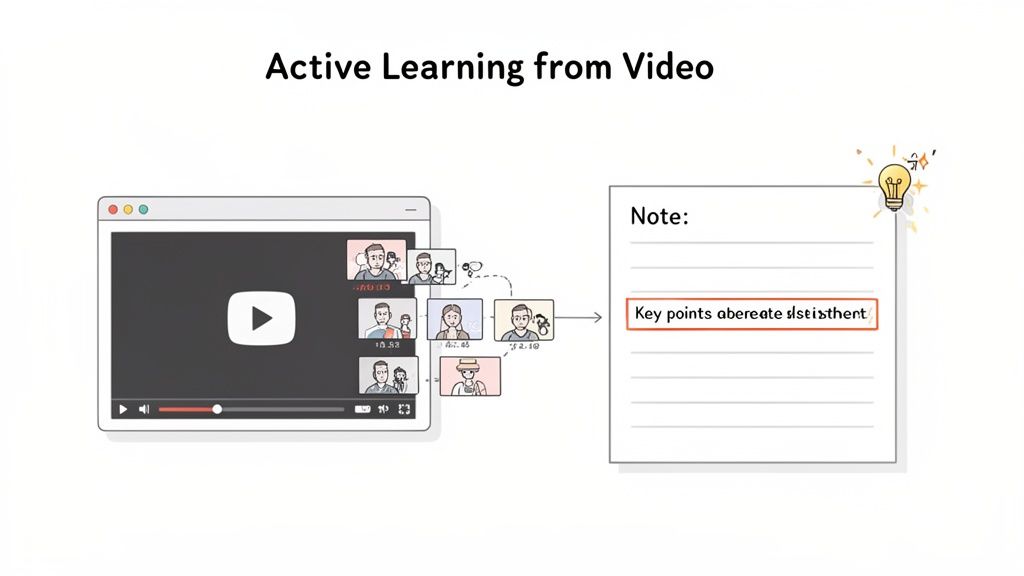
Để kiến thức in sâu, bạn phải chuyển từ vai trò khán giả thụ động sang người tham gia chủ động. Nghĩa là phải tương tác với tài liệu. Việc ghi chú khi xem video cải thiện khả năng giữ thông tin đáng kể.
Nhưng ghi chú truyền thống khi xem video là một cơn ác mộng phá vỡ tập trung. Việc phải liên tục tạm dừng, tua lại và gõ phím gấp gáp phá tan mạch học. Bạn mất nhiều thời gian đổi cửa sổ hơn là hiểu bài.
Vì vậy, các công cụ được thiết kế cho học video hiện đại là vô cùng quan trọng. Thay vì chống lại định dạng, bạn có thể dùng hệ thống làm nặng phần khó cho bạn.
Nhiệm vụ chính của não bạn trong giờ học nên là hiểu khái niệm, không phải làm thư ký phiên toà. Khi cố gắng làm cả hai, bạn làm quá tải trí nhớ làm việc và khả năng hiểu giảm mạnh. AI có thể đảm nhiệm việc ghi chú để bạn tập trung vào việc tiếp thu.
Một công cụ chuyên dụng có thể xử lý phần việc nặng nhọc, giải phóng bạn để suy nghĩ về tài liệu. Khác với các công cụ chỉ trích xuất bản ghi, HoverNotes theo dõi video để nắm bắt chính xác những gì trên màn hình. Điều này cho phép bạn tập trung vào "tại sao" trong khi công cụ ghi lại "cái gì."
Cách tiếp cận này khác hẳn so với chỉ tải bản ghi âm. Bản ghi thiếu bối cảnh hình ảnh — tức là mù quáng với những gì xuất hiện trên màn hình, thường là phần quan trọng nhất.
Bản ghi nói bạn biết giảng viên nói gì, nhưng không thể cho bạn thấy dòng mã cụ thể họ chỉ hoặc sơ đồ kiến trúc hệ thống họ vẽ. Bối cảnh hình ảnh là tất cả.
Có nhiều cách để làm việc ghi chú khi học video. Dưới đây là bảng so sánh nhanh để giúp bạn tìm ra cách phù hợp nhất với não của mình.
Phương pháp
Cách Thực hiện
Ưu điểm cho ADHD
Nhược điểm cho ADHD
Gõ tay thủ công
Tạm dừng video để gõ ghi chú trong cửa sổ riêng.
Bạn kiểm soát từng từ.
Tải nhận thức cao; chuyển đổi tác vụ liên tục giết chết tập trung và mạch học.
Viết tay trên giấy
Ghi lại ý chính vào sổ tay vật lý.
Tương tác vận động giúp nhớ lâu hơn.
Tách rời khỏi video; khó tìm lại đoạn cụ thể sau này.
Chụp ảnh màn hình cơ bản
Dùng công cụ tích hợp hệ điều hành để chụp màn hình.
Bắt được thông tin hình ảnh hoàn hảo.
Tạo thành một thư mục lộn xộn các file không có ngữ cảnh hay dấu thời gian.
Công cụ AI chuyển video thành ghi chú
Tiện ích mở rộng trình duyệt ghi chú, dấu thời gian và ảnh chụp màn hình khi bạn xem.
Ít gây trở ngại; tự động chuyển bản ghi và nắm được hình ảnh, giúp bạn tập trung vào hiểu bài.
Cần cài thêm công cụ và học quy trình đơn giản.
Dù bất kỳ hình thức tương tác nào cũng tốt hơn không có gì, nhưng công cụ thiết kế riêng cho học video giảm thiểu đáng kể trở ngại khiến não ADHD dễ bị sao nhãng.
Video là phương tiện trực quan. Chúng ta học qua việc quan sát giảng viên gỡ lỗi mã, phác thảo sơ đồ luồng, hoặc trình bày kỹ thuật. Ghi chú của bạn cần phản ánh điều đó.
Ghi ảnh màn hình thủ công rất vụng về. Bạn nhận được một thư mục lộn xộn đầy ảnh được đặt tên ngẫu nhiên, không liên kết với ghi chú văn bản. Ghi chú video hiệu quả tích hợp mượt mà bối cảnh hình ảnh.
Hãy kiếm công cụ có các tính năng sau:
Ảnh chụp màn hình có dấu thời gian: Mỗi ảnh có dấu thời gian có thể bấm được — một cú nhấp đưa bạn về chính xác khoảnh khắc đó. Điều này ích lợi lớn khi xem lại các chủ đề phức tạp mà không phải tua timeline.
Chụp khoanh vùng: Chỉ chụp đoạn mã hoặc sơ đồ cần thiết — không cần chụp toàn bộ khung hình. Giữ ghi chú của bạn sạch sẽ, súc tích.
Nhúng bối cảnh: Ảnh xuất hiện đúng nơi chúng thuộc về trong ghi chú, cho bạn dấu hiệu trực quan tức thì khi học.
Những tính năng này biến đống văn bản khô thành hướng dẫn học động, dễ xử lý hơn nhiều với não ADHD. Hướng dẫn của chúng tôi về cách học hiệu quả từ video Udemy đi sâu hơn vào các quy trình học chủ động này.
Điều tồi tệ nhất của hầu hết ứng dụng ghi chú đám mây là kiến thức của bạn bị khóa trong hệ thống của họ. Với người quan tâm đến việc sở hữu dữ liệu — đặc biệt người dùng công cụ local-first như Obsidian — đây là điều không thể chấp nhận.
Giải pháp là phương pháp local-first. Khi ghi chú của bạn lưu dưới dạng tệp Markdown (.md) thẳng trên máy tính, bạn sở hữu chúng mãi mãi. Chúng không bị kẹt trong định dạng đóng. Bạn sở hữu file. Di chuyển, sao lưu, grep thoải mái — chúng chỉ là Markdown mà thôi.
Điều này cực kỳ mạnh mẽ khi bạn xây dựng kho tri thức cá nhân. Khi ghi chú từ Udemy, Coursera, và YouTube, bạn không chỉ học cho một khoá; bạn đang tạo ra thư viện có thể tìm kiếm, liên kết mọi kiến thức bạn tích lũy. Ghi chú thuộc về bạn.
#Xây dựng hệ thống ôn tập và giữ kiến thức lâu dài
Hoàn thành một khoá học Udemy rất tuyệt. Nhưng thử thách thật sự là liệu bạn có thể dùng kiến thức đó sau một tuần, một tháng, hay một năm không. Đây là nơi nhiều người ADHD vấp phải rào cản, vì trí nhớ làm việc của ta thích quên thông tin ngay khi quay đi.
Thông tin không nằm im chỉ vì bạn đã xem video. Bạn phải xem lại. Mục tiêu là hệ thống ôn tập đơn giản, nỗ lực thấp giúp biến kiến thức mới trở thành kỹ năng bạn làm chủ.
Không phải nhồi nhét hay xem lại cả chục giờ giảng. Mà là kiểm tra thông minh, nhanh gọn giúp tăng cường kết nối thần kinh và khóa các điểm quan trọng vào trí nhớ dài hạn.
Lặp lại giãn cách là một món quà cho não ADHD. Đây là kỹ thuật học tập bạn xem lại thông tin ở khoảng cách thời gian ngày càng dài. Thay vì một phiên ôn khổng lồ áp lực mà bạn cứ trì hoãn, nó chia nhỏ quá trình thành từng phần nhỏ có thể quản lý được.
Lịch trình đơn giản có thể như sau:
Ôn tập 1: Ngày hôm sau khi hoàn thành chương.
Ôn tập 2: Ba ngày sau đó.
Ôn tập 3: Một tuần sau.
Ôn tập 4: Ba tuần sau.
Mỗi lần ôn nên rất nhanh — 5-10 phút, tối đa. Bạn chỉ lướt lại ghi chú để kích hoạt ký ức. Đặt nhắc lịch trên lịch hoặc app quản lý công việc để hệ thống này tự vận hành.
Ngồi nhìn một đống chữ khô cứng chắc chắn làm bạn chán và mất tập trung. Đây là lý do vì sao chất lượng và định dạng ghi chú quan trọng đến vậy.
Với người học ADHD, ghi chú ôn tập tốt là:
Trực quan: Đầy sơ đồ, ảnh chụp mã, và công thức quan trọng.
Tương tác: Có liên kết đưa bạn về đúng khoảnh khắc video.
Ngắn gọn: Tập trung vào ý chính lớn, không phải từng câu từng chữ giảng viên nói.
Đây là lúc ghi chú có ảnh chụp màn hình kèm dấu thời gian nhúng trực tiếp trở thành vũ khí lợi hại. Khi ôn lại khái niệm khó, bạn không phải giải mã ghi chú chữ. Chỉ cần xem ảnh. Vẫn chưa hiểu? Bấm vào ảnh là bạn được đưa ngay về khoảnh khắc đó trong video Udemy.
Tay dừng, chụp ảnh, và sắp xếp ghi chú trực quan rất mệt mỏi. Việc chuyển đổi tác vụ liên tục thế này chắc chắn phá vỡ tập trung. Đây là công việc lý tưởng cho một công cụ—để nó xử lý phần việc tẻ nhạt, bạn tập trung học.
Một công cụ như HoverNotes tự động hóa toàn bộ quy trình ghi chú, chụp hình và đánh dấu thời gian. Nó lôi ra thông tin quan trọng khi bạn xem và lưu thành file Markdown sạch sẽ. Nghĩa là tài liệu ôn tập gần như được tạo sẵn cho bạn, làm hệ thống lặp lại giãn cách trở nên gần như không trở ngại.
Nhiệm vụ của bạn chỉ là theo lịch ôn. Mở file, quét qua hình ảnh và điểm chính, xong. Thói quen nhỏ, nhẹ nhàng này tích luỹ kiến thức theo thời gian. Bạn không còn là người "xem khoá học" mà trở thành người xây dựng thư viện kiến thức cá nhân bền vững.
Khi bạn thêm ghi chú từ nhiều khoá học, bạn tạo ra kho tri thức riêng có thể tìm kiếm và tham khảo mãi mãi. Nếu ý tưởng này làm bạn hào hứng, hướng dẫn của chúng tôi về cách xây dựng bộ não thứ hai là bước tiếp theo tuyệt vời để tổ chức kiến thức số của bạn.
Ngay cả với kế hoạch tốt, bạn cũng sẽ gặp vài khó khăn. Hãy cùng giải đáp một số câu hỏi hay gặp khi cố gắng học trên Udemy với bộ não ADHD.
#Làm sao giữ động lực khi cảm hứng ban đầu phai nhạt?
À, vòng luẩn quẩn kinh điển của ADHD: siêu tập trung rồi đến lúc mất hết động lực. Bí quyết là đừng chạy theo cơn hưng phấn dopamine ban đầu mà hãy xây dựng hệ thống không lệ thuộc vào nó.
Hãy nghĩ đến phần thưởng và sự chịu trách nhiệm bên ngoài. Đặt các phần thưởng cụ thể cho những chiến thắng nhỏ. Hoàn thành một chương? Bạn được xem một tập phim yêu thích hoặc thoải mái lướt mạng 15 phút không tội lỗi. Điều này tạo vòng lặp phần thưởng mà não bạn có thể bám vào.
Chịu trách nhiệm là thứ thay đổi trò chơi khác. Tìm một “bạn học” — một người cũng học cùng khoá hoặc đơn giản là ai đó bạn gửi tin nhắn kiểm tra. Một tin nhắn đơn giản mỗi ngày kiểu, “Hôm nay bạn xem hai video chưa?” tạo áp lực bên ngoài đủ để bạn bắt đầu.
Vấp phải chủ đề khó có thể làm mất đà. Điều quan trọng nhất là làm ngược lại trực giác: hãy cho phép mình bỏ qua. Đừng ngồi lì gặm nhấm vấn đề.
Quy trình đơn giản khi bạn vướng:
Đánh dấu: Viết nhanh ghi chú về chủ đề khó và dấu thời gian video.
Tiếp tục: Tiếp tục với phần còn lại của chương. Thường phần sau cung cấp ngữ cảnh giúp bạn hiểu phần khó.
Ôn lại sau: Giải quyết phần khó ngay đầu phiên học tiếp theo khi não bạn còn tươi mới.
Vẫn chưa hiểu? Dùng phần hỏi đáp khoá học. Đừng chỉ nói "Tôi bối rối." Hãy cụ thể: "Tại 12:45, giảng viên giải thích X, nhưng tôi không thấy nó liên quan Y thế nào. Ai có thể diễn đạt lại?"
Việc để một video khó làm trật đường toàn khoá là điều tệ nhất bạn có thể làm. Mục tiêu của bạn là đà tiến. Bỏ qua một bài giảng đơn lẻ để giữ đà là quyết định khôn ngoan.
#Làm sao quản lý nhiều khoá học mà không bị quá tải?
Đợt sale Udemy đến, bạn bỗng có năm khoá mới muốn học ngay. Đó là đặc điểm điển hình của ADHD, nhưng cũng là con đường nhanh dẫn đến việc không kết thúc khoá nào.
Chiến lược hiệu quả là đặt một khoá chính tại một thời điểm. Đây là nhiệm vụ chính, bạn tập trung trong các khung giờ học đã lên lịch.
Xem các khoá khác như "phụ" hoặc "tò mò." Chạm vào chúng khi bạn cần nghỉ tư duy chủ đề chính hoặc có 10 phút rảnh. Cách này thỏa mãn phần não thích mới mà không làm phân tán sự chú ý và phá hoại mục tiêu chính.
Với não ADHD, học kéo dài thắng áp đảo. Học dồn mang lại cảm giác hiệu quả trong phút chốc — cơn siêu tập trung — nhưng dẫn đến học nông cạn. Thông tin tràn đầy bộ nhớ làm việc nhưng không chuyển vào bộ nhớ dài hạn. Bạn quên nhanh như vừa học.
Cách tốt hơn nhiều là lịch học đều đặn với các phiên ngắn, tập trung. Hãy nhắm vào 3-4 phiên mỗi tuần. Điều này tự nhiên tận dụng lặp lại giãn cách, cho não thời gian xử lý và củng cố thông tin giữa các phiên học. Kết quả là học sâu, bền và thực sự hữu ích.
#Ghi chú của tôi lộn xộn, làm sao biến nó thành hữu dụng?
Nếu ghi chú của bạn rối rắm, chúng không chỉ vô dụng mà còn tạo ra trở ngại. Chìa khoá là hệ thống tự động tổ chức để bạn hoàn toàn tập trung vào nội dung.
Đây là lúc công cụ thiết kế riêng cho học video tỏa sáng. Bạn cần thứ tự động ghi lại siêu dữ liệu — tên khoá, chương, tiêu đề video và dấu thời gian — cho mọi ghi chú.
Khi dùng công cụ lưu ghi chú thẳng lên máy dưới dạng file Markdown, bạn xây dựng thư viện kiến thức sạch, có thể tìm kiếm, và bền vững. Ghi chú lưu dưới dạng .md trong kho Obsidian của bạn, không định dạng đóng hay dịch vụ đồng bộ — ghi chú là của bạn.
Hệ thống tốt cũng cần bắt lấy hình ảnh. Nếu giảng viên vẽ sơ đồ quan trọng, mô tả bằng chữ không đủ. Với công cụ như HoverNotes, bạn có thể cắt riêng đoạn mã hoặc sơ đồ cần thiết — không cần chụp toàn khung hình. Điều này giúp ghi chú của bạn dễ quét và hữu ích vô hạn khi ôn tập.
Tính năng ảnh chụp màn hình kèm dấu thời gian trong HoverNotes một mình cũng có thể cứu bạn khỏi việc quay đi quay lại video tìm ý bạn quên. Bạn có thể dùng thử miễn phí — được 20 phút tín dụng AI khởi đầu, không cần thẻ tín dụng. Tìm hiểu thêm tại https://hovernotes.io. Xác nhận tùy chọn hiện hành trên trang bảng giá HoverNotes.
ADHD không tạo ra một phong cách học tập phổ quát duy nhất, cũng không có cơ sở vững chắc để hứa rằng một ứng dụng cụ thể sẽ cải thiện khả năng ghi nhớ theo một tỷ lệ cố định. Tổng quan của CDC về ADHD ở người trưởng thành lưu ý rằng người trưởng thành có thể gặp khó khăn trong việc quản lý sự chú ý, hoàn thành các nhiệm vụ kéo dài, và duy trì sự ngăn nắp, trong khi nhu cầu hỗ trợ khác nhau tùy từng người. Hướng dẫn của CDC dành cho môi trường học tập khuyến nghị các nhiệm vụ rõ ràng, công cụ tổ chức, ít yếu tố gây xao nhãng hơn, vận động hoặc nghỉ giải lao, và một kế hoạch cá nhân hóa; hướng dẫn này cũng lưu ý rằng bằng chứng cho các điều chỉnh hỗ trợ cụ thể còn hạn chế (CDC guidance). Trên thực tế, hãy xem các phiên học ngắn, những bước tiếp theo dễ nhìn thấy, và ghi chú có mốc thời gian như các thử nghiệm về quy trình làm việc. Giữ lại những gì giúp bạn giảm lực cản, và tìm kiếm hỗ trợ lâm sàng đủ chuyên môn cho các quyết định chẩn đoán hoặc điều trị.
Khó khăn khi ghi chú MOOC trên Coursera hoặc edX? Học một quy trình đã được chứng minh để tổ chức, ghi nhớ và áp dụng kiến thức từ các khóa học dài mà không bị mệt mỏi.
Biến những ghi chú trên LinkedIn Learning của bạn từ những dòng chữ thụ động thành nguồn tài sản sự nghiệp mạnh mẽ. Học các quy trình làm việc thực tiễn để ghi lại, sắp xếp và sử dụng kiến thức của bạn một cách hiệu quả.