Notes Vidéo IA vs Résumés : Qu'est-ce qui facilite l'apprentissage ?
Découvrez quand utiliser une IA de résumé vidéo YouTube pour des aperçus rapides, par opposition à des notes IA pour un apprentissage approfondi, la rétention d’informations et la construction d’une base de connaissances.
Par HoverNotes Team•17 min de lecture
Il est facile de confondre « résumé IA » et « notes IA », mais la différence est cruciale pour quiconque apprend à partir de vidéos. Pensez-y ainsi : un résumé vous dit de quoi parle une vidéo, tandis que les notes expliquent le comment et le pourquoi.
L’un sert au filtrage passif, l’autre à l’apprentissage actif. Un résumé vous aide à décider si une vidéo mérite votre temps. Les notes servent à approfondir, comprendre les concepts, et réellement mémoriser ce que vous avez regardé. Le problème de la rétention en apprentissage vidéo est réel — nous regardons, mais souvent nous n’en retenons rien. Les notes sont la solution.
Un résumé est comme le bandeau au dos d’un livre. Il vous donne l’essentiel en 30 secondes. Les notes IA sont les plans détaillés des chapitres, les citations clés, et les schémas que vous sortirez pour réviser un examen.
Cette distinction est fondamentale pour les étudiants, les autodidactes, et les professionnels du savoir qui doivent retenir et appliquer l’information, pas seulement la consommer.
Une IA de résumé vidéo YouTube est un outil de tri. Sa mission est de condenser une longue vidéo en quelques paragraphes ou points-clés pour vous permettre de filtrer le contenu plus rapidement. Elle répond à une question : « Dois-je passer 30 minutes à regarder ceci ? »
Elle est utile quand vous avez dix vidéos sur le même sujet et devez trouver celle qui correspond sans toutes les visionner.
Les notes vidéo générées par IA ont un autre but : l’apprentissage actif et la connaissance à long terme. Au lieu d’une vue d’ensemble sommaire, vous obtenez un document structuré qui capture les idées clés de la vidéo, les instructions étape par étape, et les détails visuels cruciaux que les résumés omettent. Prendre des notes pendant le visionnage améliore considérablement la rétention, et utiliser l’IA pour gérer la technique vous permet de vous concentrer sur la compréhension.
Décomposons la différence pratique :
Fonctionnalité
Résumé vidéo IA
Notes vidéo IA
Objectif principal
Efficacité & filtrage
Rétention & application
Résultat
Un court paragraphe ou liste en texte brut
Un document structuré Markdown avec captures d’écran
Cas d’usage
Décider si une vidéo mérite d’être vue
Étudier à partir d’une vidéo choisie
Engagement
Passif (lecture unique)
Actif (révision, recherche, référence)
Se fier uniquement aux résumés donne une illusion de compétence. Vous connaissez le sujet, mais vous ne vous êtes pas engagé dans les détails nécessaires pour vraiment le comprendre. C’est parce que la plupart des outils de résumé n’écoutent que l’audio, ignorant totalement ce qui est affiché à l’écran. Une transcription vidéo YouTube seule est souvent une impasse pour un apprentissage réel.
Pour les étudiants et travailleurs du savoir utilisant des outils comme Obsidian ou Notion, l’objectif n’est pas seulement de consommer. C’est de construire une base de connaissances permanente et consultable. C’est là que les notes IA brillent, transformant une vidéo fugace en un actif intellectuel durable qui vous appartient.
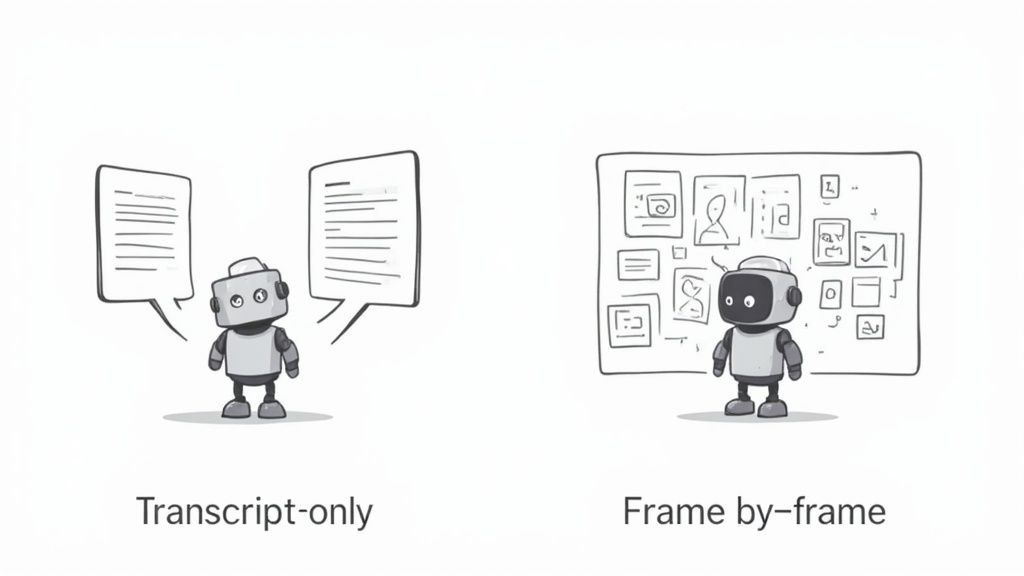
Pour comprendre pourquoi un résumé et un ensemble de notes sont si différents, il faut regarder comment fonctionne l’IA. La plupart des outils de résumé IA prennent un raccourci : ils analysent uniquement la transcription audio de la vidéo.
Cette approche centrée sur la transcription est rapide, mais elle a un énorme angle mort. Elle ignore complètement tout ce qui se passe à l’écran. Pour les contenus d’apprentissage, c’est rédhibitoire. Imaginez un tutoriel de programmation. La transcription peut mentionner un nom de fonction, mais ne verra jamais le code tapé. Une conférence de design peut décrire un flux utilisateur, mais n’en capturera pas le schéma dessiné. Le contexte visuel compte.
#Analyse uniquement de la transcription pour les résumés
Cette méthode aplatit une vidéo en un document texte simple. C’est comme tenter de comprendre une bande dessinée en ne lisant que les dialogues. Vous avez les mots, mais pas l’histoire.
Une IA de résumé vidéo youtube utilisant ce procédé fonctionne pour un contenu très textuel comme des interviews ou des reportages. Mais pour tout ce qui contient une information visuelle essentielle, le résultat est fondamentalement incomplet.
Pour quiconque essaie d’apprendre une compétence, ce vide entraîne une rupture de compréhension. Un résumé peut dire que la vidéo traite de « créer un composant React », mais ne vous montrera jamais le code réel. Vous pouvez approfondir ces limites dans notre analyse détaillée du classique résumeur vidéo IA.
Une meilleure approche traite la vidéo comme une vidéo, pas seulement comme un fichier audio. Les outils avancés utilisent une méthode multimodale qui analyse le contenu image par image, comme le ferait un humain.
Cette méthode combine deux flux de données :
Analyse audio : Elle traite les mots prononcés à partir de la transcription pour comprendre les concepts.
Analyse visuelle : Elle regarde l’écran pour identifier extraits de code, diagrammes, textes affichés, et démonstrations.
Contrairement aux outils ne traitant que la transcription, HoverNotes observe la vidéo pour saisir ce qui est réellement affiché. En tissant ces deux flux, l’IA crée des notes bien plus précises et utiles. Elle comprend que l’extrait de code montré à 03:45 est l’application directe du concept discuté.
La différence entre ces deux méthodes est frappante, surtout pour l’apprentissage. L’une vous donne un aperçu vague ; l’autre un enregistrement structuré et exploitable.
Méthode d’analyse
IA uniquement transcription (typique pour résumés)
IA visuel + transcription (idéal pour notes)
Fonctionnement
Extrait et analyse le texte de la transcription audio.
Analyse à la fois la transcription et les images vidéo.
Angle mort clé
Ignore totalement tout le contenu visuel : code, diagrammes, graphiques, textes à l’écran.
Angle mort minimal ; capture à la fois paroles et images.
Idéal pour
Résumer rapidement conférences, interviews, ou reportages sans visuels clés.
Comprendre en profondeur tutoriels, cours et tout contenu où les visuels comptent.
Exemple de sortie
« Le présentateur parle d’une nouvelle fonction JavaScript. »
« À 04:15, le présentateur écrit cette fonction... » [timestamped screenshot of code]
Le contexte visuel transforme un résumé passif en un outil d’apprentissage actif. Un outil basé uniquement sur la transcription pourrait dire « Le locuteur explique l’état du composant. » Un outil d’analyse visuelle capture cette explication et intègre une capture d’écran horodatée du code exact, vous permettant de revenir directement à ce moment.
Les résumés ne sont pas inutiles ; ce sont juste des outils différents pour des tâches différentes. Employer une IA de résumé vidéo YouTube fait sens quand votre objectif est l’efficacité et le filtrage, pas la rétention approfondie.
Ils sont les plus efficaces dans quelques situations précises.
Imaginez que vous recherchez un nouveau sujet et que vous avez une douzaine de vidéos prometteuses. Les regarder toutes prendrait des heures. C’est là qu’un résumé IA devient précieux.
Vous pouvez faire analyser chaque vidéo par l’outil et obtenir un résumé de 30 secondes. En quelques minutes seulement, vous identifiez une ou deux vidéos avec les informations spécifiques dont vous avez besoin, vous évitant ainsi des heures de contenu hors sujet.
Cela transforme une longue recherche en une tâche rapide de filtrage.
Beaucoup de contenus vidéo sont en fait juste de l’audio avec une image statique, comme les podcasts, les reportages ou de nombreuses interviews. Pour ceux-ci, le message central est purement verbal.
Un résumé fonctionne parfaitement ici car une analyse basée sur la transcription suffit. Il peut extraire les arguments ou opinions clés sans perdre le contexte essentiel, vous donnant les points principaux en un temps record.
Un résumé agit comme un éclaireur. Il analyse le terrain pour savoir s’il vaut la peine d’y consacrer une attention plus ciblée et approfondie. C’est un outil de reconnaissance, pas pour construire une base permanente.
Parfois vous n’avez pas besoin de plonger en profondeur. Vous voulez juste un rappel rapide des points principaux d’un cours que vous avez regardé le semestre dernier.
Une IA de résumé vidéo YouTube vous donne cette remise à niveau instantanée. Au lieu de naviguer dans une vidéo de 45 minutes pour retrouver un concept clé, vous pouvez parcourir un résumé concis et ramener l’information à l’esprit.
Les résumés servent la rapidité. Ils vous aident à décider, filtrer, et mémoriser rapidement les informations de haut niveau.
#Quand avez-vous absolument besoin de notes vidéo IA ?
Une IA de résumé vidéo youtube est idéale pour filtrer le contenu. Mais quand l’objectif devient l’apprentissage réel, les résumés ne suffisent pas. Pour les étudiants sérieux, autodidactes et tous ceux qui construisent une compétence, les notes générées par IA sont essentielles.
Les résumés vous donnent le « quoi ». De bonnes notes vous donnent le « comment » et le « pourquoi », transformant un visionnage passif en une séance d’apprentissage active.
Pour une conférence universitaire ou un tutoriel technique dense, un résumé sommaire est inutile. Un résumé d’un cours de calcul pourrait mentionner les « dérivées », mais passerait à côté des équations et des schémas au tableau.
Le plus grand échec des résumés est qu’ils passent à côté de la raison même de votre visionnage : le contexte visuel. Les outils qui ne traitent que la transcription sont aveugles à ce qui est réellement à l’écran.
Les notes détaillées générées par IA résolvent cela en capturant tout le contexte. Elles bâtissent un plan structuré des concepts clés et les associent à des captures d’écran horodatées des informations visuelles critiques. Cela transforme vos notes d’un vague rappel en un guide d’étude complet.
Si vous utilisez des outils comme Obsidian, Notion ou Logseq, vous construisez un « second cerveau » permanent. Les résumés sont trop superficiels pour cela ; ce sont des informations jetables, pas des connaissances durables.
C’est là que les notes générées par IA dans Markdown s’avèrent parfaites. Lorsque vous les sauvegardez directement dans votre système de fichiers local, elles deviennent des ressources consultables, liées et permanentes. C’est crucial pour les utilisateurs qui valorisent la confidentialité et la propriété de leurs données.
Possédez vos données : Les notes enregistrées comme fichiers .md dans votre coffre Obsidian vous appartiennent. Elles ne sont pas prisonnières du cloud d’une entreprise.
Créez des connexions : Vous pouvez lier ces notes vidéo à d’autres idées, tissant un riche réseau de connaissances.
Contexte consultable : Les captures d’écran intégrées rendent vos notes visuellement riches et faciles à parcourir lors d’une révision plusieurs mois plus tard.
Apprendre un logiciel, un langage de programmation ou une technique de design se joue dans le détail. Vous devez voir les clics précis au menu et les lignes de code. Un résumé vous dira qu’une vidéo porte sur « créer un tableau croisé dynamique dans Excel », mais ne vous montrera jamais comment.
C’est là que les notes IA brillent vraiment. Elles créent un guide visuel étape par étape. Chaque action critique est documentée par une capture d’écran horodatée, créant un manuel d’instructions personnalisé. Cela répond directement au problème de la rétention en apprentissage vidéo en vous offrant un dossier visuel détaillé à consulter. Les outils agissant comme une application complète de prise de notes IA sont conçus pour cela.
Si vous envisagez de faire quelque chose avec les infos d’une vidéo, vous avez besoin de notes qui capturent le processus, pas seulement le résultat.
#Comparaison du résultat final : ce que vous obtenez réellement
C’est là que la différence entre une IA de résumé vidéo YouTube générique et un preneur de notes IA dédié devient concrète. C’est la différence entre un fichier texte jetable et un actif d’étude permanent et interactif.
Un outil de résumé IA vous donne quelques paragraphes en texte brut, déconnectés de la vidéo. C’est une information que vous lirez probablement une fois, puis oublierez.
Un outil comme HoverNotes, une extension Chrome qui génère des notes IA, produit un document structuré, à plusieurs niveaux, conçu pour être réutilisé. Il fonctionne non seulement sur YouTube, mais sur n’importe quel site avec vidéos — de Udemy et Coursera au portail de cours de votre université.
Au lieu d’un simple dump de texte, vous obtenez un fichier Markdown (.md) proprement formaté. Pour quiconque utilise Obsidian, Logseq ou un outil local-first similaire, c’est un avantage énorme. Vos notes sont prêtes à l’emploi dès leur sauvegarde.
Ce fichier n’est pas juste un bloc de texte. Il comprend généralement :
Titres logiques : Les notes sont organisées avec des titres H2 et H3 reflétant la structure de la vidéo.
Listes imbriquées : Les idées clés sont décomposées en puces imbriquées.
Mise en forme intelligente : Les termes importants sont déjà en gras, facilitant la lecture.
Le véritable livrable est un document préorganisé, prêt pour l’étude. Cette approche respecte la manière dont les apprenants sérieux construisent leurs connaissances — par la structure, pas par un flot d’informations brutes.
Voici la différence la plus marquante : le contexte visuel. Un résumé textuel est aveugle à ce qui se passe à l’écran, mais les notes IA en regorgent.
HoverNotes intègre les captures d’écran directement dans vos notes, placées au bon endroit. Mais ce ne sont pas de simples images statiques. Chaque capture comprend une horodatage cliquable. Un clic, et vous revenez précisément à ce moment dans la vidéo.
Cette seule fonctionnalité transforme des notes passives en un index interactif puissant.
Si vous apprenez à partir d’un tutoriel de codage, vous ne recevez pas qu’une note sur une fonction. Vous obtenez une capture du code lui-même, et vous pouvez revenir immédiatement le voir expliqué. C’est essentiel pour combler le fossé entre regarder et faire. Vous pouvez découvrir plus ce processus dans notre guide pour transformer une vidéo YouTube en notes.
Pour quiconque construit une base de connaissances personnelle, le résultat est primordial. Obtenir un fichier .md propre avec une mise en forme riche et des éléments interactifs respecte le principe de propriété des données. Vos notes vous appartiennent, sur votre machine, dans un format universel.
#Choisir le bon outil pour votre workflow d’apprentissage
L’objectif n’est pas de trouver un outil universellement « meilleur ». Il s’agit de construire un workflow intelligent qui utilise l’outil adapté à chaque tâche, vous faisant passer d’un visionnage passif à un apprentissage actif.
Une approche hybride est souvent la plus pragmatique.
Une fois que vous avez trouvé une vidéo qui mérite votre temps, changez d’outil. Passez d’un résumé à un outil dédié à la prise de notes IA. C’est là que commence le vrai travail d’apprentissage, de rétention et d’application.
Ce workflow établit une distinction claire entre deux tâches différentes.
Filtrage : Utilisez les résumés pour saisir l’essentiel, vérifier la pertinence, et décider où investir votre attention. C’est un rapide « oui » ou « non ».
Étude : Utilisez un preneur de notes IA pour capturer des notes détaillées, structurées — avec contexte visuel — pour un apprentissage profond et durable.
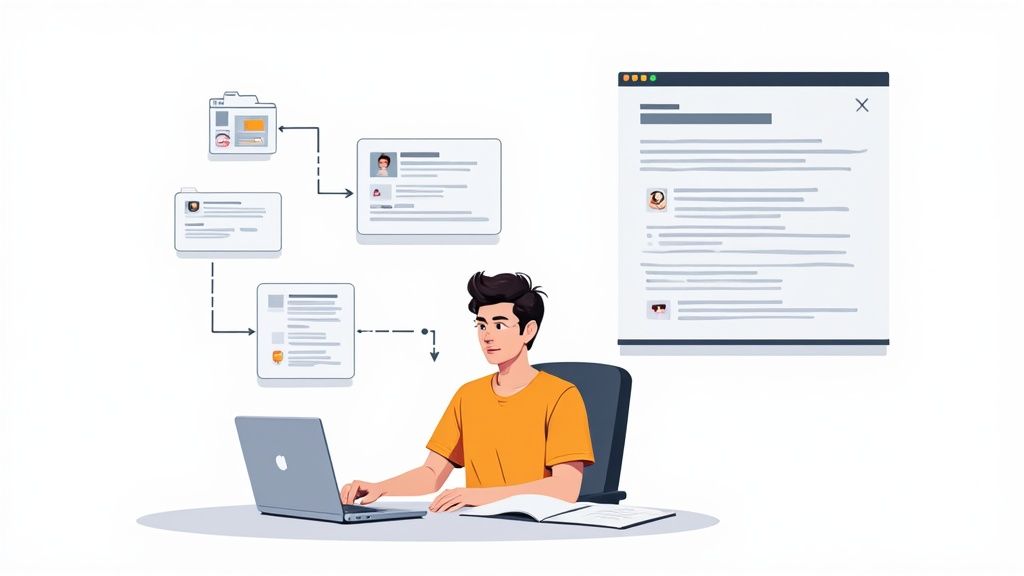
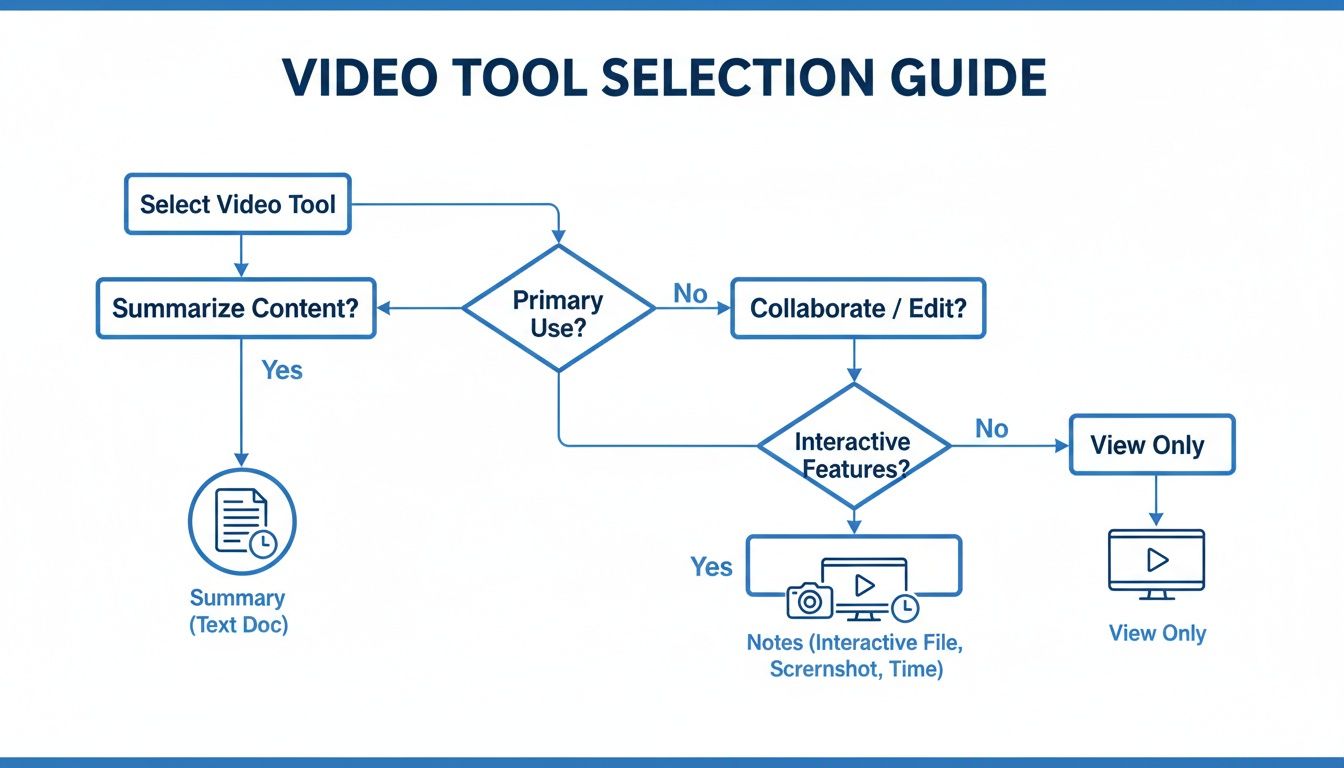
Cet arbre décisionnel aide à visualiser quand un résumé rapide suffit et quand il faut passer à une session complète de prise de notes.
L’idée clé est simple : si vous devez retenir ou appliquer l’information plus tard, il vous faut plus qu’un bloc de texte. Il vous faut un document structuré et interactif auquel revenir.
#Construire votre base de connaissances permanente
Pour les apprenants qui construisent activement une base de connaissances personnelle, cette deuxième étape est essentielle.
Votre but n’est pas seulement de regarder une vidéo ; c’est de transformer ses enseignements en un actif permanent et possédé. Un résumé est une note temporaire ; des notes structurées sont une brique pour votre second cerveau.
Quand vos notes sont sauvegardées en fichiers Markdown propres directement dans votre coffre Obsidian ou copiées proprement dans Notion, elles deviennent une part de votre capital intellectuel à long terme. Cela respecte les principes fondamentaux de propriété des données et de stockage local privilégié que valorisent beaucoup d’apprenants sérieux. Notre guide sur comment créer une base de connaissances propose plus de stratégies sur ce sujet.
En fin de compte, choisir le bon outil, c’est faire correspondre sa sortie à votre intention. Employez les résumés pour être efficace, mais utilisez des notes détaillées et riches en visuels pour vraiment apprendre.
Pour les apprenants construisant une base de connaissances personnelle avec Obsidian ou Notion, HoverNotes est conçu spécifiquement pour la deuxième étape de ce workflow. Il visionne la vidéo avec vous, générant des notes détaillées et structurées avec captures d’écran cliquables, et les sauvegarde sous forme de fichiers Markdown directement sur votre ordinateur. Les notes se copient proprement dans Notion si c’est là que vous centralisez tout. Vous pouvez l’essayer gratuitement sur https://hovernotes.io — vous bénéficiez de 20 minutes de crédits IA, sans carte bancaire. Consultez les options actuelles sur la page tarifaire HoverNotes.
Des notes utiles doivent vous amener à faire quelque chose avec le contenu, et non simplement à stocker davantage de texte. L’U.S. Institute of Education Sciences recommande d’espacer l’apprentissage dans le temps, de combiner des éléments graphiques avec des explications verbales, de recourir au rappel actif et de poser des questions explicatives approfondies (guide de bonnes pratiques). Une revue à comité de lecture consacrée à la recherche sur les vidéos éducatives souligne également l’importance de signaler les informations importantes, de diviser les leçons en segments gérables, de donner aux apprenants un contrôle sur le déroulement et d’ajouter des incitations à l’apprentissage actif (revue). Appliqué ici, cela signifie faire une pause aux limites des concepts, ne capturer que les éléments visuels dont vous avez besoin, formuler une question avec vos propres mots, puis y répondre plus tard avant de relancer la source. Ces pratiques sont fondées sur des données probantes ; un pourcentage universel de rétention pour une application ou un flux de travail donné ne l’est pas.
Les notes vidéo IA analysent les visuels et l'audio pour améliorer l'apprentissage et la rétention. Découvrez pourquoi cette méthode surpasse les approches audio seules.
Explorez les plans d’Otter AI pour voir s’ils correspondent à vos objectifs. Découvrez pourquoi l’apprentissage par vidéo nécessite une approche différente et comparez les meilleures alternatives conçues pour les étudiants.
Découvrez comment un résumé vidéo par IA peut révolutionner votre manière d’apprendre. Ce guide explique leur fonctionnement, les critères à considérer et des méthodes pratiques pour les étudiants.