A practical guide on how to take notes on videos from YouTube, Udemy, or any platform. Learn a better workflow to improve retention and stop forgetting.
By HoverNotes Team•15 min read
You’ve probably binged a series of video tutorials, felt productive, and then forgotten nearly everything a week later. It’s not your memory; it's how our brains work. Passively watching video is one of the least effective ways to learn because it doesn’t force you to engage.
We've all been stuck in the frustrating loop of trying to take notes on a video. It's a constant battle that pulls you out of the learning flow. The old way is broken, but modern tools offer a much smoother path.
Challenge
The Old Way (The Problem)
The New Way (The Solution)
Keeping Up
Constantly pausing and rewinding, losing your focus and momentum.
Notes are automatically timestamped to the exact moment in the video.
Visuals
Taking scattered screenshots that get lost in a random desktop folder.
One-click screen captures are embedded directly within your notes.
Context
Juggling a physical notebook and the screen, creating disconnected notes.
Note-taking happens right alongside the video, preserving full context.
Finding Notes
Searching through messy documents or notebooks to find a specific point.
All notes are instantly searchable and linked back to the video source.
This old, manual struggle just highlights a simple truth: if you want to make video learning stick, you have to turn it from passive viewing into an active, engaging process.
Trying to wrestle with a video and a notepad at the same time is a recipe for disaster. The common methods are clumsy, inefficient, and they kill your focus.
The Pause-and-Play Dance: You spend more time hitting the spacebar than you do actually learning. Every time you stop to type, your mental momentum grinds to a halt.
The Screenshot Graveyard: You snap a picture of a key diagram or code snippet, but it ends up orphaned on your desktop, completely disconnected from the notes that give it meaning.
The Split-Brain Problem: Trying to watch a video while scribbling in a physical notebook is just awkward. Your attention is divided, and your notes end up lacking the crucial on-screen context.
The real goal isn't just to write down what the speaker says. It's to capture your own insights and the critical visual context at the exact moment of understanding. Without that link, your notes lose most of their power.
The key is to build a system that makes this engagement feel seamless, not like another chore. Our guide on how to study effectively for exams digs deeper into these active learning strategies, which are absolutely essential for making knowledge stick.
#A universal system for taking notes on any video platform
Effective learning principles don’t change when you switch from YouTube to Udemy. Whether you’re watching a lecture on a clunky university portal, a design course on LinkedIn Learning, or a local video file on your computer, the goal is the same: pull out the key ideas, grab crucial visual context, and link it all back to the source. Reinventing your note-taking process for every platform is a waste of time.
The solution is a tool that overlays a consistent note-taking environment on any website with a video. Imagine having the exact same focused, side-by-side note panel whether you're on a mainstream platform or some obscure internal training portal.
This approach immediately solves several frustrating platform-specific problems:
No More Distractions: YouTube is built to keep you clicking, not learning. A universal tool can create a "focus mode" that hides the distracting sidebar and endless comments.
Total Inconsistency: Every platform has a different player with its own weird controls. A good system provides its own set of advanced controls—like granular speed adjustments and universal keyboard shortcuts—that work the same way everywhere.
Escape the Walled Gardens: Notes you take in a platform's built-in tool are trapped there forever. A universal system saves your notes as plain text files, so you actually own them.
A consistent workflow means you spend less mental energy fighting the interface and more time actually understanding the content. It turns note-taking from a chore into a simple, repeatable habit.
A good example is HoverNotes, a Chrome extension that watches videos with you, generates AI notes, and saves them as Markdown directly to your file system. Because it works anywhere there’s a video—from YouTube and Udemy to your university's lecture portal—you get a single, reliable process no matter where your learning takes you. Your system for taking notes on videos becomes independent of the content source.
This consistency is especially powerful when paired with a structured note-taking method. For a deep dive into one of the most effective structures, check out our guide on using the Cornell Method for video note-taking. When you combine a proven structure with a universal tool, you create a seriously powerful learning engine.
Theory is fine, but a concrete, repeatable process gets results. Let's walk through building a workflow you can use today, whether you're tackling a university course or a quick YouTube tutorial. The goal is a simple, effective habit that sticks.
The foundation of any good learning workflow is your environment. Distractions are the enemy of retention. Recommended videos on YouTube or notification pop-ups are actively working against your learning goals. A practical workflow has to start by cutting them out.
This is where tools like HoverNotes come in. It offers a distraction-free video mode that isolates the video player and puts your notes right alongside it. All the ads, comments, and sidebars designed to steal your attention are just gone. Instantly, you have a dedicated learning space in your browser.
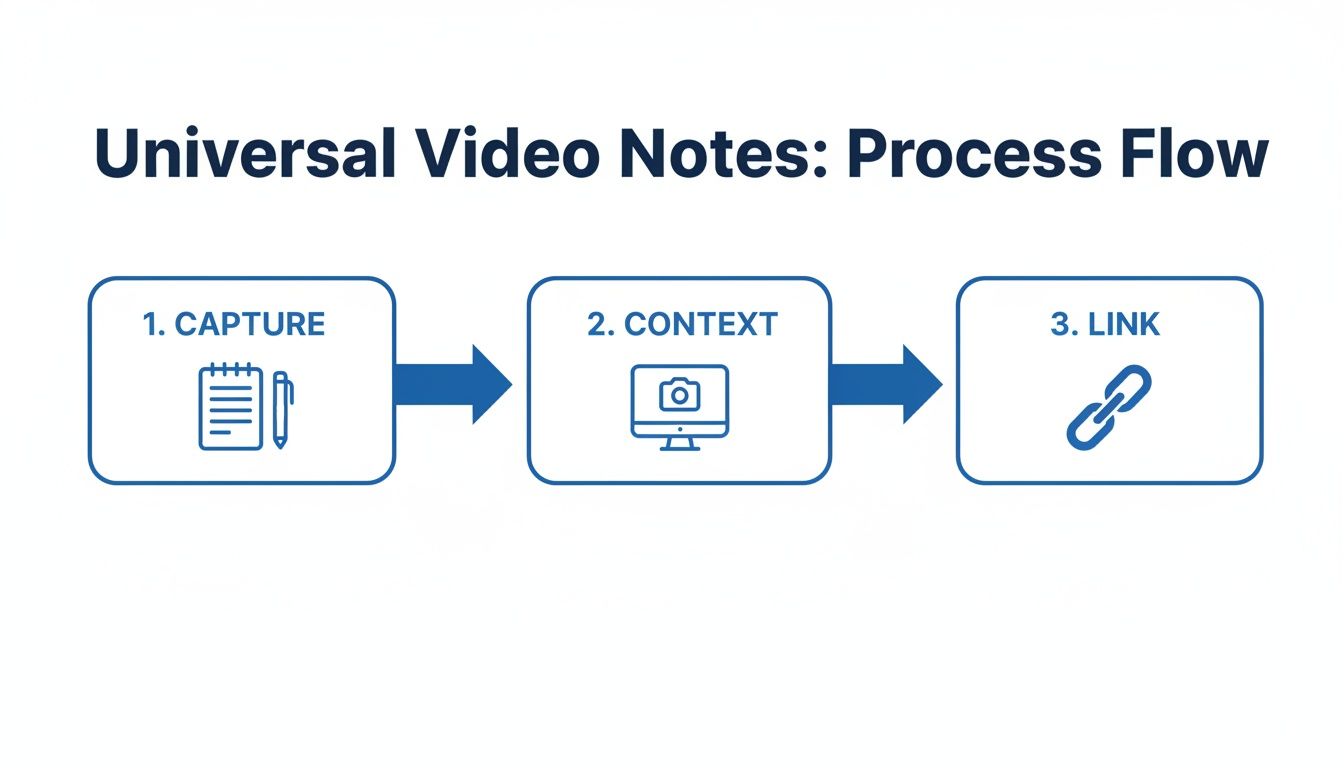
This simple flowchart breaks down the core process of pulling useful notes from any online video.
As you can see, it's a simple loop: capture the core idea, add the visual context, and link it all back to the exact moment it happened.
Once your space is locked in, the next step is capturing information without breaking your flow. A solid workflow should seamlessly blend your own thoughts with precise visual proof from the video itself. Constantly pausing to type is clunky, and taking random, full-screen screenshots just creates a messy folder of disconnected images.
The real trick is to integrate these actions. While watching, you need to be able to:
Jot down your own thoughts: This is where the real learning happens. Add questions, summarize concepts in your own words, and connect new ideas to what you already know.
Grab visual context: Instantly snag a screenshot of a complex diagram, a slide packed with key data, or a snippet of code—and drop it directly into your notes.
Timestamp everything automatically: Every note and every screenshot should be linked to the exact moment in the video, no manual effort required.
An effective system makes capturing information feel effortless. For instance, HoverNotes lets you use keyboard shortcuts to snip just the code snippet or diagram you need—no need to capture the whole frame—and embeds it right where you're typing. Every screenshot includes a clickable timestamp, so one click returns you to that exact moment.
The final piece of the puzzle is making sure your notes are permanent, searchable, and actually yours. If your notes are locked inside a specific platform's proprietary format, they aren't truly yours. The best practice is to save them in a universal, local-first format like Markdown (.md).
This simple step has massive benefits. Markdown files are just plain text, which means they'll be readable on any device you own, now and 50 years from now. You don't need a specific app or an internet connection to access them.
This is a game-changer for anyone using a Personal Knowledge Management (PKM) app. If you're an Obsidian user, your video notes can be saved directly into your vault. No importing, no syncing, no fuss. They immediately become a linkable part of your digital brain. For Notion users, notes can be copied and pasted with all formatting perfectly intact.
You own the files. This is one of the most important online learning best practices you can adopt. Your knowledge should never be held hostage by a web service.
The most tedious part of taking notes from videos is the manual labor. Pausing, rewinding, typing everything out, trying to summarize on the fly... it’s a drain on your focus.
This is where AI automates the grunt work, freeing up your mental bandwidth to actually think about the material. But not all AI note-takers are created equal.
There's a critical difference: some tools just process the audio transcript, while others "watch" the video frame-by-frame. For any technical tutorial, design course, or scientific lecture, a transcript-only tool is useless. It completely misses the code on screen, the diagrams being drawn, and the formulas on the whiteboard.
The visual context is often where the real learning happens.
Imagine learning Python from a YouTube tutorial. The instructor is explaining a complex function while typing out the code. A transcript gives you what they said, but it won't give you the actual code they wrote.
A smarter approach is to use a tool that captures both. Unlike tools that only parse transcripts, HoverNotes watches the video to capture what's actually on screen. It generates AI notes while also letting you grab timestamped screenshots of the crucial visual moments. Suddenly, your notes contain not just the spoken explanation, but the visual proof to go with it.
This is about using AI as a smart assistant, not a replacement for your brain. The AI handles the initial capture, freeing you up to think critically, ask questions, and connect ideas.
Modern AI can also break down language barriers. You could watch a lecture from a Japanese university but get your notes generated directly in English. This opens up a world of learning content that was previously out of reach.
If you want to dig deeper into the different options out there, we've put together a guide on the best AI note-taker apps to help you choose.
Curious to see how it works? Many tools offer a free trial. HoverNotes, for instance, gives you 20 minutes of free AI credits without asking for a credit card. It’s a low-risk way to see if letting an AI handle the heavy lifting fits your workflow. Confirm current options on the HoverNotes pricing page.
#Connecting video notes to your personal knowledge base
Taking notes is only half the battle. If your insights end up scattered across random documents or locked inside a proprietary app, they're not much use. The real goal is to turn fleeting video content into a permanent, interconnected part of your digital brain.
This is especially true for anyone using a personal knowledge management (PKM) system like Obsidian or Notion. The whole point of these tools is to build a lasting library of what you know. Your video notes need to plug directly into that library without a complicated import/export dance every time.
The most reliable way to make sure your knowledge lasts is to keep it in a simple, open format on your own machine. This is the idea behind local-first storage. When you save notes as plain Markdown (.md) files, you’re not just renting space in someone else’s cloud—you own the files outright.
This has a few powerful advantages:
Permanence: Markdown is just plain text. It will be readable on any computer, forever. Your notes won’t disappear if a service you rely on shuts down.
Privacy: Your notes stay on your machine. No company is scanning them for data, and no cloud sync is required unless you set one up yourself.
Control: You can back them up, move them around, or search through them with system tools. They are yours to manage.
Storing your knowledge in open, local formats is like building your library on a foundation of solid rock instead of shifting sand. You own the files. Move them, back them up, grep them—they're just Markdown.
This approach is central to how a tool like HoverNotes is designed. It saves notes as .md files directly to your file system, making them instantly compatible with local-first apps.
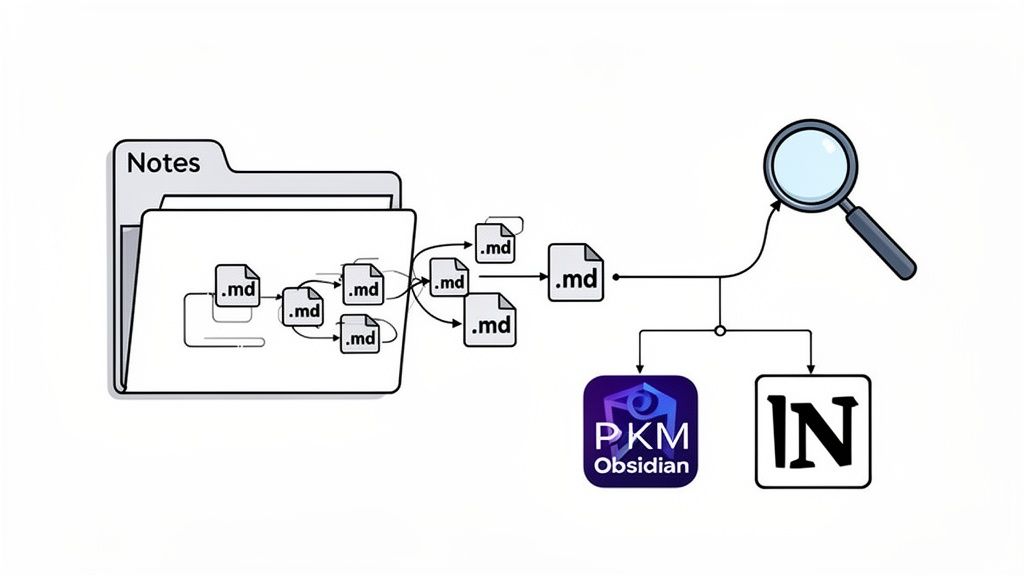
Here’s a simple visual of what that looks like. Your individual notes are just local files, but inside a tool like Obsidian, they become an interconnected web of ideas.
This image nails the concept: simple Markdown files become powerful when they can be searched, linked, and visualized within a dedicated knowledge tool.
For Obsidian users, the workflow is incredibly smooth. When you take notes on videos with a tool that saves directly to your file system, those notes can land straight in your Obsidian vault. They immediately become part of your knowledge graph, ready to be linked to other ideas without any extra steps.
Notion users have a slightly different but equally effective workflow. While Notion is cloud-based, a good note-taking tool will ensure your notes are copy-paste friendly. This means you can copy your structured notes—complete with headings, bullet points, and embedded images—and paste them directly into a Notion page with the formatting perfectly intact.
The real goal is to eliminate friction. If you're serious about learning from videos, building a durable and interconnected set of notes is non-negotiable. For a deeper dive on this, check out our guide on how to create a knowledge base that truly lasts.
Even without AI, the distraction-free mode and screenshots are worth it.
Even with a solid plan, you're bound to have questions as you start taking video note-taking more seriously. Here are some of the most common ones.
Question
Answer
What's the most effective way to take notes from a video?
A hybrid approach works best. Let AI handle the heavy lifting—summarizing key points and transcribing—so you can focus on actually understanding the material. Then, you step in. Actively add your own thoughts, ask questions, and grab timestamped screenshots of important diagrams or code snippets. It’s the perfect mix of AI efficiency and your own human insight.
Can I take notes on videos from platforms like Coursera?
Yes. Platforms like Coursera or Udemy have built-in note features, but they trap your knowledge in their ecosystem. A much smarter move is to use a universal tool that works on any website with a video. This way, you have one consistent process, and more importantly, you actually own the notes you create. They don't disappear if your subscription ends.
How should I organize my video notes for easy review?
Get your notes into a personal knowledge management (PKM) system like Obsidian or Notion. Saving them as local Markdown (.md) files is the best way. They’re simple, portable, and incredibly searchable. When you save notes directly to an Obsidian vault, for example, they immediately become part of your larger web of knowledge.
The goal is to break your notes free from isolated platforms and build a single, centralized library of knowledge that you control. This is how you transform passive watching into a real, lasting asset.
The best way to figure out what works for you is to just try it. If you use Obsidian for learning, HoverNotes saves notes directly to your vault. The timestamp screenshot feature alone saves hours of rewatching.
Useful notes should make you do something with the material, not merely store more text. The U.S. Institute of Education Sciences recommends spacing learning over time, combining graphics with verbal explanations, using active retrieval, and asking deep explanatory questions (practice guide). A peer-reviewed review of educational video research also emphasizes signaling important information, splitting lessons into manageable segments, giving learners control, and adding active-learning prompts (review). Applied here, that means pausing at concept boundaries, capturing only the visual evidence you need, writing a question in your own words, and later answering it before replaying the source. These practices are evidence-based; a universal retention percentage for one app or workflow is not.
Learn how a study guide maker transforms video lectures into actionable notes. This guide covers setup, capture, and integrating notes into your workflow.
Stop forgetting what you watch. This guide offers science-backed methods to boost your video learning retention using active recall and smarter note-taking.