Fathom-Alternative für Video-Lernen (nicht für Meetings)
Suchst du eine Alternative zu fathom ai für Studierende? Entdecke Video-Lernwerkzeuge, die visuelle Notizen erfassen, nicht nur Transkripte, für YouTube und Coursera.
Von HoverNotes Team•13 Min. Lesezeit
Kurzfassung:Fathom eignet sich hervorragend zum Zusammenfassen von Zoom-Meetings, ist jedoch das falsche Werkzeug für Studierende. Es transkribiert nur Audio und ignoriert vollständig die visuellen Inhalte auf dem Bildschirm wie Code, Diagramme und Formeln. Um von Videos auf Plattformen wie YouTube, Coursera oder Uni-Portalen zu lernen, braucht man eine Alternative, die Videos anschaut, visuelle Inhalte mit zeitgestempelten Screenshots erfasst und Notizen speichert, die man wirklich besitzt (wie lokale Markdown-Dateien für Obsidian).
Kommen wir gleich zur Sache: Fathom ist für die Zusammenfassung von Zoom-Business-Meetings konzipiert. Für Studierende ist es jedoch das falsche Werkzeug. Warum? Weil Lernen mit einem Video nicht wie ein Geschäftsmeeting ist. Fathom transkribiert, was der Professor sagt, verpasst aber komplett, was er – den Code auf dem Bildschirm, die Diagramme auf dem Whiteboard oder die gezeichneten chemischen Formeln.
Fathom wurde für die Geschäftswelt entwickelt. Denken Sie an Verkaufsgespräche, Team-Updates und Aufgaben, die in ein CRM eingegeben werden. Die gesamte Funktionalität ist auf dieses Umfeld optimiert.
Wenn Sie versuchen, aus einer aufgezeichneten Vorlesung auf Coursera oder einem Programmier-Tutorial auf YouTube zu lernen, wird dieser Schwerpunkt zum großen Problem. Ein Transkript kann die Feinheiten einer hervorgehobenen Codezeile oder den Fluss eines handgezeichneten Diagramms nicht erfassen. Das ist, als wollte man malen lernen, indem man nur einer Beschreibung der Farben zuhört. Manuelle Notizen sind ebenfalls frustrierend – ständiges Pausieren und Abspielen ist mühsam, und Screenshots liegen verstreut und ohne Kontext vor.
Das ist nicht nur eine kleine Unannehmlichkeit, sondern ein grundlegendes Missverhältnis. Die Welt der KI-Tutoring-Software zeigt, wie spezialisiert Lernwerkzeuge inzwischen sind.
Ein wirklich auf Studierende ausgerichtetes Tool muss über Audio hinausgehen. Es muss visuellen Kontext erfassen, auf jeder Bildungsplattform funktionieren und sich in den Workflow eines Studierenden einfügen – was zunehmend heißt, sich mit Apps wie Obsidian oder Notion zu verbinden. Um Ihr Video-Lernen wirklich zu verbessern, brauchen Sie ein Werkzeug, das genau für diesen Zweck gebaut ist.
#Fathom vs. eine alternative Lösung für Studierende (HoverNotes)
Hier eine praktische Gegenüberstellung eines auf Business fokussierten Tools wie Fathom mit einer auf Studierende ausgerichteten Alternative wie HoverNotes.
Aspekt
Fathom AI
HoverNotes (Alternative für Studierende)
Primärer Anwendungsfall
Live-Zusammenfassungen von Geschäftstreffen (Zoom, GMeet)
Jede Website mit Video (YouTube, Udemy, Coursera, lokale Dateien)
Notizformat
Cloud-basiert, proprietäres Format
Lokal-basierte Markdown (.md) Dateien
Visuelle Inhalte
Verpasst alle Bildschirminhalte
Zeitgestempelte Screenshots und ausgeschnittene Bereiche
Am besten geeignet für
Vertriebsprofis, Manager
Studierende, Selbstlerner, Wissensarbeiter
Diese Tabelle sagt alles: Fathom ist für Fachleute gedacht, die Gespräche dokumentieren. Studentenlösungen sind für Lernende, die Wissen gesprochen und gesehen erfassen.
#Warum Fathom bei Meetings glänzt, bei Vorlesungen aber versagt
Seien wir ehrlich: Fathom ist ein solides Tool für seine Zielgruppe – Geschäftsanwender. Es zeichnet Live-Meetings gut auf, fasst sie zusammen, generiert To-Dos und integriert sich in CRMs wie Salesforce. Es wurde für Gespräche gebaut, bei denen das Wichtigste ist, was gesagt wird.
Diese Stärken werden im Klassenzimmer jedoch zu Nachteilen. Das Ziel von Studierenden ist nicht, To-Dos zu verfolgen, sondern komplexe Informationen zu verstehen und zu behalten.
Im Kern transkribiert Fathom Audio. Das ist perfekt für Gespräche, verfehlt jedoch den Zweck bei den meisten Lerninhalten.
Stellen Sie sich vor, Sie wollen Python anhand eines Video-Vortrags nur mit einem Transkript lernen. Sie würden Sätze erhalten wie "Schauen Sie sich jetzt diese Funktion auf dem Bildschirm an", aber der eigentliche Code fehlt. Syntax, Struktur, Ergebnis – alles weg.
Dasselbe Problem taucht überall auf:
Diagramme in einer Chemie-Vorlesung
Formeln auf einem digitalen Whiteboard
Anatomie-Folien in einem Medizinkurs
Diagramme und Grafiken in einer Wirtschaftslektion
Ohne die visuelle Ebene verlieren die gesprochenen Worte ihre Bedeutung. Wirkliches Lernen passiert, wenn man hört, was gesagt wird, und es mit dem verbindet, was man sieht. Deshalb entstehen aus einem Transkript eines YouTube-Videos selten brauchbare Notizen. Als Suchender nach einer Fathom-Alternative brauchen Sie ein Tool, das beides erfasst.
#Plattformeinschränkungen isolieren dich von den Lernzentren
Fathom wurde entwickelt, um sich mit dem Kalender eines Professionals zu synchronisieren und automatisch geplanten Zoom- und Google-Meet-Calls beizutreten.
Aber wo lernen Studierende tatsächlich? Ihre Inhalte sind verstreut in einem riesigen Ökosystem, für das Fathom nicht konzipiert wurde:
YouTube: Die weltweit größte Tutorials-Bibliothek.
Udemy, Coursera und edX: Die Giganten der Online-Kurse.
Universitätsportale: Wo Professoren aufgezeichnete Vorlesungen hochladen.
Lokale Videodateien: Heruntergeladene Kurse zum Offline-Lernen.
#Was Studierende wirklich von einem Video-Notizwerkzeug brauchen
Effektives Lernen mit Videos heißt mehr als nur das Transkript zu bekommen. Die eigentliche Herausforderung ist, den "anschauen und vergessen"-Kreislauf zu durchbrechen, bei dem sich stundenlange Vorlesungen vermischen und nichts haften bleibt. Um das zu ändern, musst du eine dauerhafte, durchsuchbare Wissenssammlung aus dem Gesehenen aufbauen.
Das bedeutet, dass dein Lernwerkzeug mehr können muss als nur zuhören. Bei technischen Themen – Ingenieurwesen, Medizin oder Programmieren – ist ein Tool, das nur Audio erfasst, grundsätzlich defekt. Du musst den visuellen Kontext mitschneiden.
#Grundlegende Anforderungen für das Lernen mit Videos
Ein Tool für Studierende muss einige zentrale Versprechen erfüllen, die sich von den Anforderungen eines Geschäftsanwenders unterscheiden.
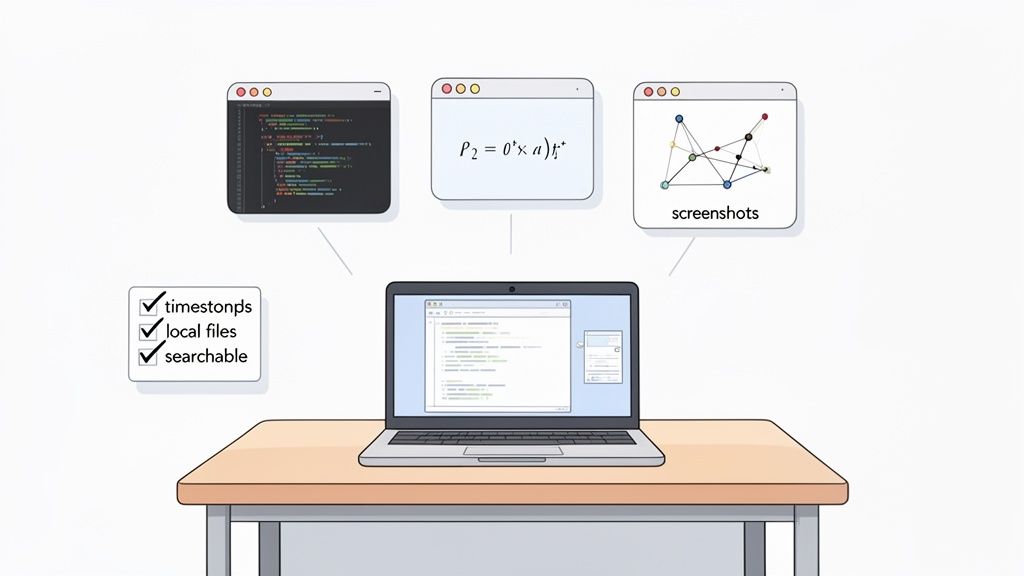
Erfassung des visuellen Kontexts: Die Möglichkeit, Diagramme, Formeln, Code-Snippets und Folien zu screenshotten, ist unverzichtbar.
Klickbare Zeitstempel: Jede Notiz und jeder Screenshot muss auf den genauen Moment im Video zurückverlinken. Dieses Feature spart stundenlanges Hin- und Her-Suchen.
Plattformunabhängigkeit: Es muss überall funktionieren, wo du lernst: YouTube, Coursera, das Vorlesungsportal deiner Uni und sogar bei lokalen Videodateien.
Lokale Datenhoheit: Deine Notizen gehören dir. Für viele Studierende, besonders mit Obsidian, müssen Notizen als Dateien auf deinem Computer leben, nicht in einer proprietären Cloud.
Das Ziel ist eine persönliche Wissensbibliothek, die du jederzeit durchsuchen und nutzen kannst. Das verlangt nach Notizen in einem offenen Format wie Markdown (.md), das jeder Texteditor öffnen kann.
Für diejenigen, die sich visuelle Hinweise zum Merken brauchen, ist die Fähigkeit, das Sichtbare einzufangen, das A und O. (Wenn das auf dich zutrifft, sieh dir diese Lerntechniken für visuelle Lerntypen an).
Ein Tool wie HoverNotes wurde genau für diese Bedürfnisse gebaut. Es ist eine Chrome-Erweiterung, die Videos mit dir zusammen anschaut, KI-Notizen generiert und diese als Markdown direkt auf dein Dateisystem speichert. Es verarbeitet nicht nur das Transkript, sondern verfolgt das Video, um zu erfassen, was tatsächlich auf dem Bildschirm passiert. Deine Notizen, einschließlich zeitgestempelter Screenshots, werden als saubere Markdown-Dateien direkt auf deinem Rechner gespeichert. Dieser einfache Wechsel verwandelt passives Schauen in aktiven Wissensaufbau.
#Vorstellung von HoverNotes: Die Fathom-AI-Alternative für Studierende
HoverNotes ist eine Chrome-Erweiterung, die von Grund auf für Studierende gebaut wurde, die von Videos, Diagrammen und Code lernen. Es hört nicht nur zu, sondern schaut das Video mit dir zusammen und erfasst das Wichtige.
Es wurde so konzipiert, dass es die täglichen Probleme von Studierenden löst. Während Fathom auf Zoom festhängt, funktioniert HoverNotes überall dort, wo es Video gibt – YouTube-Tutorials, Coursera-Kurse, Universitätsportale und sogar lokale Videodateien.
#Entwickelt für Student:innen-Workflows, nicht für Business-Meetings
Der entscheidende Unterschied ist die Ausgabe. Statt einer cloud-basierten Zusammenfassung speichert HoverNotes deine Notizen als einfache Markdown (.md) Dateien direkt auf deinem Computer. Für Studierende mit Obsidian ist das enorm. Die Notizen landen direkt im Obsidian-Tresor und schaffen eine dauerhafte, durchsuchbare Bibliothek.
„Im Gegensatz zu Tools, die nur das Transkript auswerten, schaut HoverNotes das Video an und erfasst, was wirklich auf dem Bildschirm passiert.“
Dieser lokal-zuerst-Ansatz bedeutet: Du besitzt dein Wissen selbst. Die Dateien gehören dir. Du kannst sie sichern, bearbeiten und offline nutzen. Deine Notizen sind nicht hinter einem Login versteckt, der verschwinden könnte.
HoverNotes bietet Funktionen fürs visuelle Lernen, die Meeting-Software nicht hat.
Zeitgestempelte Screenshots: Jeder Screenshot enthält einen anklickbaren Zeitstempel. Ein Klick bringt dich genau zu diesem Moment im Video zurück.
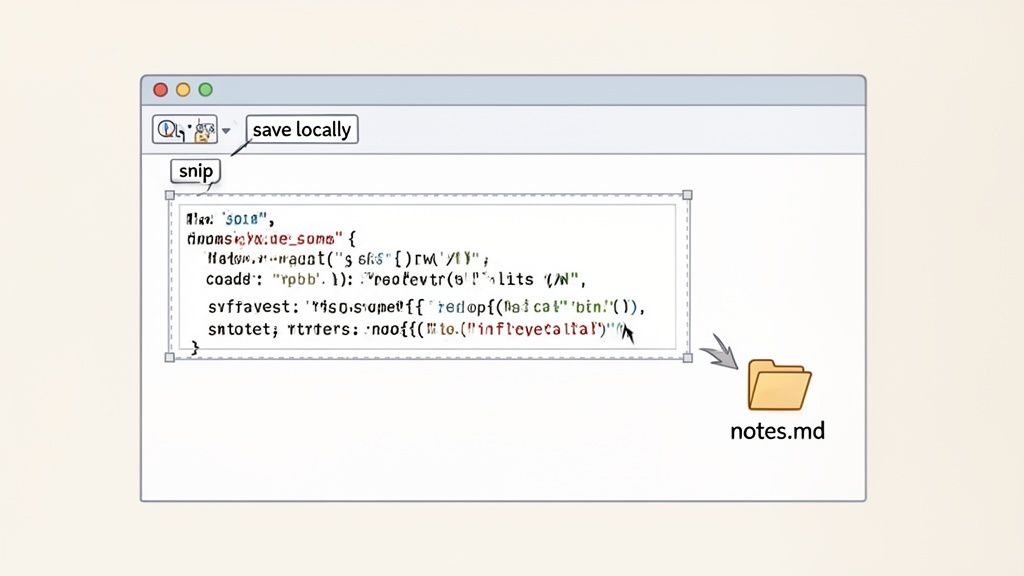
Ausschnitt-Erfassung: Brauchst du nicht den ganzen Bildschirm? Schneide genau den Code-Block, die Formel oder das Diagramm aus und füge ihn in deine Notizen ein.
Ablenkungsfreier Videomodus: Dieses Feature blockiert Werbung und Seitenleisten und stellt Video und Notizen nebeneinander für fokussiertes Lernen dar.
Selbst wenn du lieber manuell Notizen machst, sind der Editor, die Screenshots und der Videomodus kostenlos nutzbar. Mehr Infos zu HoverNotes auf der offiziellen Website. Das Ziel ist nicht nur Notizen machen, sondern eine visuelle Lernressource erstellen, die dir hilft, das Gelernte zu behalten.
#Wie Fathom und HoverNotes studentische Workflows abbilden
Kommen wir zum Praktischen: Wie funktionieren diese Tools beim tatsächlichen Lernen?
Du schaust dir ein Python-Tutorial auf YouTube an. Der Dozent zeigt eine wichtige Funktion auf dem Bildschirm.
Mit Fathom: Fathom transkribiert, was gesagt wird, etwa: „Okay, schaut euch jetzt diese Funktion an.“ Der Transkripttext ist korrekt, aber der eigentliche Code fehlt. Für Programmierer ist das eine nutzlose Notiz.
Mit HoverNotes: Du nutzt das „Snip“-Tool, um genau den Codeblock zu erfassen. Der Screenshot wird sofort zeitgestempelt in deine Notizen eingefügt und verlinkt dich zurück zur Erklärung.
Das eine gibt dir einen Hinweis auf das, was du verpasst hast. Das andere liefert dir die Antwort.
#Ein Diagramm in einer Biologie-Vorlesung überprüfen
Du bist in einer Uni-Vorlesung zum Krebszyklus. Der Professor erläutert ein komplexes Diagramm.
Mit Fathom: Du bekommst ein Wort-für-Wort-Transkript. Hilfreich, aber den Krebszyklus nur anhand der Worte zu lernen, ist mühsam.
Mit HoverNotes: Du machst einen vollständigen Screenshot vom Diagramm. Er landet zusammen mit der KI-Zusammenfassung dessen, was der Professor sagte, in deinen Notizen. Du hast das Bild und die Erklärung zusammen.
Wenn die visuellen Inhalte die Lektion sind, ist ein Tool, das nicht sieht, das falsche Werkzeug. Eine echte Video-Notiz-App muss visuell-vorangestellt sein.
#Vergleich der Funktionen für studentische Workflows
Diese Tabelle zeigt, wie die Apps zentrale studentische Aktivitäten handhaben.
Studentische Aufgabe
Ansatz von Fathom AI
Ansatz von HoverNotes
Was ist besser für Studierende?
Einen Code-Schnipsel erfassen
Transkribiert das Audio, verpasst den visuellen Code.
Erfasst einen Screenshot des Codes mit Zeitstempel.
HoverNotes. Du bekommst den tatsächlichen Code.
Ein Vorlesungsdiagramm durchsehen
Liefert ein Transkript, aber keinen visuellen Kontext.
Screenshot vom Diagramm + KI-Zusammenfassung.
HoverNotes. Es erfasst sowohl das Visuelle als auch das Gesprochene.
Für eine Prüfung vorbereiten
Muss Transkripte in separate Apps exportieren.
Speichert Notizen mit Bildern direkt in Obsidian/Logseq, bereit zur Wiederholung.
HoverNotes. Schafft einen nahtlosen Übergang vom Lernen zur Prüfungsvorbereitung.
Eigentum an den Daten
Speichert alle Notizen in Fathoms Cloud.
Speichert Notizen als lokale Markdown-Dateien auf deinem Rechner.
HoverNotes. Ideal für Datenschutz und langfristiges Wissensmanagement.
Die Workflows verfolgen unterschiedliche Ziele. Fathom dokumentiert, was in einem Meeting gesagt wurde. HoverNotes hilft dir, das Sichtbare und Gehörte in einer Lektion zu verstehen und zu behalten.
Für Studierende, die persönliche Wissensmanagement-Tools wie Obsidian nutzen, ist der Speicherort der Notizen zentral.
HoverNotes speichert Notizen als .md-Dateien direkt im Obsidian-Tresor, kein proprietäres Format oder Sync-Dienst – deine Notizen gehören dir. Mehr Infos gibt es in dieser ausführlichen Analyse von Fathom-Alternativen.
Fathom ist ein Cloud-Dienst. Deine Notizen liegen auf deren Servern. Für Datenschutz-Bewusste ein Ausschlusskriterium.
HoverNotes nutzt eine lokal-zuerst-Architektur. Deine Notizen werden als Markdown (.md) Dateien auf deinem Rechner gespeichert. Du besitzt sie.
Das bedeutet:
Mühelose Obsidian-Integration: Notizen tauchen automatisch in deinem Tresor auf.
Vollständige Privatsphäre: Notizen verlassen nie dein Gerät.
Zukunftssicheres Wissen: Markdown ist ein universelles Format. Deine Notizen bleiben über Jahrzehnte lesbar.
Das macht HoverNotes zur praktikablen Wahl für alle Studierenden, die ein privates "zweites Gehirn" aufbauen.
Um das klarzustellen: Das ist keine Kritik an Fathom. Für Live-Meetings im Business ist es eine potente Lösung. Wenn dein Tag voll mit Salescalls oder Teammeetings auf Zoom und Google Meet ist, ist Fathom wahrscheinlich die richtige Wahl. Die CRM-Integrationen und Kollaborationsfunktionen sind auf Geschäftspraktiken ausgelegt.
Das Ziel ist, das passende Werkzeug für den jeweiligen Zweck zu wählen.
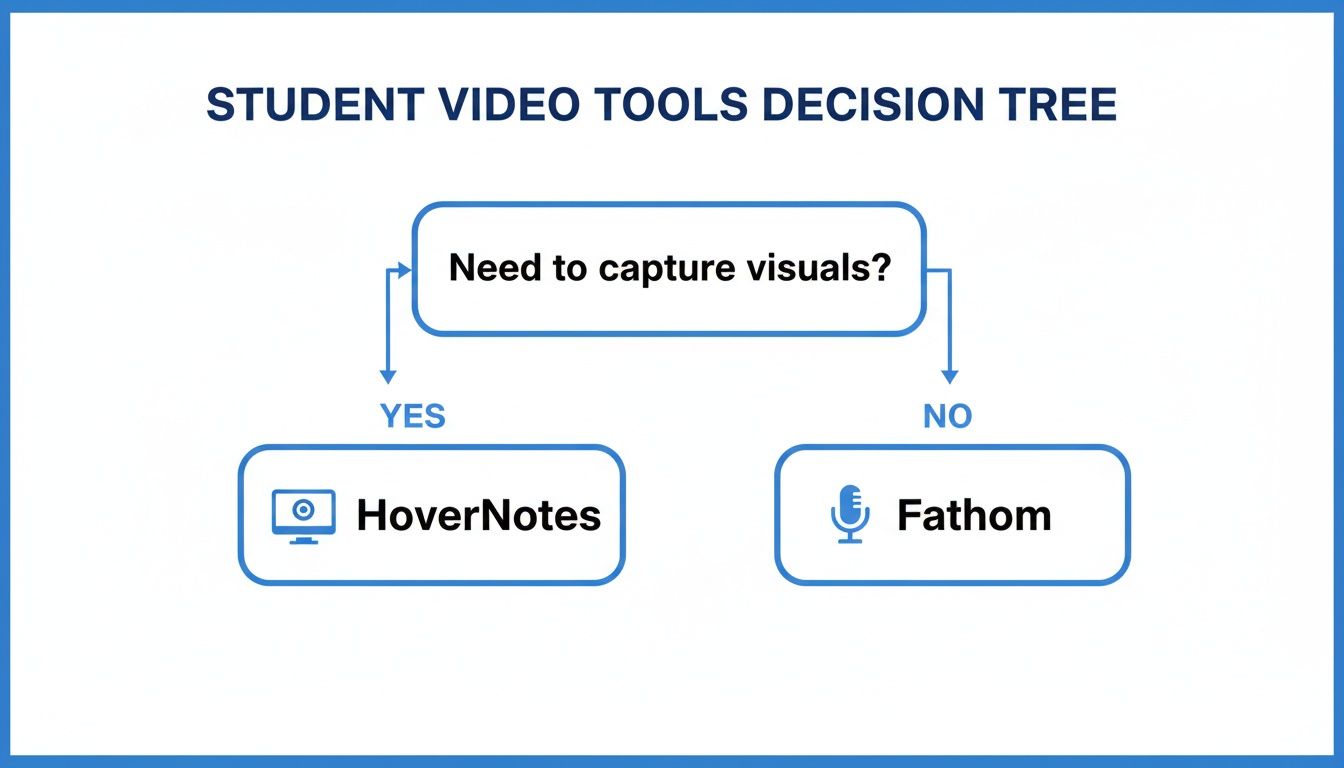
Die Kernfrage ist: Möchtest du erfassen, was auf dem Bildschirm passiert? Wenn es nur um die Zusammenfassung gesprochener Live-Gespräche geht, ist Fathom ein Top-Kandidat. Für das Lernen aus voraufgezeichneten Videos – bei denen Diagramme, Code und Bildschirmtexte entscheidend sind – brauchst du einen anderen Ansatz.
Für Geschäftstreffen bleib bei Fathom. Fürs Lernen brauchst du ein Werkzeug, das auf visuelle Inhalte ausgelegt ist.
#So startest du heute mit intelligenterem Video-Notieren
Effektives Lernen mit Videos hängt von einem Tool ab, das versteht, was gezeigt wird, nicht nur, was gesagt wird. Ein Transkript reicht nicht, wenn die Lektion ein Diagramm oder ein Code-Snippet ist. Die richtige Fathom AI-Alternative für Studierende bedeutet, visuelle Kontexte zu priorisieren.
Natürlich ist ein Tool nur die halbe Miete. Die Kombination mit den effektivsten Lerntechniken für Studierende ist der Schlüssel, um tatsächlich zu behalten, was du lernst.
#Der Wechsel zu einem visuell-vorangestellten Werkzeug
Am besten spürst du den Unterschied, wenn du es selbst ausprobierst. Manche Tools haben störende Verzögerungen oder verwirrende Oberflächen, ein lernorientiertes Tool sollte nahtlos funktionieren. Nutzerberichte erwähnen oft, dass Fathoms Interface für Nicht-Vertriebsaufgaben klobig wirkt und die Genauigkeit sinkt, wenn Visuals wie Gleichungen im Vordergrund stehen.
#Teste einen studierendenorientierten Workflow kostenlos
Der Einstieg mit einem speziell für Studierende entworfenen Tool sollte leicht sein. Du solltest es mit deinem echten Kursmaterial auf YouTube, Coursera oder einem Uni-Portal ohne Verpflichtungen ausprobieren können. Allein die zeitgestempelten Screenshots sparen stundenlanges erneutes Ansehen.
Du kannst HoverNotes kostenlos testen – es gibt 20 Minuten KI-Guthaben, und eine Kreditkarte ist nicht erforderlich. Selbst ohne KI sind der ablenkungsfreie Modus und unbegrenzte zeitgestempelte Screenshots immer kostenlos. Mehr unter https://hovernotes.io. Aktuelle Optionen findest du auf der HoverNotes-Preisseite.
Nützliche Notizen sollten dich dazu bringen, etwas mit dem Material zu tun, statt nur mehr Text zu speichern. Das U.S. Institute of Education Sciences empfiehlt, Lernen über die Zeit zu verteilen, Grafiken mit verbalen Erklärungen zu kombinieren, aktives Abrufen zu nutzen und tiefgehende Erklärungsfragen zu stellen (Praxisleitfaden). Eine peer-reviewte Übersichtsarbeit zur Forschung über Bildungsvideos betont außerdem, wichtige Informationen hervorzuheben, Lektionen in handhabbare Abschnitte zu unterteilen, Lernenden Kontrolle zu geben und Impulse für aktives Lernen einzubauen (Übersichtsarbeit). Auf diesen Fall angewendet bedeutet das: an Konzeptgrenzen pausieren, nur die visuellen Belege erfassen, die du brauchst, eine Frage in eigenen Worten formulieren und sie später beantworten, bevor du die Quelle erneut abspielst. Diese Praktiken sind evidenzbasiert; ein universeller Prozentsatz zur Behaltensleistung für eine einzelne App oder einen einzelnen Workflow ist es nicht.
Suchst du eine Fireflies AI-Alternative für Studierende? Finde heraus, warum Meeting-Tools für Videokurse nicht ausreichen, und entdecke einen KI-Notizenmacher, der speziell fürs Lernen entwickelt wurde.
Entdecke luna-notes-alternative-die-überall-funktioniert: eine praktische Alternative zu Luna Notes, die geräteübergreifend funktioniert und sich ideal für ernsthafte Lernende eignet.
Suchst du nach einer Alternative zu NoteGPT? Entdecke Tools, die für ernsthafte Lernende entwickelt wurden und lokalen Speicher, Obsidian-Integration sowie visuelle Kontextunterstützung aus Videos bieten.