Sử dụng Trình Tóm tắt Video AI để Học Nhanh hơn | HoverNotes
AI Notes28 tháng 11, 2025•Updated: 16 tháng 7, 2026
Sử dụng Trình Tóm tắt Video AI để Học Nhanh hơn
Khám phá cách mà bộ tóm tắt video AI có thể thay đổi cách bạn học. Hướng dẫn này bao gồm cách chúng hoạt động, những điều cần lưu ý và quy trình làm việc thực tế dành cho sinh viên.
Bởi HoverNotes Team•22 phút đọc
Trình tóm tắt video AI sử dụng trí tuệ nhân tạo để xử lý video và tạo ra bản tóm tắt ngắn gọn các điểm chính. Nó cung cấp ý chính, bản ghi toàn bộ và các dấu thời gian có thể nhấp, giúp bạn nhảy trực tiếp đến các phân đoạn quan trọng.
Mục đích của nó là giải quyết một vấn đề phổ biến: trích xuất thông tin cốt lõi từ các bài giảng, hướng dẫn và cuộc họp mà không cần phải xem lại toàn bộ video.
#Tại Sao Bạn Quên Phần Lớn Những Gì Bạn Xem Trên Mạng
Bạn ngồi xem một bài hướng dẫn mã hoá kéo dài hai giờ hoặc một bài giảng đại học dày đặc. Một tuần sau, bạn hầu như không nhớ được khái niệm chính nào cả. Đây không phải là thất bại cá nhân; đó là vấn đề về việc giữ thông tin vốn có khi xem video một cách thụ động. Khi bạn chỉ hấp thụ thông tin mà không tương tác, ký ức sẽ không bền lâu.
Vấn đề nằm ở sự khác biệt giữa tiêu thụ thụ động và học tập chủ động. Để học một điều gì đó, bạn phải xử lý nó, đặt câu hỏi và kết nối với những gì bạn đã biết. Chỉ đơn giản bấm "phát" không buộc não bạn phải làm việc đó.
Đó là lý do tại sao việc ghi chép trong lúc xem cải thiện đáng kể khả năng ghi nhớ. Hành động vật lý như tạm dừng, tua lại và tóm tắt bằng lời của chính bạn buộc não bạn phải tham gia. Bạn không còn là người xem thụ động mà trở thành người tham gia chủ động.
Mục tiêu không chỉ là xem video; mà là lấy ra giá trị từ nó và chuyển vào dạng mà bạn có thể sử dụng sau này. Ghi chú của bạn trở thành tài sản vĩnh viễn, có thể tìm kiếm được. Video chỉ là nguồn tạm thời.
Nhưng việc ghi chú thủ công rất kém hiệu quả. Việc liên tục chuyển đổi giữa video và ứng dụng ghi chú làm bạn mất tập trung. Bạn tốn nhiều năng lượng hơn để gõ những gì được nói ra thay vì hiểu các ý tưởng.
Đây là vấn đề mà trình tóm tắt video AI ra đời để giải quyết. Nó xử lý các phần cơ học trong việc ghi chép, để bạn tập trung vào việc hiểu bài. AI ghi lại các điểm chính, giúp bạn suy nghĩ phê phán về các khái niệm khi chúng được trình bày. Điều này trực tiếp chống lại đường cong quên và làm cho việc học hiệu quả hơn.
Nó tự động ghi lại mọi thứ: AI xác định các thuật ngữ chính, định nghĩa và ví dụ để bạn không phải làm.
Nó giải phóng sự tập trung của bạn: Bạn có thể tập trung vào các ý tưởng phức tạp thay vì chỉ làm người ghi chép.
Nó tạo ra bản ghi vĩnh viễn: Bạn có một tài liệu có cấu trúc, dễ tìm kiếm để xem lại sau, điều rất quan trọng giúp củng cố kiến thức.
Bằng cách tự động hóa các phần ghi chép tẻ nhạt, những công cụ này giúp xây dựng thói quen học tập chủ động đã được chứng minh là tăng khả năng lưu giữ. Trình tóm tắt video AI không chỉ giúp tiết kiệm thời gian; nó còn thay đổi cách bạn tiếp cận từ xem thụ động thành xây dựng kiến thức chủ động.
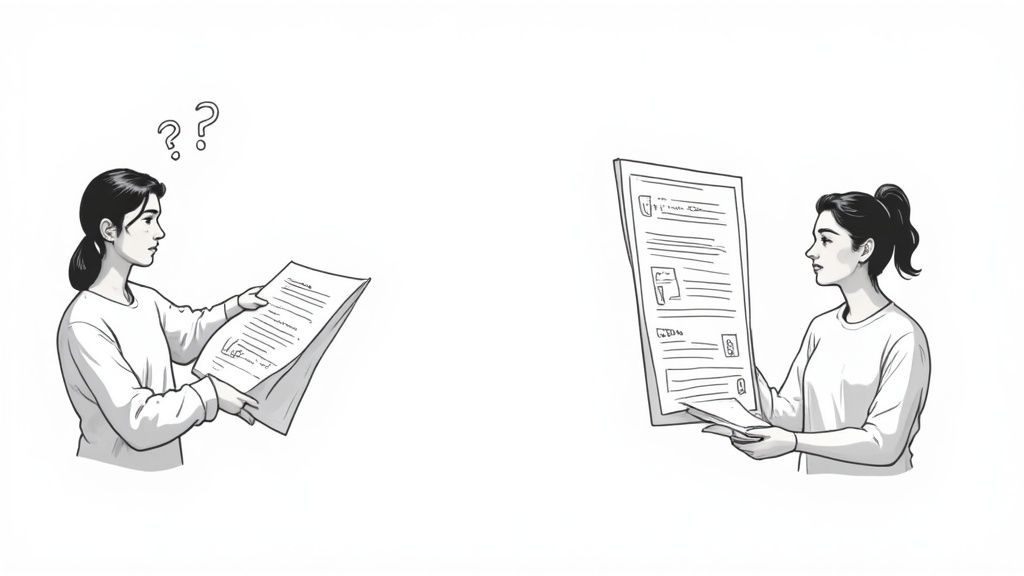
Để hiểu trình tóm tắt video AI làm gì, hãy tưởng tượng hai sinh viên. Một người bỏ học và chỉ đọc bản ghi. Người kia tham gia bài giảng, xem giáo sư phác họa sơ đồ và nghe giọng điệu của họ. Ghi chú của sinh viên thứ hai sẽ hữu ích hơn nhiều vì họ nắm được toàn bộ ngữ cảnh.
Hầu hết các trình tóm tắt cơ bản giống sinh viên đầu tiên — họ chỉ xử lý từ ngữ. Các công cụ hữu ích hơn thì giống với sinh viên thứ hai. Họ không chỉ "nghe" bài giảng; họ còn "xem" nó.
Loại trình tóm tắt video AI phổ biến nhất lấy bản ghi của video và đưa văn bản đó vào Mô hình Ngôn ngữ Lớn (LLM). LLM quét văn bản, xác định những điểm quan trọng và tạo ra phiên bản rút gọn.
Phương pháp này nhanh, nhưng có một điểm mù lớn: nó không biết điều gì đang diễn ra trên màn hình.
Nó không thể thấy đoạn mã được gõ trong bài hướng dẫn lập trình.
Nó bỏ lỡ điểm dữ liệu chính trong biểu đồ trong cuộc họp kinh doanh.
Nó không hiểu sơ đồ phức tạp trên bảng trắng có nghĩa gì.
Trừ khi người nói nói rõ "Tôi đang gõ const example = 'hello'," các công cụ chỉ dựa vào bản ghi sẽ bỏ lỡ. Điều này khiến chúng gần như vô dụng với các chủ đề đòi hỏi hình ảnh minh họa quan trọng.
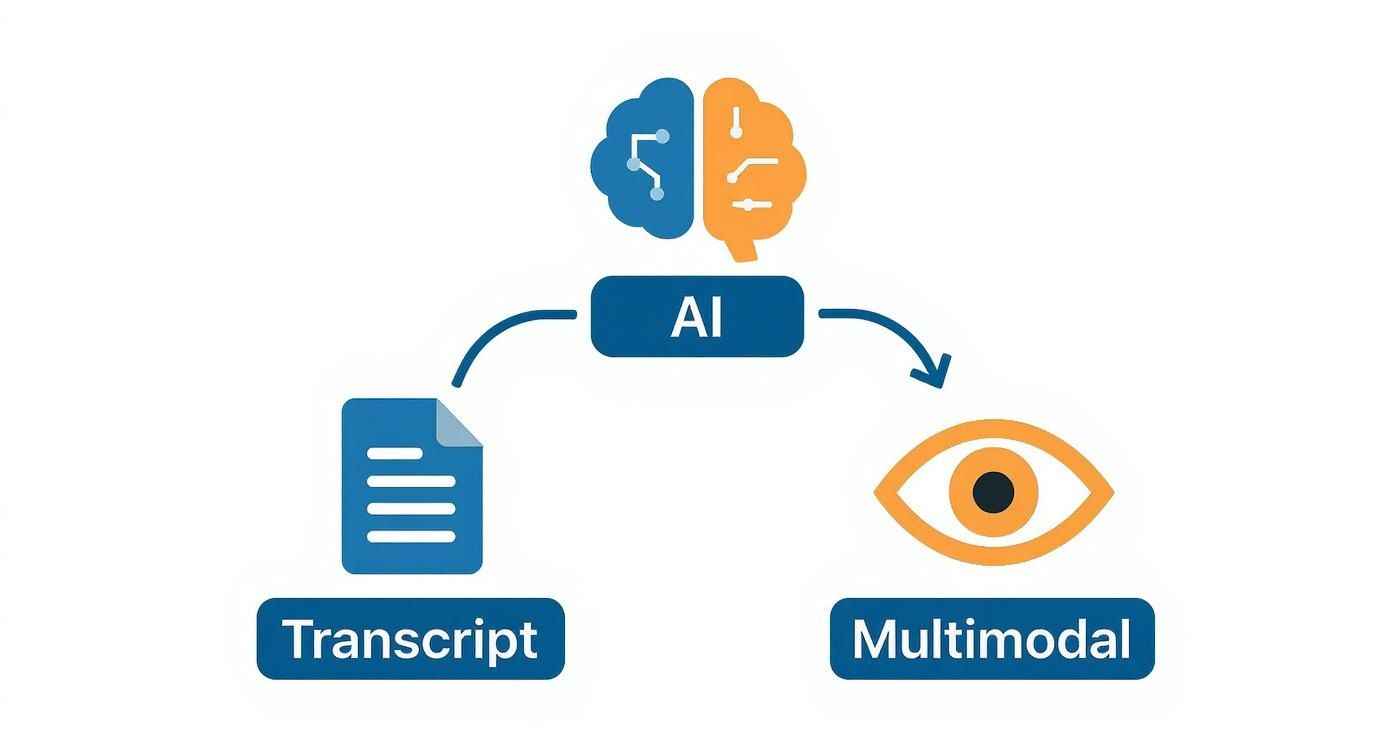
Một trình tóm tắt video AI thực sự sử dụng phương pháp đa mô-đun, tức là nó xử lý đồng thời nhiều loại dữ liệu — âm thanh, văn bản và các khung hình video.
Thay vì chỉ đọc văn bản, AI đa mô-đun "xem" video bằng hai công nghệ chính:
Xử lý ngôn ngữ tự nhiên (NLP): bộ phận này hiểu các từ được nói, giống như các công cụ cơ bản.
Thị giác máy tính: phân tích từng khung hình video để phát hiện thông tin hình ảnh quan trọng. Nó có thể đọc chữ trên slide, nhận biết đối tượng và nhận diện khi một sơ đồ quan trọng được trình chiếu.
Bằng cách kết hợp những gì nó “nghe” (NLP) với những gì nó “nhìn thấy” (thị giác máy tính), AI phát triển sự hiểu biết phong phú hơn nhiều. Nó kết nối lời nói của người thuyết trình với hành động trên màn hình, tạo ra bản tóm tắt phản ánh toàn bộ trải nghiệm.
Ví dụ, HoverNotes là một tiện ích mở rộng Chrome tạo ghi chú AI từ video và lưu trực tiếp vào Obsidian. Nó sử dụng phương pháp này để nắm bắt đoạn mã và sơ đồ mà các công cụ khác không thể nhìn thấy. Bạn có thể xem cách hoạt động này đối với các chủ đề kỹ thuật trong hướng dẫn của chúng tôi về cách AI cải thiện việc học từ các hướng dẫn lập trình.
Một mô hình đa mô-đun hiểu rằng khi người thuyết trình nói, "Như bạn có thể thấy từ biểu đồ này," nó cần nhìn vào màn hình, phân tích biểu đồ và bao gồm dữ liệu đó vào ghi chú. Công cụ chỉ dùng bản ghi chỉ biết là các từ đã được nói.
#So Sánh Trình Tóm Tắt Chỉ Dùng Bản Ghi và Đa Mô-đun
Không phải tất cả trình tóm tắt video AI đều như nhau. Sự khác biệt thực sự nằm ở một câu hỏi: AI có được nhìn thấy gì?
Nó chỉ nhận được các từ nói ra, hay nó cùng bạn xem video? Phân biệt này tách biệt các công cụ cơ bản với những công cụ được xây dựng cho việc học tập đòi hỏi hình ảnh.
Trình tóm tắt chỉ dùng bản ghi giống như người đọc hướng dẫn từng bước cho bạn qua điện thoại. Trình tóm tắt đa mô-đun giống như đồng phi công có bản đồ, nhìn thấy biển chỉ đường và điểm mốc.
Phương pháp phổ biến nhất rất đơn giản: AI lấy bản ghi video và tóm tắt văn bản đó. Phương pháp này nhanh và rẻ tiền, nên nhiều công cụ miễn phí sử dụng. Nhưng nó có điểm mù rất lớn — nó hoàn toàn không nhận biết hình ảnh.
Trình tóm tắt video AI chỉ dựa vào bản ghi không thể nhìn thấy:
Mã trên màn hình: Nó bỏ lỡ từng dòng mã mà người hướng dẫn gõ nhưng không đọc to.
Sơ đồ và biểu đồ: Nó chỉ nghe lời giải thích chứ hoàn toàn không biết đến sơ đồ đó.
Slide và bài thuyết trình: Các số liệu quan trọng hay điểm nhấn trên slide hoàn toàn vô hình với AI chỉ xử lý âm thanh.
Hạn chế này làm cho các công cụ trở nên không đáng tin cậy với các chủ đề mà thông tin hình ảnh rất cần thiết, như phát triển phần mềm, khoa học dữ liệu hay bài giảng y khoa. Bạn sẽ chỉ có bản tóm tắt những gì được nói, chứ không phải những gì được trình chiếu.
Một trình tóm tắt video AI đa mô-đun chính là đồng phi công đó. Nó xử lý đồng thời nhiều loại dữ liệu — hay gọi là "chế độ" — cùng lúc. Nó phân tích bản ghi âm thanh và sử dụng thị giác máy tính để hiểu các khung hình hình ảnh của video.
Bằng cách kết hợp những gì nó "nghe" với những gì nó "nhìn", AI đa mô-đun xây dựng bức tranh hoàn chỉnh, có ngữ cảnh. Nó liên kết các khái niệm lời nói với các hình ảnh tương ứng.
Một giáo sư nói, "Công thức cụ thể này là chìa khóa." AI đa mô-đun không chỉ ghi lại câu nói. Nó nhìn vào màn hình, dùng thị giác máy tính nhận diện công thức được chỉ vào, và đặt một ảnh chụp màn hình của nó vào ghi chú của bạn.
Cách tiếp cận này cho bạn bản tóm tắt phản ánh toàn bộ bài học. Chính nó cho phép công cụ như HoverNotes, tiện ích mở rộng Chrome tạo ghi chú AI từ video và lưu trực tiếp vào Obsidian, bắt được những chi tiết hình ảnh mà các công cụ chỉ dùng bản ghi bỏ lỡ. Kết quả là một bộ ghi chú hữu ích hơn nhiều khi ôn tập, đặc biệt trong các lĩnh vực kỹ thuật.
#Tính Năng Trình Tóm Tắt Chỉ Dùng Bản Ghi và Đa Mô-đun
Tính Năng
Trình Tóm Tắt Chỉ Dùng Bản Ghi
Trình Tóm Tắt Đa Mô-đun
Nguồn Dữ Liệu Chính
Bản ghi video (chỉ văn bản)
Bản ghi, âm thanh và khung hình hình ảnh
Nội Dung Hình Ảnh
Bỏ qua tất cả yếu tố trên màn hình như mã, sơ đồ và biểu đồ.
Phân tích chủ động và ghi lại các yếu tố hình ảnh để lấy ngữ cảnh.
Độ Chính Xác
Cao cho các bài giảng không có hình ảnh, nhưng rất thấp với chủ đề kỹ thuật hoặc nặng về hình ảnh.
Luôn có độ chính xác cao hơn trên tất cả các loại nội dung video.
Tính Hữu Ích Khi Ôn Tập
Hạn chế. Ghi chú thiếu ngữ cảnh cần thiết để kích hoạt ký ức hiệu quả.
Cao. Bao gồm ảnh chụp màn hình và dấu thời gian để kết nối ghi chú với video.
Phù Hợp Cho
Tóm tắt podcast hoặc video kiểu người nói đơn giản.
Học tập phức tạp như lập trình, bài giảng khoa học, và phân tích tài chính.
Đối với bất cứ ai học một chủ đề phức tạp hay hình ảnh, một bản tóm tắt bỏ sót nửa thông tin không chỉ là thiếu sót — nó có thể gây hiểu lầm. Học hiệu quả đòi hỏi phải thấy được toàn cảnh.
Với nhiều công cụ AI có sẵn, rất khó để tìm được cái thật sự dành cho việc học. Nhiều công cụ chỉ là bot bản ghi, bỏ sót điểm mấu chốt.
Để tìm một công cụ thực sự cải thiện cách bạn học, hãy tìm các tính năng thiết yếu không thể thương lượng. Chúng biến việc xem video thụ động thành quá trình xây dựng kiến thức chủ động.
Một bản tóm tắt đầy lỗi hoặc nội dung không liên quan sẽ gây hiểu lầm. Chất lượng đầu ra phụ thuộc vào mô hình AI nền tảng.
Hãy tự hỏi: Bản tóm tắt này có bắt được các luận điểm chính không? Với video kỹ thuật, nó có nhận dạng đúng thuật ngữ và đoạn mã không? Nếu công cụ hiểu sai ngữ cảnh, nó chỉ tạo thêm việc sửa lỗi chứ không tiết kiệm thời gian.
Phương pháp đa mô-đun phân tích cả bản ghi và dữ liệu hình ảnh giúp AI có cái nhìn chính xác hơn về những gì đang diễn ra.
Một bản tóm tắt tốt không chỉ cho biết điều gì được nói; nó chỉ ra chính xác nơi điều đó được nói. Dấu thời gian là liên kết giữa ghi chú và video gốc.
Khi xem lại ghi chú sau một tuần, một dấu thời gian có thể nhấp cho phép bạn nhảy ngay đến khoảnh khắc đó trong video để lấy ngữ cảnh. Đây là điều nền tảng cho việc ôn tập hiệu quả. Để tìm hiểu thêm, xem hướng dẫn về điều khiển video cần thiết cho việc học hiệu quả.
Bản tóm tắt không có dấu thời gian chỉ là một tài liệu chết. Bản tóm tắt có dấu thời gian là một hướng dẫn học tập tương tác, kết nối ghi chú của bạn trực tiếp tới nguồn gốc.
Đối với các chủ đề như lập trình, giải tích hay thiết kế, hình ảnh quan trọng ngang với lời nói. Một bản tóm tắt bỏ qua màn hình chỉ cung cấp một nửa câu chuyện.
Một trình tóm tắt video AI hữu ích sẽ tích hợp ảnh chụp màn hình những khoảnh khắc quan trọng trực tiếp vào ghi chú. Đây là dấu hiệu rõ ràng của AI đa mô-đun đang hoạt động.
Hãy tìm các công cụ có thể:
Chụp lại slide và sơ đồ: Tự động lấy ảnh chụp biểu đồ quan trọng.
Tách văn bản trên màn hình: Lấy các đoạn mã quan trọng hoặc công thức.
Liên kết ảnh chụp với dấu thời gian: Cho phép bạn nhấp vào ảnh để nhảy đến điểm đó trong video.
HoverNotes, ví dụ, nhúng bằng chứng hình ảnh này ngay bên cạnh bản tóm tắt văn bản, tạo ra hồ sơ bài học đầy đủ.
Ghi chú của bạn chỉ hữu dụng khi chúng nằm ở nơi bạn suy nghĩ. Trình tóm tắt khóa ghi chú trong app riêng của nó tạo ra bức tường kiến thức khác. Đối với người dùng cơ sở kiến thức cá nhân như Obsidian, lưu trữ ưu tiên tại chỗ là yêu cầu bắt buộc.
Hãy tìm các lựa chọn xuất file mạnh mẽ, tốt nhất là ở định dạng phổ biến như Markdown. Điều này đảm bảo bạn sở hữu kiến thức của mình mãi mãi, không phụ thuộc vào bất kỳ app đơn lẻ nào.
Một trình tóm tắt video AI không phải là nút thần kỳ. Nó là một thành phần trong hệ thống bạn thiết kế để xử lý thông tin hiệu quả hơn. Mục tiêu là biến một bài giảng thoáng qua thành tài sản vĩnh viễn, kết nối mà bạn sở hữu. Đây là cách áp dụng thực tế.
Đối với sinh viên, thử thách là kết nối các ý tưởng từ nhiều bài giảng cho một kỳ thi. Trình tóm tắt AI có thể giúp xây dựng trung tâm học tập tập trung.
Xử lý bài giảng ngay lập tức. Sau khi xem bài giảng ghi hình, tạo bản tóm tắt. Điều này giúp lưu giữ ý chính khi chúng còn mới.
Lưu trực tiếp vào cơ sở kiến thức của bạn. Dùng công cụ tích hợp với app ghi chú. Ví dụ, HoverNotes là tiện ích mở rộng Chrome tạo ghi chú AI từ video và lưu trực tiếp vào Obsidian. Điều này tránh việc sao chép dán và đảm bảo mọi thông tin đều có trong kho lưu trữ trung tâm của bạn.
Xem lại và chỉnh sửa ghi chú AI. Xem bản thảo đầu tiên của AI. Đánh dấu in đậm các từ khóa và thêm câu hỏi hoặc liên kết của bạn. Việc chỉnh sửa này là một hình thức học tập chủ động rất hiệu quả.
Tạo liên kết với kiến thức hiện có. Khi xem lại, liên kết các khái niệm chính với ghi chú các bài giảng trước. Khi "mitochondria" xuất hiện trong Bài giảng 5, liên kết nó với phần giới thiệu trong Bài giảng 2. Việc này xây dựng mạng lưới kiến thức giúp việc nhớ lại khi thi dễ dàng hơn.
Đến lúc bạn ôn tập, bạn không phải xem lại 20 giờ video. Bạn đang xem lại bộ ghi chú cô đọng, kết nối chặt chẽ — một wiki cá nhân cho khóa học của bạn.
Cách tiếp cận hệ thống này biến những video rời rạc thành một hướng dẫn ôn tập có thể tìm kiếm và do bạn kiểm soát.
#Quy Trình Cho Người Lao Động Kiến Thức Tiếp Thụ Nội Dung Kỹ Thuật
Đối với người làm việc kiến thức, hiệu quả là điều cốt yếu. Bạn cần rút ra những nhận định có thể hành động từ các buổi thuyết trình và hội thảo trực tuyến mà không mất cả ngày xem video.
Phân loại qua bản tóm tắt: Trước khi xem webinar 90 phút, tạo bản tóm tắt. Duyệt nhanh giúp bạn biết nó có hữu ích hay chỉ là quảng cáo.
Trích xuất đoạn quan trọng có thể áp dụng: Với hướng dẫn kỹ thuật, tập trung vào phần tóm tắt có mã hoặc các bước cấu hình. Trình tóm tắt video AI đa mô-đun tốt sẽ ghi lại chi tiết hình ảnh với ảnh chụp màn hình.
Tích hợp vào tài liệu dự án: Sao chép đoạn quan trọng thẳng vào tài liệu dự án hoặc wiki nhóm. Thêm liên kết trở lại ghi chú có dấu thời gian để giữ ngữ cảnh gốc.
Bằng cách áp dụng những thói quen này, bạn chuyển từ người tiêu thụ thụ động thành người xây dựng kiến thức chủ động. Để tìm hiểu thêm, đọc bài phân tích sâu về cuộc cách mạng ghi chú AI.
Khi tìm hiểu về trình tóm tắt video AI, việc có nhiều câu hỏi là điều tự nhiên. Bạn nên hoài nghi. Dưới đây là các câu trả lời thẳng thắn cho những lo ngại phổ biến.
#Tôi Có Thể Bỏ Qua Video và Chỉ Đọc Bản Tóm Tắt AI Không?
Không. Bản tóm tắt AI không thay thế cho việc học. Bạn sẽ bỏ lỡ giọng điệu người nói, các kết nối tinh tế, và sự tinh vi cần thiết để hiểu sâu.
Mục đích của bản tóm tắt AI là tăng cường, không thay thế. Nó làm cho thời gian bạn xem trở nên có giá trị hơn.
Trước khi xem: Bản tóm tắt đóng vai trò mở đầu, cho bạn biết cần chú ý điều gì.
Khi xem: AI ghi chú, giải phóng não bạn để suy nghĩ về nội dung.
Sau khi xem: Bản tóm tắt trở thành hướng dẫn học tập lâu dài, có thể tìm kiếm, giúp chống quên.
Một trình tóm tắt video AI tự động hóa phần tẻ nhạt của việc học để bạn tập trung vào điều quan trọng.
#Nếu Âm Thanh Kém hoặc Giọng Địa Phương Mạnh Thì Sao?
Nguyên tắc "rác vào, rác ra" áp dụng ở đây. Nếu video có âm thanh nhỏ hoặc nhiều tiếng ồn nền, bất kỳ trình tóm tắt nào cũng sẽ gặp khó khăn. Công cụ chỉ dùng bản ghi đặc biệt nhạy cảm, vì lỗi trong bản ghi sẽ dẫn đến bản tóm tắt rối rắm.
Các công cụ đa mô-đun có lợi thế. Mặc dù cũng cần âm thanh đủ rõ, khả năng nhìn video sẽ tạo lớp dự phòng. Nếu âm thanh không rõ nhưng slide hiển thị thuật ngữ quan trọng, AI đa mô-đun có thể đối chiếu giữa nghe và nhìn để sửa lỗi. Nó không hoàn hảo, nhưng thêm độ bền.
#Dữ Liệu Của Tôi Có Riêng Tư Không? Ai Mới Thực Sự Sở Hữu Ghi Chú Của Tôi?
Đây là câu hỏi quan trọng, đặc biệt nếu bạn coi trọng quyền sở hữu kiến thức. Khi dùng hầu hết công cụ AI trực tuyến, dữ liệu của bạn được gửi lên máy chủ của công ty. Nhiều dịch vụ dùng dữ liệu để đào tạo mô hình, và một số có thể tuyên bố quyền sở hữu ghi chú AI tạo ra. Luôn đọc kỹ điều khoản sử dụng.
Đó là lý do tại sao quy trình làm việc ưu tiên lưu trữ tại chỗ lại quan trọng khi xây dựng cơ sở kiến thức cá nhân. Bạn muốn ghi chú — và hiểu biết — là của chính bạn.
Khi ghi chú được lưu tại chỗ, bạn đang xây dựng tài sản trên thuộc sở hữu kỹ thuật số riêng. Bạn kiểm soát hoàn toàn, và cơ sở tri thức không thể bị đóng cửa bởi thay đổi mô hình kinh doanh của công ty.
Sẵn sàng biến việc xem video thụ động thành kiến thức vĩnh viễn, có thể tìm kiếm? Hãy thử HoverNotes hôm nay và xem trợ lý AI đa mô-đun có thể biến đổi quá trình học tập của bạn thế nào, lưu ghi chú trực tiếp vào cơ sở kiến thức của chính bạn. Bắt đầu với HoverNotes ngay.
Ghi chú hữu ích nên khiến bạn làm điều gì đó với tài liệu, chứ không chỉ lưu thêm văn bản. Viện Khoa học Giáo dục Hoa Kỳ khuyến nghị phân bổ việc học theo thời gian, kết hợp hình ảnh với giải thích bằng lời, dùng truy hồi chủ động và đặt các câu hỏi giải thích sâu (hướng dẫn thực hành). Một bài tổng quan bình duyệt về nghiên cứu video giáo dục cũng nhấn mạnh việc làm nổi bật thông tin quan trọng, chia bài học thành các phân đoạn dễ quản lý, trao quyền kiểm soát cho người học và thêm các gợi ý học tập chủ động (bài tổng quan). Áp dụng ở đây, điều đó có nghĩa là tạm dừng tại các ranh giới khái niệm, chỉ ghi lại bằng chứng trực quan bạn cần, viết một câu hỏi bằng lời của chính mình, rồi về sau trả lời câu hỏi đó trước khi phát lại nguồn. Những thực hành này có cơ sở bằng chứng; còn một tỷ lệ ghi nhớ phổ quát cho một ứng dụng hay quy trình cụ thể thì không.
Đang tìm kiếm một lựa chọn thay thế cho NoteGPT? Khám phá các công cụ được thiết kế dành cho những người học nghiêm túc, những người cần lưu trữ cục bộ, tích hợp Obsidian và bối cảnh hình ảnh từ các video.
ghi chú video AI phân tích hình ảnh và âm thanh để tăng cường học tập và ghi nhớ. Tìm hiểu lý do tại sao phương pháp này vượt trội hơn so với chỉ sử dụng âm thanh.
Tìm hiểu khi nào nên sử dụng AI tóm tắt video YouTube để có cái nhìn nhanh và khi nào nên dùng ghi chú AI để học sâu, ghi nhớ và xây dựng cơ sở tri thức.