How to Study from Video Lectures Effectively | HoverNotes Blog | HoverNotes
General2025年12月25日
How to Study from Video Lectures Effectively
Learn how to study effectively for exams with science-backed methods. Turn passive video lectures into powerful study tools for better recall and retention.
著者 HoverNotes Team•16 分で読める
It’s a familiar story: you spend hours re-watching lectures, convinced the information is sinking in, only to hit a wall of blankness during the exam. If that sounds like you, it’s not a personal failing—it’s the method.
Passively watching video is one of the least effective ways to learn, yet it has become the default study habit for millions.
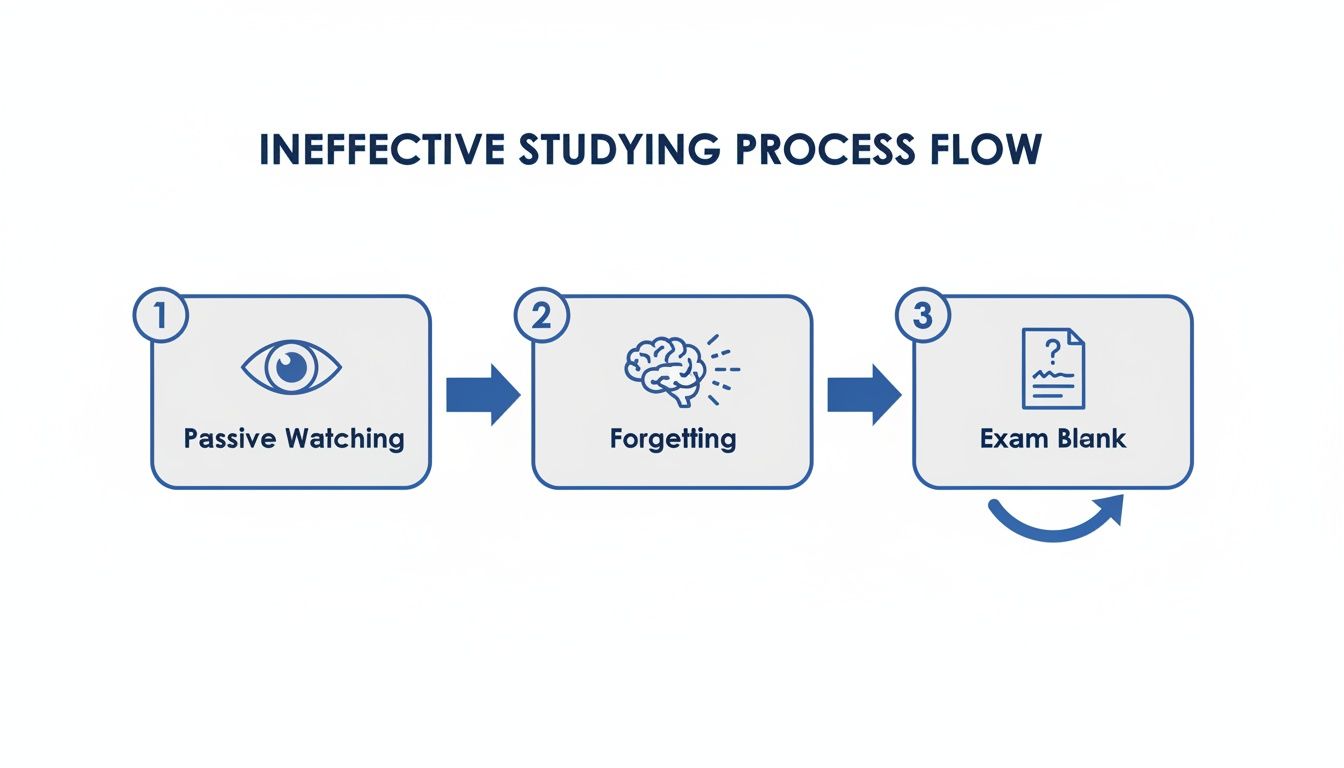
The problem with cramming video lectures is its reliance on passive consumption. Just watching creates a dangerous "illusion of competence." It feels productive, but the information rarely makes it into your long-term memory.
Your brain treats a complex lecture like another episode of a show you're binge-watching—pleasant, but not something to be carefully stored and retrieved later. This locks you into a frustrating cycle: watch, forget, re-watch. You're putting in the time, but the knowledge stays shallow and evaporates almost as quickly as you absorb it.
Here's the hard truth: our brains are designed to forget. It’s a feature, not a bug, that saves us from being overwhelmed by useless information. Cognitive psychology calls this the "Forgetting Curve." It shows we lose a huge chunk of new information within hours unless we deliberately signal to our brain that it's important.
Cramming fights a losing battle against this natural process.
This is where two powerful, evidence-backed learning principles can completely change the game for studying from videos:
Active Recall: The act of pulling information out of your memory. Instead of re-reading a note, you force yourself to answer a question about it.
Spaced Repetition: Reviewing information at increasing intervals over time. It’s like sending a recurring "this is important!" signal to your brain.
Shifting from passive watching to these active techniques is the single biggest key to making your study time count.
Many students don't realize their go-to study methods are holding them back. The table below shows the difference between low-retention passive habits and their high-retention active counterparts.
Passive Method (Low Retention)
Active Method (High Retention)
Re-watching lecture videos
Quizzing yourself on lecture concepts
Re-reading notes or textbooks
Explaining a concept aloud in your own words
Highlighting key passages
Creating flashcards from your notes
Listening to a lecture recording
Summarizing a lecture from memory
Looking at a solved problem
Solving the problem again without looking
Making the switch from the left column to the right is the foundation of effective, evidence-based studying. It's about doing, not just observing.
The goal isn’t to watch more, but to interact more. Transforming your video notes from a simple transcript into a set of questions you can quiz yourself on is the first step toward building a reliable knowledge base.
For anyone who depends on video lectures, this means you need a system to turn passive viewing into an active study arsenal. But simple transcripts often miss the mark. They don't capture the critical visual context from diagrams, on-screen code, or whiteboard demonstrations. We cover this in more detail in our guide on how to get a YouTube video transcript and its limitations.
To truly learn from video, you need a workflow that captures both the words and the visuals, turning them into materials that actually work for you. The next sections show you exactly how to build that system.
Here’s the thing about studying: most students get it backward. We spend hours trying to cram information into our brains, but the real magic happens when you practice pulling it back out. That’s active recall.
It's not just a theory. Research consistently shows that forcing your brain to retrieve information crushes passive methods like re-reading notes or re-watching lectures when it comes to exam scores. The goal is to turn your notes from a dead transcript into a live quizzing tool.
So, how does this work with hours of video lectures? The workflow is simple: turn statements into questions.
Go through your notes and rephrase every key concept. A dry fact like, "The Krebs cycle produces ATP through substrate-level phosphorylation" becomes an active question: "What's the main output of the Krebs cycle, and how is it made?"
Without this step, you fall into the trap of passive learning. You watch, you sort of remember, and then... you blank on the exam.
This cycle is exactly what active recall is designed to break.
Manually pausing a video, typing out a sentence, and then rewording it as a question is a nightmare. It shatters your focus and can easily turn a one-hour lecture into a three-hour slog.
This is where a smarter workflow comes in.
Instead of doing that grunt work, you can use an AI assistant to handle the initial note-taking. HoverNotes is a Chrome extension that watches videos with you, generates AI notes, and saves them as Markdown directly to your file system. Your job shifts from being a scribe to being an interrogator. All your mental energy can go toward the high-value task of refining those notes and crafting powerful questions.
The real learning doesn't happen when you write the note down. It happens when you force your brain to retrieve the information without peeking. Your question-based notes are just the tool to make that happen.
#Test Your Understanding with the Feynman Technique
Once you have a list of self-generated questions, you can take things a step further with the Feynman Technique.
Here’s how it works:
Pick a question from your notes.
Try to answer it by explaining the concept out loud.
Pretend you're teaching it to someone who has never heard of it.
Use simple language. Use analogies. If you find yourself getting stuck or using complicated jargon, you've just pinpointed a gap in your understanding. This immediate feedback loop is one of the fastest ways to find and patch knowledge holes before an exam.
#Use Spaced Repetition to Beat the Forgetting Curve
If active recall is how you forge new memories, then spaced repetition is how you make them permanent. This technique is your best defense against the brain's natural tendency to forget.
Instead of cramming everything the night before an exam, you review material at increasingly longer intervals. You might revisit your notes one day after a lecture, then three days later, and then again a week after that.
Each review sends a powerful signal to your brain: "Hey, this information is important. Don't throw it out!" This process moves knowledge from shaky short-term memory into solid, reliable long-term storage. Without it, you’re fighting a losing battle against the dreaded "Forgetting Curve," where you lose most of what you've learned within days.
You don't need fancy software to make this work. A basic schedule in your calendar is enough to see a huge difference in your exam scores.
Here’s a practical schedule you can start using for every video lecture:
Review 1 (24 hours later): Pull up your question-based notes and try to answer every one from memory. Mark any you struggle with.
Review 2 (3 days later): This time, focus only on the tricky questions you marked during the first review.
Review 3 (7 days later): Do a full pass on all the questions for that lecture. You’ll be surprised at how much faster the answers come.
Final Review (1-2 weeks before the exam): Consolidate your notes from all lectures and run a final, comprehensive self-quizzing session.
This method transforms studying from one massive, overwhelming event into a series of small, manageable tasks. If you want to get your materials organized for this, check out our guide on how to create a knowledge base.
There's a big catch when you apply this to video lectures: text-only notes often fail you during review.
Your calendar pings: "Review Lecture 3 on Anatomy." You open your notes, but a plain wall of text isn't enough to jog your memory, especially for visual subjects like anatomy, engineering, or coding.
You don't just remember what the professor said; you remember the specific diagram they drew or the line of code they highlighted. Without that visual cue, context is lost.
Manually taking screenshots is a clunky workflow. They end up scattered across your desktop, disconnected from the notes they're supposed to support.
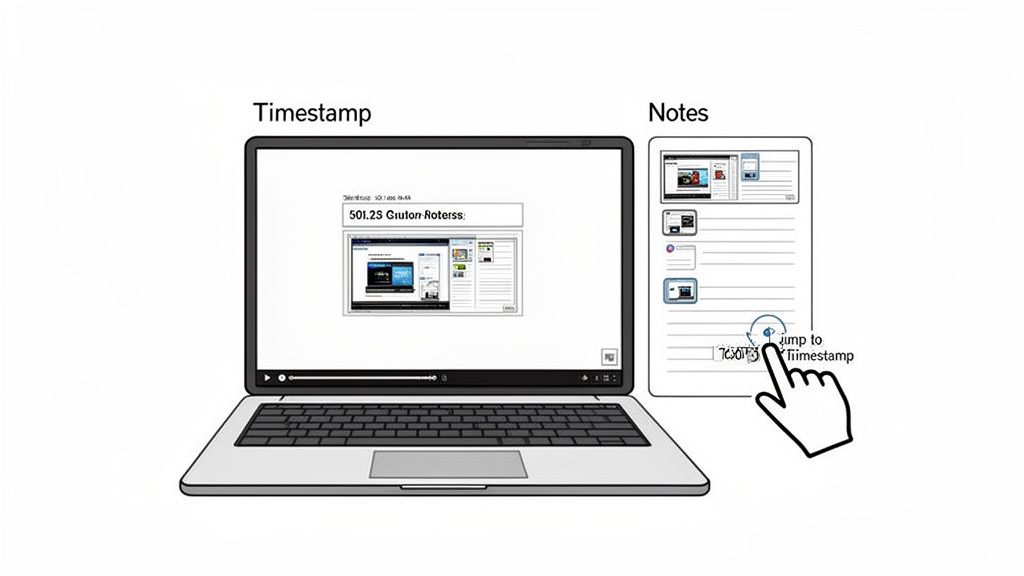
A much better approach is to use a tool that embeds those crucial visuals directly into your study material. For example, unlike tools that only parse transcripts, HoverNotes watches the video to capture what's actually on screen. It lets you take timestamped screenshots and even snip specific regions—like a formula or chart—and drop them right into your notes.
Later, when you're reviewing, if you're struggling to remember the context, just click the screenshot. It jumps you back to that precise moment in the video. This makes review sessions fast and effective.
We’ve all been there. You're trying to learn from a video lecture on YouTube or Coursera, but spend more time hitting pause, rewinding, and frantically typing than actually learning. It's a clunky process that shatters your focus.
Instead of engaging with the concepts, you're stuck as a transcriptionist. This constant start-and-stop is an inefficient way to absorb complex information.
What if you could offload the tedious part? Instead of fighting the pause button, you can use a tool that acts as your note-taking partner. This shifts your role from capturing information to processing it—a much smarter use of your brainpower.
Tools built for this exact problem can handle the initial capture, freeing you up to think. For instance, HoverNotes is a Chrome extension that works anywhere there's a video—Coursera, YouTube, even internal university portals—and automatically generates a structured set of notes.
This is a big deal because most transcript-only tools miss what really matters on screen. They can't see diagrams, code snippets, or charts. Having those visuals embedded right in your notes is a massive advantage when it's time to review. You can dive deeper into this topic in our guide on taking study notes.
With the right setup, your workflow becomes simpler and far more effective.
Here’s what it looks like in practice:
Let the AI capture everything. As you watch the lecture, the AI builds a detailed outline. If you see a critical diagram, grab a screenshot with a single click. Jot down your own thoughts as they come.
You process and refine. Once the lecture is over, your real work begins. Go through the AI-generated notes, add your own insights, and—most importantly—start turning key statements into active recall questions.
Build your personal knowledge base. Notes save as plain Markdown (.md) files directly to your file system. If you're an Obsidian user, the notes can save directly to your vault. Your notes belong to you, forever.
This approach flips the script on video learning. Instead of passively transcribing, you're actively engaging with the material from the start.
The goal is to spend less time transcribing and more time thinking. Let a tool handle the raw capture so you can focus on connecting ideas and preparing for active recall.
This workflow transforms passive video watching into a powerful study session. Every screenshot includes a clickable timestamp—one click returns you to that exact moment. That feature alone can save you hours of scrubbing through timelines to find that one specific explanation.
Focus is your most valuable asset during exam prep. But the very tools we need for learning are often engineered to destroy it. Protecting your attention isn't just a nice-to-have; it's a core strategy for getting work done.
It starts with your physical space. A dedicated spot for studying, even just a corner of your room, signals to your brain that it's time to get serious. Keep it tidy and have what you need within arm's reach.
The biggest battle is digital. Recommended videos, notifications, and social media can derail a study session in seconds. This is especially true on platforms like YouTube, where the algorithm is designed to keep you clicking, not learning.
A purpose-built learning tool can make a world of difference. For example, HoverNotes has a distraction-free "video mode" that isolates the video player and your notes on a clean screen. It strips away recommended videos, ads, and comments, creating a focused bubble for deep work. Better yet, you own your files—notes are saved locally as Markdown, perfect for an offline, totally distraction-free review session in a tool like Obsidian.
Once your environment is set, structure your time. The Pomodoro Technique is a classic because it's simple and effective.
Here’s how it works:
Set a specific goal. Decide exactly what you want to accomplish (e.g., "Answer all active recall questions for Lecture 5").
Work for 25 minutes. Set a timer and do nothing else.
Take a 5-minute break. Get up, stretch, and step away from your screen.
Repeat. After four cycles, take a longer break of 15-30 minutes.
This method breaks down overwhelming tasks into manageable sprints and prevents burnout by building in recovery time. For more control, try adding a website blocker. You can find some options in our list of the best Chrome extensions for students.
The last week before an exam isn’t for learning new material. It's for consolidation—taking everything you’ve learned and locking it in. With a solid plan, you can ditch the frantic panic and shift into a systematic review.
Kick off the week with a full-length, timed practice test. Create real exam conditions. The goal isn't a perfect score; it's to diagnose exactly where you're losing points.
Once you’re done, grade it. Be honest and categorize every mistake. Was it a simple calculation error? A concept you genuinely don't understand? Did you misread the question?
This is where an organized digital knowledge base is a game-changer. Instead of digging through messy notebooks, you can pinpoint what you need in seconds. If you've been building your notes in Obsidian, a quick search for "Krebs cycle" instantly pulls up every note and diagram you saved on the topic.
Now that you know your weak spots, the next few days are about targeted active recall. Pull up the question-based notes you’ve been creating and hammer away at the topics you struggled with on the practice test. Force your brain to retrieve the information from scratch before checking your notes.
If you get stuck, go back to the source. A well-organized note system makes this fast. For example, if you use a tool like HoverNotes, every screenshot in your notes has a clickable timestamp. One click and you’re back at that exact moment in the lecture video for a quick refresher. No more wasted time.
The final days before an exam should be about targeted strikes, not a scattered firefight. Focus your energy only on what the practice test proved you don't know yet.
The day before the exam is for a light, confidence-boosting review. Skim your summaries and go over your strongest topics to remind yourself how much you know. Avoid tackling new or complex problems—that’s a recipe for last-minute panic.
Get your bag packed, lay out your clothes, and get a good night's sleep. Walk into that exam hall prepared and rested, not burnt out.
When you're building a solid study system, a few common questions always pop up. Here are some quick, practical answers based on what actually works.
#How Far in Advance Should I Really Start Studying for a Big Exam?
Ideally, you're reviewing from day one. Realistically, give yourself a bare minimum of two to three weeks for major exams. This is the window you need to make spaced repetition and practice testing work for you. Anything less and you're just cramming, which is a disaster for long-term retention.
First, go solo. This is your time to grapple with the material, create your first pass of notes, and start turning concepts into active recall questions. You need this focused, uninterrupted time to do the initial heavy lifting.
Then, bring in the group. Use those sessions to put your knowledge to the test. The single most powerful thing you can do in a group is try to explain a concept to someone else. It's the ultimate form of active recall and will instantly show you where your understanding is shaky.
#How Can I Turn My Video Lecture Notes Into a Study Guide That Actually Works?
The goal is to move from passive notes to an active study tool.
It starts with good notes that capture both the text and key visuals from the lecture. But the real magic happens next: you have to process those notes by rephrasing every key concept as a question.
This one move—turning statements into questions—transforms your notes from a static document into a self-quizzing machine. That's the core of an effective exam study guide.
Manually transcribing lectures is a huge time sink. Using a tool to automate that initial capture is a game-changer. It lets you pour all your energy into the high-value work of refining and questioning the material, not just typing it out.
If you use Obsidian for learning, HoverNotes saves notes directly to your vault as plain Markdown files, complete with screenshots. Notes also copy cleanly into Notion if that's where you keep everything. You can try it out for free with 20 minutes of AI credits—no credit card needed to get started.
Learn how to take study notes that boost retention and understanding. Discover practical methods for lectures, textbooks, and modern video learning workflows.
Explore Otter AI plans to see if they fit your goals. Learn why video learning requires a different approach and compare top alternatives built for students.