Как учиться быстрее и запоминать больше: Практическое руководство | HoverNotes
Learning31 января 2026 г.•Updated: 16 июля 2026 г.
Как учиться быстрее и запоминать больше: Практическое руководство
Узнайте, как учиться быстрее и запоминать больше с помощью проверенных, научно обоснованных стратегий активного воспроизведения, ведения заметок и эффективных учебных методик.
Автор HoverNotes Team•15 мин чтения
Перестаньте просто пассивно смотреть: Ваш мозг избавляется от информации, ради которой не нужно трудиться. Просмотр обучающего видео без ведения конспекта создаёт иллюзию компетентности, а не настоящие знания.
Используйте активный вызов из памяти: Не просто перечитывайте конспекты. Проверяйте себя. Заставляйте мозг извлекать информацию из памяти. Это укрепляет нейронные связи.
Сочетайте слова и визуальные образы: Ваш мозг обрабатывает вербальную и визуальную информацию разными каналами. Совмещение их (текстовые заметки + скриншоты схем) создаёт гораздо более прочные воспоминания. Только транскрипты не дают важного визуального контекста.
Устраните трения: Ручное ведение заметок по видео — это постоянная пауза, воспроизведение и разрозненные скриншоты. Используйте инструмент, который интегрирует заметки с видеоплеером, чтобы сохранить концентрацию.
Владейте своими знаниями: Сохраняйте заметки в виде простых текстовых файлов (например, Markdown) на своём устройстве. Это гарантирует, что ваша база знаний всегда будет принадлежать вам, независимо от компаний или сервисов.
Будем честны: главная причина, почему вы учитесь медленнее, — это пассивное потребление информации. Мозг устроен так, что избавляется от всего, ради чего не приходится прилагать усилий. Поэтому просмотр обучающих видео кажется продуктивным, но через несколько дней вы почти всё забываете.
#Истинная причина, по которой вы забываете то, что выучили из видео
Когда-нибудь за выходные подряд смотрели курс программирования на Udemy, а через неделю не можете вспомнить основные функции? Вы не одиноки. Это ключевая проблема виде обучения.
Просто смотреть или слушать не заставляет мозг включаться по-настоящему. Создаётся иллюзия компетентности — вы узнаёте материал на лету, и обманываете себя, что уже выучили его. Но узнавание — это не вспоминание. Вы на самом деле не заставили мозг построить прочные нейронные пути, чтобы достать информацию позже.
#Почему мозг удаляет информацию, которую вы пассивно просматриваете
Представьте мозг как безжалостный файловый менеджер. Он постоянно получает новые данные и должен решать, что достаточно важно, чтобы сохранить в долгосрочной памяти, а что — временный кэш. Основной сигнал для этого — вовлечённость.
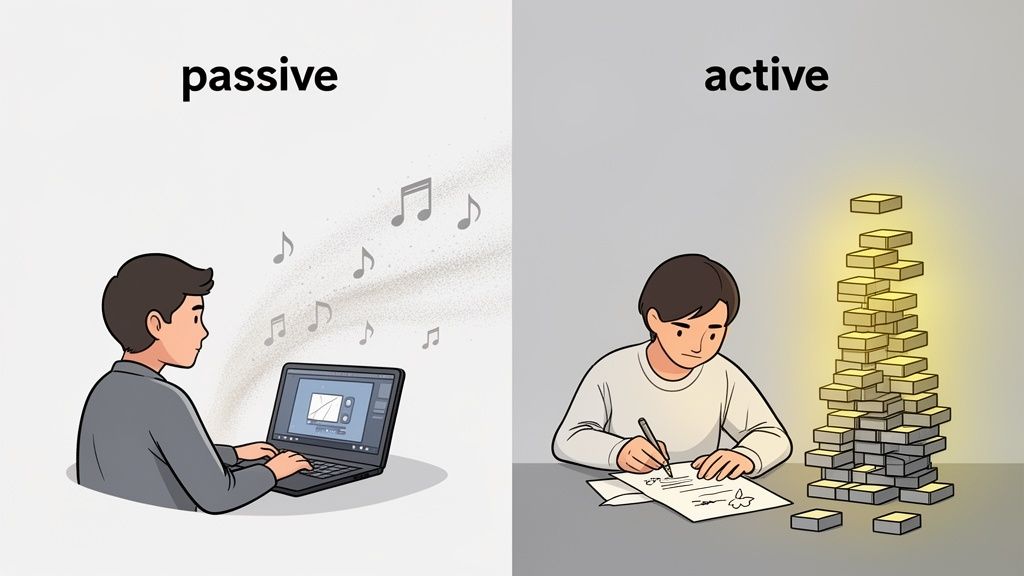
Пассивное потребление: Смотреть видео без конспектов — это как открыть файл и не нажать «сохранить». Мозг воспринимает информацию как временный шум и помечает её на удаление.
Активное вовлечение: Обработка, вопросы и запись — это как нажать Ctrl+S. Мозг понимает, что это важно и понадобится снова.
Сам факт записывания концепции заставляет вас задуматься о её смысле. Чем больше вы думаете о том, что изучаете, тем лучше запоминаете.
Если делать заметки — ответ, то почему это не делает каждый? Потому что создавать заметки по видео — это неудобно и раздражает. Вы попадаете в мучительный цикл:
Постоянное паузирование и воспроизведение: Приходится бить по пробелу каждые несколько секунд, чтобы записать мысль, и при этом теряется концентрация.
Скриншоты без контекста: Вы можете сделать скрин ключевой диаграммы, но он окажется в случайной папке на рабочем столе, никак не связан с заметками, которые объясняют, что она значит.
Распыление внимания: Управлять видеоплеером, тетрадью и клавиатурой одновременно неудобно и неэффективно.
Это трение — огромный барьер. Активное обучение превращается в рутину, поэтому большинство просто возвращаются к пассивному просмотру. Настоящая сложность не в осознании, что нужно делать заметки, а в поиске рабочего процесса, который будет безболезненным.
#Освойте активный вызов из памяти, чтобы действительно запомнить информацию
Если проблема — пассивный просмотр, то решение — активный вызов памяти. Это не хитрый трюк, а одна из самых мощных, подтверждённых исследованиями техник для усвоения знаний. Идея проста: перестаньте перечитывать, начните извлекать.
Активный вызов заставляет мозг выдёргивать информацию из памяти, а не просто пассивно узнавать её на экране. Можно представить так: пересмотреть лекцию — это как пройти по знакомой тропе. Активный вызов — как если вас высадили рядом в лесу, и надо самому найти тропу. Тяжело, зато мозг прокладывает прочный ментальный маршрут.
Каждый раз, когда вы успешно достаёте информацию из памяти, вы посылаете мозгу ясный сигнал: «Внимание, это важно. Сохрани это».
Заметки, которые вы делаете по видео, — идеальный материал для этого. Вместо того чтобы просто перечитывать, превратите их в вопросы, которые заставят ваш мозг работать. Это простое изменение превращает статический документ в инструмент самопроверки, укрепляющий память.
Вот как это выглядит на практике:
Для программиста: Вы только что смотрели урок по декораторам Python. В заметках пишете: «Декоратор — это функция, которая принимает другую функцию и расширяет её поведение.» Вместо того чтобы просто читать, создаёте вопрос для активного вызова: «Своими словами, что такое декоратор Python и какую проблему он решает?» или «Запишите синтаксис базового декоратора по памяти.»
Для студента-медика: На лекции рассказали про бета-блокаторы, и вы сделали скрин диаграммы, показывающей влияние на частоту сердечных сокращений. Задача для активного вызова — закрыть надписи на диаграмме и попытаться вслух объяснить процесс целиком: «Как именно бета-блокаторы уменьшают частоту сердечных сокращений на клеточном уровне?»
Простой акт заставить себя вспомнить — спросить себя «Что это было?» — укрепляет нейронные связи этой памяти гораздо сильнее, чем пассивный повтор ответа.
#Интервальное повторение: двигатель долговременной памяти
Активный вызов силён, но вместе с системами интервального повторения (SRS) вы строите знания надолго. Интервальное повторение — проверенный метод, когда вы повторяете информацию с нарастающими интервалами. Сложные темы повторяете чаще, простые — реже; так наиболее эффективно закрепляете их в долговременной памяти.
Простой график может выглядеть так:
День 1: Проверьте себя по заметкам в течение 24 часов.
День 3-4: Повторите материал.
День 7: Вернитесь к темам через неделю.
Дальше: Постепенно увеличивайте интервалы — две недели, месяц и т.д.
Эта методика работает, потому что прерывает «кривую забывания» в тот момент, когда память начинает угасать, укрепляя её каждый раз дольше. Для глубже изучения у нас есть статья о как эффективно учиться к экзаменам с подробным разбором этих стратегий. А чтобы применить такие же принципы к чтению, смотрите руководство по сохранению прочитанного с помощью нейронауки.
#Постройте эффективный рабочий процесс для заметок по видео
Главное препятствие в обучении по видео — это трение. Вы знаете как: постоянные паузы и воспроизведения, неуклюжий набор текста пока говорит преподаватель и бессвязные скриншоты, теряющие смысл на следующий день. Из-за этого большинство просто возвращаются к пассивному просмотру.
Современный рабочий процесс может кардинально изменить ситуацию. Вместо борьбы с форматом используйте инструменты, созданные специально для решения этих проблем. Например, HoverNotes — это расширение Chrome, которое «смотрит» видео вместе с вами, генерирует заметки с помощью ИИ и сохраняет их в виде Markdown прямо в файловую систему. Это разработано, чтобы устранить трения.
Цель — не просто делать заметки. А создать плавный мост между просмотром видео и настоящим владением знаниями внутри него.
#Выходите за пределы транскриптов с помощью визуального контекста
Одна из главных проблем большинства рабочих процессов виде обучения — потеря визуальной информации. Простого транскрипта недостаточно, чтобы передать сложную схему, важную строку кода или пошаговую демонстрацию. Во многих предметах то, что вы видите, куда важнее того, что вы слышите.
Поэтому инструменты, которые захватывают только транскрипт, дают вам неполную картину. Нужна система, которая фиксирует то, что реально отображается на экране.
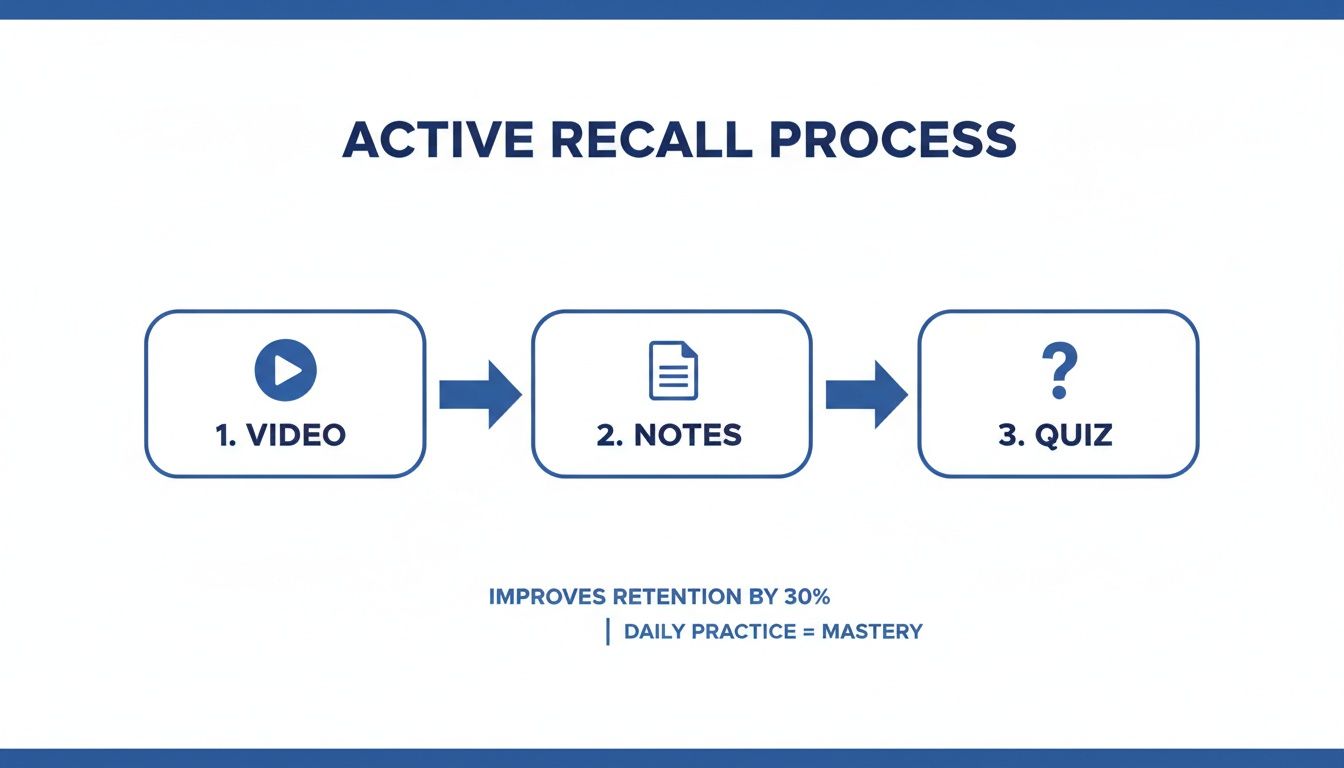
Правильный рабочий процесс превращает пассивный просмотр в активный цикл обратной связи.
Этот цикл критически важен: заметки, которые вы создаёте, становятся сырьём для самотестирования, что реально закрепляет память.
Значительный шаг вперёд — это возможность захватывать конкретные визуальные элементы и вставлять их прямо в свои заметки. Представьте, что вы изучаете новую программу, и преподаватель выделяет меню. Вместо того чтобы писать «клик в верхнем правом углу», вы сразу делаете вырезку нужной части экрана и помещаете её прямо в заметки.
В отличие от инструментов, которые только обрабатывают транскрипты, HoverNotes смотрит видео и захватывает всё, что отображается на экране. Вы получаете снапшоты с отметками времени — диаграммы, код и слайды, встроенные именно там, где они относятся в заметках.
Так создаётся документ с богатым контекстом. Каждое ключевое изображение сохраняется рядом с текстом, который его объясняет, что делает ваши повторения гораздо эффективнее.
Где хранятся ваши заметки — очень важно. Облачные сервисы удобны, но вы фактически арендуете место для своих знаний. Если сервис прекратит работу или изменит условия, ваши заметки могут потеряться или оказаться в проприетарном формате. Для тех, кто серьёзно относится к своей базе знаний, это огромный риск.
Это особенно актуально для растущего числа пользователей Obsidian, которые ценят приватность, долговечность и полный контроль над данными. Идеальный рабочий процесс сохраняет заметки прямо в локальную файловую систему — без синхронизации в облаке.
Когда заметки сохраняются как простые Markdown (.md) файлы, они принадлежат вам. Навсегда. Вы можете открыть их в любом текстовом редакторе, сделать резервные копии и искать по ним с помощью системных инструментов. Такой подход локального хранения гарантирует постоянный доступ к вашим ценным знаниям.
Этот скриншот даёт мгновенный визуальный контекст, благодаря чему концепцию намного легче вспомнить позже.
#Гладко интегрируйтесь с уже используемыми инструментами
Эффективный рабочий процесс не должен заставлять менять ваши системы. Он должен встраиваться в инструменты, которыми вы уже пользуетесь.
Для пользователей Obsidian: Сохранение заметок в виде .md файлов прямо в ваш хранилище — огромное преимущество. Ваши видеозаметки становятся частью постоянного графа знаний без лишних действий. Заметки принадлежат вам с момента создания.
Для пользователей Notion: Хотя локальное хранение отлично подходит некоторым, многие выбирают коллаборативные функции таких инструментов, как Notion. Хороший рабочий процесс гарантирует, что ваши заметки можно чисто копировать и вставлять, сохраняя форматирование — заголовки, списки и т.д.
Ключ — гибкость. Вы должны иметь возможность захватывать знания из любого видеоисточника — будь то курс на Udemy, туториал на YouTube или локальный файл на компьютере — и получать их в предпочитаемом приложении с минимальными усилиями. Подробности мы рассматриваем в нашем руководстве по созданию эффективных видеозаметок.
Даже без ИИ наличие специального режима без отвлечений с редактором и возможностью делать скриншоты может сильно помочь. Функция создания скриншотов с отметкой времени экономит часы повтора – вы можете одним кликом быстро вернуться к моменту, когда объяснялась важная тема.
#Делайте мозг умнее с помощью двойного кодирования
Случалось ли вам уставиться в стену текста, полностью потерявшись, а затем кто-то рисовал простую диаграмму, и всё становилось понятно? Это мозг работает на полную мощность — и это принцип, который поможет учиться быстрее.
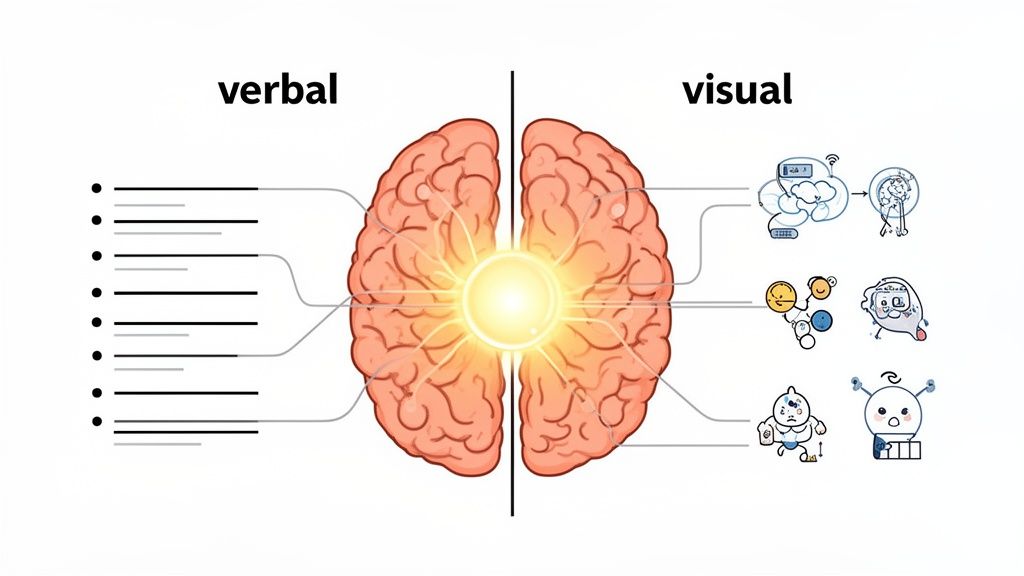
Это называется теория двойного кодирования. Проще говоря, мозг обработывает информацию двумя каналами: вербальным — для слов (устных и письменных) и визуальным — для образов и схем. Если использовать только один канал — например, читать транскрипт — вы недоиспользуете потенциал мозга.
Если совмещать слова с подходящими визуальными материалами, формируются два разных, но связанных пути памяти для одной и той же идеи. Это делает информацию более устойчивой и проще для воспоминания. Вы даёте будущему себе два способа найти нужный файл в ментальном архиве.
Настоящая сила видео — не только аудио. Это когда преподаватель выделяет строку кода, показывается анимация биологического процесса или график, который даёт перспективу.
Транскрипт всего этого лишён. Он фиксирует слова, но отнимает визуальный контекст, придающий им смысл.
Полагаться только на транскрипт — всё равно что собирать мебель IKEA по инструкциям, где описаны детали, но нет ни одной диаграммы. Все части есть, но непонятно, как они совмещаются.
Представьте, что вы учите сложный алгоритм. Транскрипт говорит: «Указатель теперь перемещается к следующему узлу». Технически верно, но абстрактно. А теперь вообразите скриншот из этого момента в видео с диаграммой, где стрелка ясно идёт от одного блока к другому. Это изображение в паре с текстом даёт моментальное понимание и создаёт прочную двойную память.
#Как создавать заметки с богатым визуальным содержанием
Для использования двойного кодирования ваши заметки должны быть такими же наглядными, как изучаемый материал. Но руками ставить паузу и делать скриншоты — утомительно и рушит рабочий процесс. Трение, связанное с захватом, сохранением и связыванием изображения с заметками, слишком велико, и большинство просто сдаются.
Гораздо лучше интегрировать визуальный захват прямо в процесс заметок. Именно здесь особенно полезны инструменты, которые «смотрят» видео вместе с вами.
Как это реализовать:
Захват визуального контекста: Не просто записывайте мысли. Активно делайте скриншоты ключевых моментов — обобщающего слайда, блока кода, сложной схемы.
Используйте скриншоты с отметками времени: Метки времени на скриншотах позволяют кликнуть по изображению в заметках и сразу вернуться в видео к этому моменту для быстрого повтора.
Вырезайте важные детали: Не всегда нужен весь экран. Возможность вырезать только нужную часть — формулу или небольшой график — сохраняет заметки аккуратными и сфокусированными.
Например, инструмент типа HoverNotes работает именно так. Он позволяет делать скриншоты и вырезки, автоматически встраивая их в заметки рядом с вашим текстом. Так как у каждого скриншота кликабельная отметка времени, ваши заметки превращаются в интерактивное учебное пособие. Для дополнительной информации смотрите наше руководство по методам обучения для визуалов.
С сознательным сочетанием текста и визуальных доказательств вы перестаёте быть пассивным зрителем и начинаете создавать насыщенные, многоуровневые учебные материалы, которые ваш мозг легко запоминает.
Даже при отличных учебных стратегиях, если среда противодействует вам, даже активный вызов мозга не поможет. Чтобы учиться быстрее и лучше запоминать, нужна система, которая способствует глубокой концентрации и помогает мозгу закреплять воспоминания.
Речь о том, где, когда и как вы учитесь. Хаотичная и полно отвлечений обстановка расшатывает внимание, делая невозможным сосредоточенную работу, необходимую для усвоения.
Долгие бессистемные марафоны учёбы — плохая идея. Они приводят к выгоранию и плохому усвоению. Способность мозга к концентрации ограничена, и это надо учитывать. Лучше разбить обучение на целенаправленные временные интервалы.
Метод Помодоро популярен с причиной: он работает. Вы устанавливаете таймер на 25 минут максимально сфокусированной работы, затем делаете короткий 5-минутный перерыв. После четырёх таких циклов — длинный перерыв на 15-30 минут.
Метод эффективен, так как решает ключевые психологические задачи:
Уничтожает прокрастинацию: 25-минутный рывок кажется менее страшным, чем многочасовое занятие.
Усиливает концентрацию: Когда знаете, что скоро будет перерыв, проще не отвлекаться на телефон или другие вкладки.
Предотвращает выгорание: Регулярные перерывы дают мозгу отдохнуть, сохраняя свежесть и вовлечённость.
Ваша физическая и цифровая среда сильно влияет на концентрацию. Каждое уведомление, лишняя вкладка, беспорядок — это маленький крючок, который может вытащить вас из глубокой работы.
При учёбе по видео это особенно непросто. YouTube буквально создан, чтобы вы активно кликали. Вам нужно вернуть контроль. Есть отличные руководства по эффективной учёбе дома, которые охватывают всё — от физического пространства до цифровых привычек.
Специальный режим «видео без отвлечений» может полностью изменить правила игры. Представьте, что исчезают все рекламы, комментарии и рекомендуемые видео, остаются только контент и ваши заметки рядом. Это позволяет полностью погрузиться в материал, не борясь с попытками платформы вас отвлечь.
Умение концентрироваться — это навык, и окружающая среда — главный фактор, влияющий на него. Чистый стол и продуманное цифровое пространство — обязательные условия для эффективного обучения.
Можно применять все учебные приёмы, но если вам не хватает качественного сна, вы саботируете себя сами. Сон — не простой отдых, а время, когда мозг консолидирует изученное.
Во время глубокого сна мозг воспроизводит нейронные паттерны того, что вы учили. Этот процесс укрепляет связи между нейронами, переводя воспоминания из кратковременной памяти в долговременную.
Попытка изменить методы учёбы порождает много вопросов. Разберём самые распространённые.
#Сколько времени нужно уделять заметкам и сколько просмотру?
Если вы ставите паузу каждые тридцать секунд или тратите половину времени только на набор, значит процесс создания заметок слишком громоздкий. Задача — фиксировать ключевые идеи, не теряя концентрацию. Инструменты с ИИ могут выполнять большую часть рутины по расшифровке и резюмированию, освобождая вас для осмысления и быстрого добавления собственных мыслей или скриншотов в нужные моменты.
Лучший способ — тот, который вы действительно будете использовать постоянно. Тем не менее, при обучении по видео цифровые заметки имеют явные преимущества.
Скорость: Большинство из нас печатает значительно быстрее, чем пишет от руки.
Поиск: Найти концепцию в цифровой базе вроде Obsidian или Notion занимает секунды. Попробуйте так в старых тетрадях.
Интеграция: Можно вставлять скриншоты, добавлять ссылки и редактировать заметки на лету.
Возможность захватить скриншот сложной формулы с отметкой времени и вставить его в заметки — это то, с чем ручка и бумага не сравнится. Клик по изображению и мгновенный возврат к нужному моменту видео — большое преимущество для повторений сложных тем.
#Как понять, что мои методы учёбы действительно работают?
Вот главный тест: Можете ли вы объяснить концепцию кому-то другому (или самому себе вслух), не глядя в заметки? Если да, значит, вы её выучили.
Другой признак — как часто вы пересматриваете видео. Если постоянно возвращаетесь к одним и тем же урокам, которые вроде бы уже видели, значит, начальный процесс обучения не создаёт прочные знания. Ваши заметки должны быть первой точкой повторения, а не исходное видео.
Если вы используете Obsidian для учёбы, HoverNotes сохраняет заметки прямо в ваш хранилище в формате Markdown. Заметки просто копируются в Notion, если вы там храните всё. Попробуйте бесплатно — с 20 минутами ИИ-кредитов, без необходимости вводить карту. Актуальные варианты смотрите на странице цен HoverNotes.
Полезные заметки должны побуждать вас что-то делать с материалом, а не просто сохранять больше текста. Институт педагогических наук США рекомендует распределять обучение во времени, сочетать графику с устными объяснениями, использовать активное извлечение из памяти и задавать глубокие объяснительные вопросы (practice guide). Рецензируемый обзор исследований образовательного видео также подчеркивает важность выделения ключевой информации, разделения уроков на удобные для освоения фрагменты, предоставления учащимся контроля и добавления заданий для активного обучения (review). В применении к этому процессу это означает: делать паузы на границах понятий, фиксировать только те визуальные доказательства, которые вам нужны, формулировать вопрос своими словами, а позже отвечать на него до повторного просмотра источника. Эти практики основаны на данных исследований; универсального процента удержания информации для одного приложения или рабочего процесса не существует.
Узнайте основы когнитивной науки о том, почему вы забываете большую часть обучающего видеоконтента, и как активное, стратегическое ведение заметок может значительно улучшить вашу способность запоминать информацию.
Перестаньте забывать то, что смотрите. Это руководство предлагает научно обоснованные методы для улучшения запоминания видеоинформации с помощью активного воспроизведения и более эффективного ведения заметок.