Complete Guide to Video Learning with Obsidian: The Ultimate 2025 Comparison
Transform any video into permanent, searchable knowledge with the most comprehensive comparison of Obsidian video note-taking methods
Discover the best methods for taking video notes in Obsidian in 2025. Compare Media Extended, Timestamp Notes, Fleeting Notes, and see why HoverNotes emerges as the clear winner for AI-powered video learning.
Transform any video into permanent, searchable knowledge with the most comprehensive comparison of Obsidian video note-taking methods
In 2025, Obsidian has become a powerhouse for video learning, offering multiple methods for capturing and organizing video notes. While several solutions exist, the groundbreaking HoverNotes extension has emerged as the clear frontrunner, transforming how users interact with video content in their knowledge management system.
Seamlessly bring video learning to your Obsidian vault. HoverNotes creates structured markdown notes that become a part of your existing knowledge graph.

Video content has become a primary source of learning, making efficient note-taking crucial for knowledge retention. Obsidian's ecosystem provides various tools for this purpose, but choosing the right solution can significantly impact your learning effectiveness.
The traditional approach of pausing videos to manually type notes disrupts your learning flow and often results in incomplete or poorly organized information. Modern solutions leverage AI and automation to capture comprehensive insights while you focus on understanding the content.
Standout Features:
User Experience:
Why It Wins: HoverNotes doesn't just take notes—it understands context, captures visual information, and integrates seamlessly with your existing Obsidian workflow. The AI watches the video alongside you, generating comprehensive notes that would take hours to create manually.
Features:
Limitations:
Features:
Limitations:
Features:
Limitations:
Features:
Limitations:
| Feature | HoverNotes | Media Extended | Timestamp Notes | Fleeting Notes | Transcript Solutions |
|---|---|---|---|---|---|
| AI-Powered Notes | ✓ | ✗ | ✗ | ✗ | Limited |
| Real-time Capture | ✓ | ✗ | ✗ | ✗ | ✗ |
| Visual Elements Capture | ✓ | ✗ | ✗ | ✗ | ✗ |
| Local Storage | ✓ | ✓ | ✓ | ✗ | ✓ |
| Cross-platform Support | ✓ | Limited | Limited | YouTube Only | Limited |
| Split-view Mode | ✓ | ✓ | ✓ | ✗ | ✗ |
| Setup Complexity | Minimal | Medium | Medium | Medium | High |
| Learning Disruption | Minimal | High | High | Medium | Medium |
Transform how you learn from videos. HoverNotes turns every tutorial into permanent, searchable knowledge that grows your expertise over time.
Unlike other solutions that focus solely on text, HoverNotes understands and captures:
Traditional Manual Method (Media Extended/Timestamp Notes):
HoverNotes Method:
The video learning landscape in Obsidian has evolved significantly, with HoverNotes leading innovation through:
Other solutions have remained largely static, with minimal AI integration or automation improvements.
Install HoverNotes
Start Learning
Optimize Your Workflow
Folder Structure for Video Notes:
📁 Video Learning/
  📁 Programming/
    📁 React/
    📁 Python/
    📁 AI & ML/
  📁 Business/
  📁 Design/
  📁 Personal Development/
Template Integration: HoverNotes automatically creates structured notes that work perfectly with Obsidian templates, including:
Skip the complex setup and workflow management. HoverNotes combines AI understanding, automatic organization, and seamless integration in one simple extension.
"HoverNotes has genuinely changed the way I learn from coding tutorials. Instead of constantly pausing or rewinding to jot things down, HoverNotes automatically generates clean, well-organized notes in real time—complete with syntax-highlighted code snippets and helpful screenshots. What really sets HoverNotes apart is how intelligently it captures context. It doesn't just rely on transcripts—it actually 'watches' the video with you and picks up on diagrams, code examples, and even handwritten notes on screen. I also really appreciate the flexibility of how it stores notes. You can access everything in the cloud, or connect it with Obsidian if you prefer to keep things local and private."
Source: Chrome Web Store - Verified Purchase
"Forget other note-taking apps, HoverNotes is in a league of its own. The AI-Notes feature is my favorite, letting me focus on what truly matters: learning. What stands out is that it doesn't just use transcripts; it actually watches the video with you. This makes it powerful for understanding code, diagrams, sketches, and anything referenced in the video. The integration with Obsidian is perfect for those who prefer a private and local note-keeping option. Highly recommended for developers and students alike!"
Source: Chrome Web Store - Verified Purchase
"This is a must-have for anyone who watches video tutorials and needs efficient note-taking without constantly rewinding. It automatically generates structured summaries, capturing key points without requiring you to pause and write things down manually. The integration with YouTube and other video platforms is seamless, and the ability to export notes makes it even more convenient. This tool is a game-changer for students and professionals looking to save time and stay organized."
Source: Chrome Web Store - Verified Purchase
"HoverNotes is an absolute game-changer for developers and learners! As someone who frequently watches coding tutorials on platforms like YouTube and Udemy, I found this tool to be incredibly efficient and intuitive. The real-time AI-powered notes, complete with syntax-highlighted code snippets and screenshots, have saved me so much time—no more rewinding videos to catch details! The split-view mode is a brilliant addition, allowing me to watch and take notes simultaneously. It's made my learning process smoother and more productive."
Source: Chrome Web Store - Verified Purchase
All reviews above are verified Chrome Web Store purchases with 4+ helpfulness ratings from other users.
HoverNotes represents the evolution from manual note-taking to intelligent knowledge extraction. As AI capabilities continue advancing, we're moving toward:
While Obsidian offers various video learning solutions, HoverNotes stands out as the most comprehensive and efficient option in 2025. Its combination of AI-powered automation, seamless integration, and user-friendly features makes it the clear choice for anyone serious about video-based learning in Obsidian.
The tool's ability to generate accurate notes while preserving the cognitive benefits of active learning sets it apart from traditional methods. For students, professionals, and lifelong learners, HoverNotes represents the future of video learning in Obsidian, offering an unmatched balance of efficiency and effectiveness.
Key Advantages:
Ready to transform your video learning experience? Start with HoverNotes today and discover why thousands of Obsidian users have made the switch from manual note-taking to intelligent knowledge extraction.
Seamlessly bring video learning to your Obsidian vault. HoverNotes creates structured markdown notes that become a part of your existing knowledge graph.
Have questions about integrating HoverNotes with your Obsidian workflow? Check out our complete integration guide or explore our getting started tutorial.
Related Articles:
Continue your learning journey with these related posts
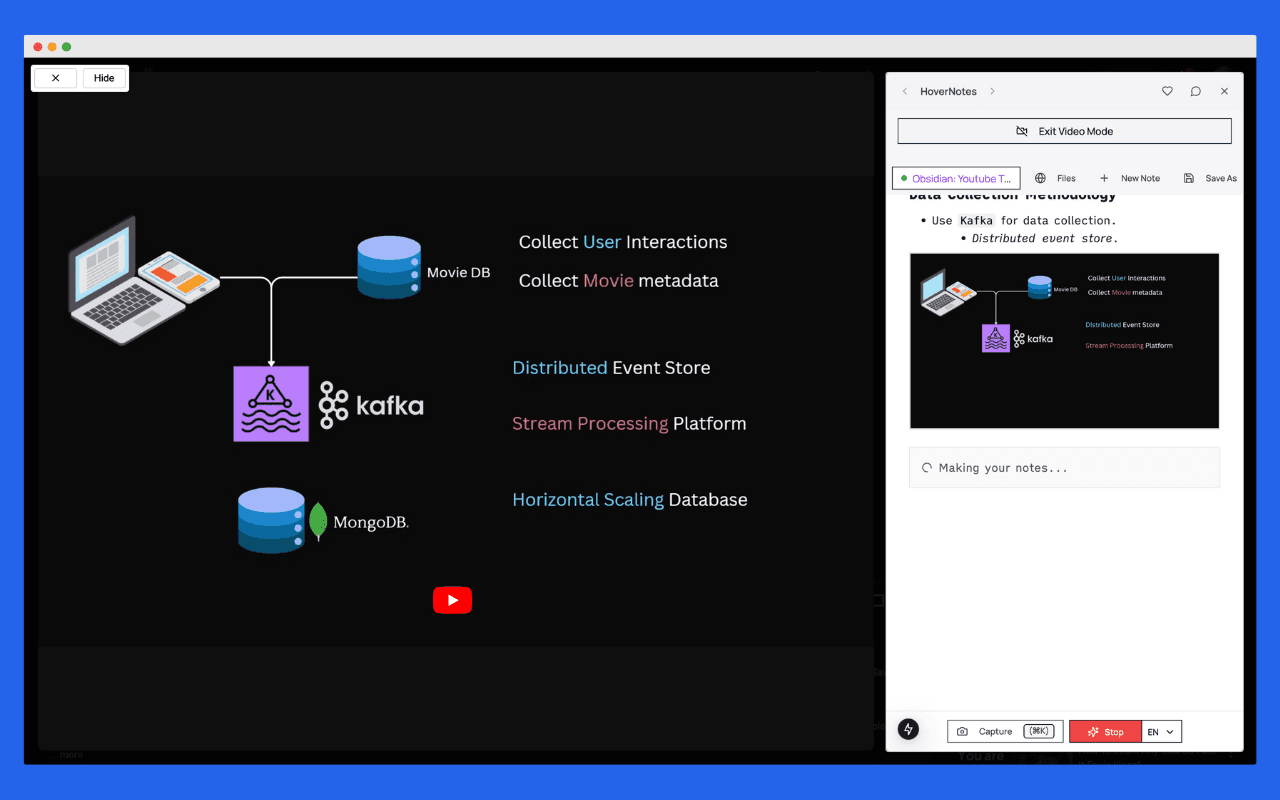
Discover the best tools and methods for taking video notes in Obsidian in 2025. Compare plugins, browser extensions, and AI-powered solutions for effective video learning.
Transform any video into permanent, searchable knowledge in your vault. Learn how to seamlessly integrate HoverNotes with Obsidian for powerful video-based learning workflows.
Turn any video into permanent, searchable notes in your Obsidian vault. AI-powered note-taking that captures key concepts, visual content, and actionable insights from educational videos.